git stash
Definición
El comando git stash guarda temporalmente los cambios que has hecho en tu copia de trabajo para que puedas hacer otro trabajo y luego volver y reaplicarlos.
Guardar tu trabajo temporalmente
El comando git stash toma tanto los cambios preparados como los no preparados que no se han confirmado, los guarda para usarlos más adelante y luego los elimina de tu copia de trabajo. Primero, puedes ejecutar git status para ver el estado sucio. Luego ejecuta git stash para guardar los cambios temporalmente:
Git stash
git statusOn branch master
Changes to be committed:
new file: style.css
Changes not staged for commit:
modified: index.htmlGit stash
$ git stashSaved working directory and index state WIP on master: 5002d47 our new homepage
HEAD is now at 5002d47 our new homepageGit stash
$ git statusOn branch master
nothing to commit, working tree cleanVolver a aplicar los cambios guardados
git stash pop elimina los cambios de tu stash y los vuelve a aplicar en tu copia de trabajo.
La forma alternativa es ejecutar git stash apply si quieres volver a aplicar los cambios y mantenerlos en tu stash:
Git stash
git statusOn branch master
nothing to commit, working tree cleanGit stash
git stash popOn branch master
Changes to be committed:
new file: style.css
Changes not staged for commit:
modified: index.html
Dropped refs/stash@{0} (32b3aa1d185dfe6d57b3c3cc3b32cbf3e380cc6a)Guardar archivos no rastreados o ignorados
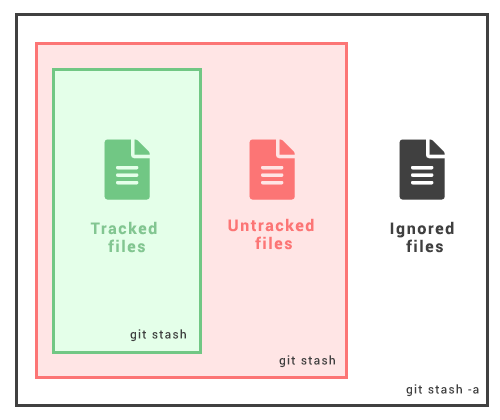
git stash guardará los cambios que se hayan añadido a tu índice (cambios preparados) y los cambios hechos a archivos actualmente rastreados por Git (cambios no preparados). No guardará los nuevos archivos de la copia de trabajo que aún no se han preparado ni los archivos ignorados. En estos casos, la opción git stash -u (o --include-untracked) ayuda a guardar los archivos no rastreados.
Git stash
git stash -uTambién puedes añadir cambios a archivos ignorados usando la opción -a (o --all) al ejecutar git stash.
Git stash
git stash -aMúltiples stashes
Puedes ejecutar git stash varias veces para crear varios stashes, y luego ejecutar git stash list para verlos. De forma predeterminada, los stashes se identifican como "WIP" – trabajo en progreso. Aparece encima de la rama y de los commits a partir de los cuales creaste el stash.
Git stash
git stash liststash@{0}: WIP on master: 5002d47 our new homepage
stash@{1}: WIP on master: 5002d47 our new homepage
stash@{2}: WIP on master: 5002d47 our new homepageEs bueno añadir algo de contexto con git stash push -m "message"
De forma predeterminada, git stash pop volverá a aplicar el último stash creado: stash@
Puedes elegir qué stash volver a aplicar así:
Git stash
git stash pop stash@{3}Switched to a new branch 'add-stylesheet'
On branch add-stylesheet
Changes to be committed:
new file: style.css
Changes not staged for commit:
modified: index.html
Dropped refs/stash@{1} (32b3aa1d185dfe6d57b3c3cc3b32cbf3e380cc6a)Ver diferencias de un stash
Usa git stash show para ver un resumen de un stash:
Git stash
git stash showindex.html | 1 +
style.css | 3 +++
2 files changed, 4 insertions(+)También puedes usar las opciones -p o --patch para ver el diff completo de un stash:
Git stash
git stash show -pdiff --git a/style.css b/style.css
new file mode 100644
index 0000000..d92368b
--- /dev/null
+++ b/style.css
@@ -0,0 +1,3 @@
+* {
+ text-decoration: blink;
+}
diff --git a/index.html b/index.html
index 9daeafb..ebdcbd2 100644
--- a/index.html
+++ b/index.html
@@ -1 +1,2 @@
+<link rel="stylesheet" href="style.css"/>Stashes parciales
Git permite elegir si quieres guardar temporalmente solo un archivo, varios archivos o cambios individuales dentro de archivos. git stash -p recorre cada hunk (una parte de un cambio en Git) en la copia de trabajo y pregunta si quieres guardarlo temporalmente o no:
Git stash
git stash -pdiff --git a/style.css b/style.css
new file mode 100644
index 0000000..d92368b
--- /dev/null
+++ b/style.css
@@ -0,0 +1,3 @@
+* {
+ text-decoration: blink;
+}
Stash this hunk [y,n,q,a,d,/,e,?]? y
diff --git a/index.html b/index.html
index 9daeafb..ebdcbd2 100644
--- a/index.html
+++ b/index.html
@@ -1 +1,2 @@
+<link rel="stylesheet" href="style.css"/>
Stash this hunk [y,n,q,a,d,/,e,?]? nComandos de hunk
| Command | Description |
|---|---|
| / | Search for a hunk by regex. |
| ? | Print help. |
| n | Do not stash the hunk. |
| a | Stash this hunk and all later hunks in the file. |
| d | Do not stash this hunk or any of the later hunks in the file. |
| e | Manually edit the current hunk |
| q | Quit (selected hunks will be stashed) |
| s | Split the hunk into smaller hunks. |
| y | Stash the hunk. |
Crear una rama a partir de un stash
Puedes crear una nueva rama para aplicar en ella los cambios guardados con git stash branch:
Git stash
git stash branch add-stylesheet stash@{1}Switched to a new branch 'add-stylesheet'
On branch add-stylesheet
Changes to be committed:
new file: style.css
Changes not staged for commit:
modified: index.html
Dropped refs/stash@{1} (32b3aa1d185dfe6d57b3c3cc3b32cbf3e380cc6a)Limpiar el stash
Puedes eliminar el stash con git stash drop:
Git stash
git stash drop stash@{1}Dropped stash@{1} (17e2697fd8251df6163117cb3d58c1f62a5e7cdb)Si usas git stash clear, eliminará todos los stashes:
Git stash
git stash clearPractice
What are the features and functionalities of the 'git stash' command?