Etiqueta HTML <section>
La etiqueta HTML <section> es uno de los elementos HTML5. Se utiliza para crear secciones independientes dentro de una página web que contienen contenido lógicamente relacionado (bloque de noticias, información de contacto, etc.). La etiqueta <section> se usa a menudo al crear una página de aterrizaje para dividir la página en bloques lógicos separados.
Por ejemplo, un menú de navegación debe estar envuelto en una etiqueta <nav>, pero la visualización de un mapa y una lista de resultados de búsqueda no tienen elementos específicos y pueden colocarse dentro de un <section>.
La etiqueta <section> puede anidarse dentro de la etiqueta <article>, dividiendo el contenido en grupos. HTML5 recomienda incluir un encabezado (<h1>–<h6>) para cada sección para definir su tema. Aunque se puede usar cualquier nivel de encabezado, es una buena práctica seguir una jerarquía lógica basada en la estructura de anidación.
peligro
No utilice la etiqueta
<section>como un contenedor universal para crear la estructura de la página; para ese propósito, debe usar la etiqueta<div>.
Sintaxis
La etiqueta <section> se usa en pares. El contenido se escribe entre las etiquetas de apertura (<section>) y cierre (</section>).
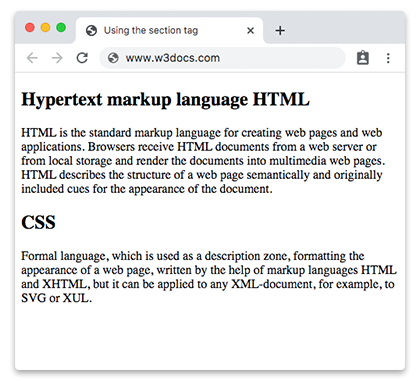
Ejemplo de la etiqueta HTML <section>:
Ejemplo de la etiqueta HTML <section>
<!DOCTYPE html>
<html>
  <head>
    <title>Using the section tag</title>
  </head>
  <body>
    <section>
      <h2>Hypertext markup language HTML</h2>
      <p>HTML is the standard markup language for creating web pages and web applications. Browsers receive HTML documents from a web server or from local storage and render the documents into multimedia web pages. HTML describes the structure of a web page semantically and originally included cues for the appearance of the document.</p>
    </section>
    <section>
      <h2>CSS</h2>
      <p>Formal language, which is used as a description zone, formatting the appearance of a web page, written by the help of markup languages HTML and XHTML, but it can be applied to any XML-document, for example, to SVG or XUL.</p>
    </section>
  </body>
</html>Resultado
Ejemplo de la etiqueta HTML <section> dentro de otra etiqueta <section>:
Ejemplo de la etiqueta HTML <section> dentro de otra etiqueta <section>
<!DOCTYPE html>
<html>
  <head>
    <title>Title of the document</title>
  </head>
  <body>
    <h1>Example of the section tag</h1>
    <section>
      <h2>Hypertext markup language HTML</h2>
      <p>
        HTML is the standard markup language for creating web pages and web applications. Browsers receive HTML documents from a web server or from local storage and render the documents into multimedia web pages. HTML describes the structure of a web page semantically and originally included cues for the appearance of the document.
      </p>
      <section>
        <h3>Hypertext markup language HTML</h3>
        <p>HTML is the standard markup language for creating web pages and web applications. Browsers receive HTML documents from a web server or from local storage and render the documents into multimedia web pages. HTML describes the structure of a web page semantically and originally included cues for the appearance of the document.</p>
      </section>
    </section>
    <section>
      <h2>CSS</h2>
      <p>Formal language, which is used as a description zone, formatting the appearance of a web page, written by the help of markup languages HTML and XHTML, but it can be applied to any XML-document, for example, to SVG or XUL.</p>
    </section>
  </body>
</html>Atributos
La etiqueta <section> admite los Atributos Globales y los Atributos de Eventos.
Cómo dar estilo a una etiqueta HTML <section>
section {
  background-color: #f9f9f9;
  padding: 20px;
  border: 1px solid #ddd;
}
Práctica
¿Cuál es el propósito de la etiqueta Section en HTML?