Etiqueta HTML <hr>
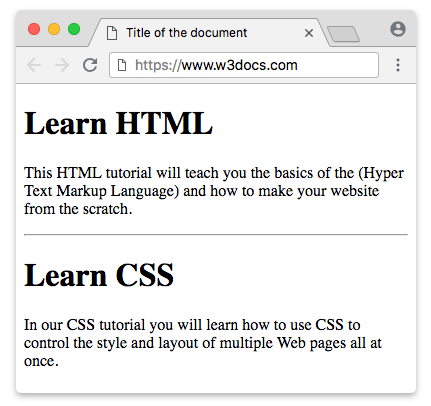
El elemento HTML <hr> es un elemento de nivel de bloque que representa una separación temática en un documento HTML. La apariencia visual de la línea horizontal depende del navegador. A menudo se muestra con un borde que crea un efecto 3D.
En HTML5, la etiqueta <hr> define una separación temática entre elementos de nivel de párrafo. En versiones anteriores de HTML, se usaba para dibujar una línea horizontal que separaba visualmente el contenido. En HTML5, tiene un significado semántico.
Sintaxis
La etiqueta <hr> está vacía, lo que significa que no se requiere etiqueta de cierre. Pero en XHTML, la etiqueta (<hr>) debe cerrarse (<hr/>).
Ejemplo de la etiqueta HTML <hr>:
HTML hr tag
<!DOCTYPE html>
<html>
  <head>
    <title>Title of the document</title>
  </head>
  <body>
    <h1>Learn HTML</h1>
    <p>
      This HTML tutorial will teach you the basics of the (Hyper Text Markup Language) and how to make your website from scratch.
    </p>
    <hr />
    <h1>Learn CSS</h1>
    <p>
      In our CSS tutorial you will learn how to use CSS to control the style and layout of multiple Web pages all at once.
    </p>
  </body>
</html>Atributo size de HTML <hr>
El atributo size especifica la altura de la línea.
DANGER
Aunque el atributo size es uno de los atributos obsoletos, todavía es compatible con todos los navegadores.
Ejemplo de la etiqueta HTML <hr> con el atributo "size":
hr tag size attribute
<!DOCTYPE html>
<html>
  <head>
    <title>Title of the document</title>
  </head>
  <body>
    <p>A normal horizontal line:</p>
    <hr />
    <p>A horizontal line with a height of 40 pixels:</p>
    <hr size="40" />
  </body>
</html>TIP
Una forma alternativa de especificar el tamaño de la etiqueta <hr> es usar la propiedad CSS height.
Ejemplo de la etiqueta HTML <hr> usada con la propiedad height:
hr tag with CSS width property
<!DOCTYPE html>
<html>
  <head>
    <title>Title of the document</title>
    <style>
      hr {
        height: 20px;
      }
    </style>
  </head>
  <body>
    <p>
      A horizontal line with a height of 20 pixels.
    </p>
    <hr />
  </body>
</html>Atributo width de HTML <hr>
El atributo width especifica el ancho de la línea.
DANGER
El atributo width también forma parte de la lista de atributos obsoletos, pero es compatible con todos los navegadores.
Ejemplo de la etiqueta HTML <hr> con el atributo width:
hr tag width attribute
<!DOCTYPE html>
<html>
  <head>
    <title>Title of the document</title>
  </head>
  <body>
    <p>A normal horizontal line:</p>
    <hr />
    <p>A horizontal line with a width of 30%:</p>
    <hr width="30%" />
  </body>
</html>TIP
Usa la propiedad CSS width en lugar del atributo width.
Ejemplo de la etiqueta HTML <hr> usada con la propiedad width:
hr tag with CSS width property
<!DOCTYPE html>
<html>
  <head>
    <title>Title of the document</title>
    <style>
      hr {
        width: 250px;
      }
    </style>
  </head>
  <body>
    <p>A horizontal line with a width of 250 pixels:</p>
    <hr />
  </body>
</html>Atributo noshade de HTML <hr>
El atributo noshade elimina el efecto de sombreado 3D de la línea horizontal.
DANGER
El atributo noshade es uno de los atributos obsoletos, pero es compatible con todos los navegadores.
Ejemplo de la etiqueta HTML <hr> con el atributo noshade:
hr tag with noshade attribute
<!DOCTYPE html>
<html>
  <head>
    <title>Title of the document</title>
  </head>
  <body>
    <p>Shaded horizontal line :</p>
    <hr />
    <p>Noshaded horizontal line:</p>
    <hr noshade />
  </body>
</html>TIP
Una forma alternativa de lograr el efecto noshade es usar la propiedad CSS border.
Ejemplo de la etiqueta HTML <hr> usada con la propiedad border:
hr tag with CSS border property
<!DOCTYPE html>
<html>
  <head>
    <title>Title of the document</title>
    <style>
      hr {
        border: 1px solid #000000;
        background: transparent;
      }
    </style>
  </head>
  <body>
    <p>
      A horizontal line specified with CSS border Property.
    </p>
    <hr />
  </body>
</html>Atributo align de HTML
El atributo align especifica la alineación de la línea.
DANGER
El atributo align es uno de los atributos obsoletos, pero es compatible con todos los navegadores.
Ejemplo de la etiqueta HTML <hr> con el atributo align:
hr tag align attribute
<!DOCTYPE html>
<html>
  <head>
    <title>Title of the document</title>
  </head>
  <body>
    <p>Lorem ipsum is simply dummy text...</p>
    <hr align="left" width="70%" />
  </body>
</html>TIP
Usa la propiedad CSS text-align en lugar del atributo align de <hr>.
Ejemplo de la etiqueta HTML <hr> usada con la propiedad margin:
hr tag with CSS margin property
<!DOCTYPE html>
<html>
  <head>
    <title>Title of the document</title>
    <style>
      hr {
        width: 50%;
        margin-left: 0;
        margin-right: auto;
      }
    </style>
  </head>
  <body>
    <p>A horizontal line specified with CSS margin property</p>
    <hr />
  </body>
</html>DANGER
Los atributos de presentación de la etiqueta <hr> están obsoletos en HTML5. Para dar estilo, usamos CSS en su lugar.
Cómo dar estilo a la etiqueta <hr>
La propiedad CSS border se usa para dar estilo a la línea horizontal.
Ejemplo de la etiqueta HTML <hr> estilizada con la propiedad border:
hr tag with CSS border property
<!DOCTYPE html>
<html>
  <head>
    <title>Title of the document</title>
    <style>
      /* blue border */
      hr.one {
        border-top: 1px solid #1c87c9;
      }
      /* Dashed border */
      hr.two {
        border-top: 1px dashed #1c87c9;
      }
      /* Dotted border */
      hr.three {
        border-top: 1px dotted #1c87c9;
      }
      /* Thick border */
      hr.four {
        border: 1px solid #1c87c9;
      }
      /* Large rounded border */
      hr.five {
        border: 15px solid #1c87c9;
        border-radius: 5px;
      }
    </style>
  </head>
  <body>
    <p>Default:</p>
    <hr />
    <p>Styling "hr" tag</p>
    <hr class="one" />
    <hr class="two" />
    <hr class="three" />
    <hr class="four" />
    <hr class="five" />
  </body>
</html>Atributos
| Atributo | Valor | Descripción |
|---|---|---|
| align | left center right | Define la alineación horizontal de una línea. Obsoleto en HTML5, pero todavía compatible con los navegadores por compatibilidad con versiones anteriores. |
| noshade | noshade | Define que la línea se mostrará sin efecto 3D. Obsoleto en HTML5, pero todavía compatible con los navegadores por compatibilidad con versiones anteriores. |
| size | pixels | Define el tamaño de una línea. Obsoleto en HTML5, pero todavía compatible con los navegadores por compatibilidad con versiones anteriores. |
| width | pixels % | Define el ancho de una línea. Obsoleto en HTML5, pero todavía compatible con los navegadores por compatibilidad con versiones anteriores. |
La etiqueta <hr> admite los atributos globales y los atributos de evento.
Practice
What does the HTML <hr> tag do?