Etiqueta HTML <big>
La <big> element increases the font size by one relative unit compared to its parent element.
This element makes the text one size bigger. However, the text cannot be larger than the maximum font size of the browser.
The <big> tag is placed within the <body> tag.
DANGER
The <big> is a deprecated HTML tag, and it is no longer used in HTML5. Use CSS styles that control font size instead.
Syntax
The <big> tag comes in pairs. The content is written between the opening (<big>) and closing (</big>) tags.
Example of the HTML <big> tag:
Example of the bigger text|HTML <big> tag|W3Docs
<!DOCTYPE html>
<html>
  <head>
    <title>Title of the document</title>
  </head>
  <body>
    <p>This text is normal.</p>
    <p><big>This text is bigger.</big></p>
  </body>
</html>Result
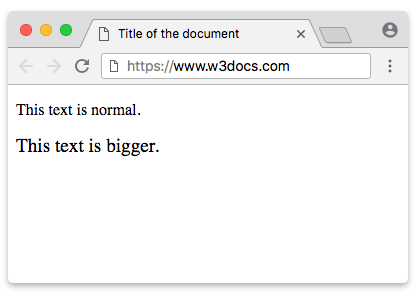
Now let’s consider another example, where we use the CSS font-size property to make the text bigger.
Example of the CSS font-size property:
Example of the CSS font-size property|W3Docs
<!DOCTYPE html>
<html>
  <head>
    <title>Title of the document</title>
    <style>
      p {
        font-size: 16px;
      }
      span {
        font-size: 19px;
      }
    </style>
  </head>
  <body>
    <p>
      This text is normal,
      <span> and this text is bigger.</span>
    </p>
  </body>
</html>Result
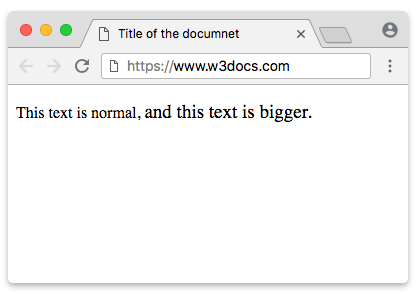
Attributes
The <big> tag supports the Global Attributes.
Practice
What is the usage and importance of the <big> HTML tag, as described on the specified web page?