Etiqueta HTML <tfoot>
La etiqueta <code><tfoot></code> define el pie de una tabla HTML. Se utiliza junto con los elementos <thead> y <tbody>, que definen respectivamente el encabezado y el cuerpo de la tabla.
La etiqueta <code><tfoot></code> debe declararse dentro del elemento <table>, después de los elementos <caption> y <colgroup> (si los hay). Ten en cuenta que <code><tfoot></code> debe colocarse antes de <code><tbody></code> en el código fuente, aunque los navegadores siempre lo mostrarán en la parte inferior de la tabla.
DANGER
La etiqueta <code><tfoot></code> debe contener al menos una etiqueta <tr>.
TIP
Los elementos <code><thead></code>, <code><tbody></code>` y <code><tfoot></code> `` no afectan de forma predeterminada al diseño de la tabla. Usa propiedades CSS para personalizar el aspecto de la tabla.
Sintaxis
La etiqueta <code><tfoot></code> viene en pares. El contenido se escribe entre las etiquetas de apertura (<code><tfoot></code>) y cierre (<code></tfoot></code>).
Etiqueta HTML <code><tfoot></code>
<table>
  <thead> ... </thead>
  <tfoot>
    <tr>
      <td> ... </td>
    </tr>
  </tfoot>
  <tbody> ... </tbody>
</table>
Ejemplo de la etiqueta HTML <code><tfoot></code>:
Etiqueta HTML <code><tfoot></code>
<!DOCTYPE html>
<html>
  <head>
    <title>The title of the document.</title>
  </head>
  <body>
    <table style="width: 400px; border-collapse: collapse;" border="1">
      <caption>
        FIFA World Cup 2018 Top Goalscorers
        <hr />
      </caption>
      <thead>
        <tr>
          <th>Name</th>
          <th>Country</th>
          <th>Goal</th>
        </tr>
      </thead>
      <tfoot>
        <tr>
          <th colspan="3">Harry Kane - the best player!</th>
        </tr>
      </tfoot>
      <tbody>
        <tr>
          <td>Harry Kane</td>
          <td>England</td>
          <td>6</td>
        </tr>
        <tr>
          <td>Christiano Ronaldo</td>
          <td>Portugal</td>
          <td>4</td>
        </tr>
        <tr>
          <td>Neymar</td>
          <td>Brazil</td>
          <td>2</td>
        </tr>
      </tbody>
    </table>
  </body>
</html>
Resultado
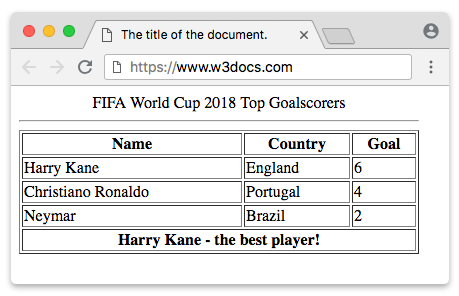
La etiqueta <code><tfoot></code> y otras etiquetas para resumir el contenido de la tabla
El elemento <code><tfoot></code> define una sección de pie para la tabla, que normalmente contiene datos de resumen o agregados. En el código fuente, debe aparecer antes del elemento <code><tbody></code>, pero los navegadores siempre lo muestran en la parte inferior.
Usa los elementos <code><thead></code>, <code><tbody></code>` y <code><tfoot></code> `` para estructurar tablas que contienen conjuntos de datos complejos. Estos elementos ayudan a organizar el contenido de la tabla. Para habilitar el desplazamiento independiente del cuerpo, aplica propiedades CSS overflow.
Atributos
| Attribute | Value | Description |
|---|---|---|
| align | right, left, center, justify, char | Sets horizontal alignment of the content inside the <code><tfoot></code> element. This attribute is not supported by HTML5. |
| bgcolor | bgcolor | Sets the background color of the rows inside the <code><tfoot></code> element. This attribute is not supported by HTML5. |
| char | character | Specifies the alignment of the content inside the <code><tfoot></code> element to a character. Is used only when the attribute align="char". This attribute is not supported by HTML5. |
| charoff | number | Specifies the number of characters the content inside the <code><tfoot></code> element will be aligned from the character specified by the char attribute. Is used only when the attribute align="char". This attribute is not supported by HTML5. |
| valign | top, bottom, middle, baseline | Specifies a vertical alignment of the content inside the <code><tfoot></code> element. This attribute is not supported by HTML5. |
Nota: Todos los atributos enumerados arriba están obsoletos en HTML5. Usa CSS para dar estilo.
La etiqueta <code><tfoot></code> también admite los atributos globales y los atributos de evento.
Cómo dar estilo a una etiqueta HTML <code><tfoot></code>
tfoot {
  background-color: #f2f2f2;
  font-weight: bold;
}
Practice
What is the purpose of HTML tfoot tag and where is it usually placed in a table?