Propiedad width de CSS
La propiedad CSS width establece el ancho de un elemento. El ancho no incluye border, padding ni margin. Ten en cuenta que esto se aplica al modelo de caja content-box por defecto; con box-sizing: border-box, el relleno y el borde se incluyen en el cálculo del ancho.
La propiedad width se aplica a todos los elementos excepto a los elementos en línea no reemplazados, las filas de tabla y los grupos de filas (es decir, <thead>, <tfoot> y <tbody>).
La propiedad acepta una longitud CSS (px, pt, em, etc.), un porcentaje o la palabra clave auto.
Ten en cuenta que el valor en porcentaje se basa en el ancho del elemento padre (el bloque contenedor). Para elementos con posición absoluta, el porcentaje se calcula en relación con el ancho del cuadro de relleno del bloque contenedor.
La propiedad width puede ser anulada por las propiedades min-width y max-width.
INFO
Los valores de longitud negativos no son válidos.
| Valor inicial | auto |
|---|---|
| Se aplica a | Todos los elementos excepto elementos en línea no reemplazados, filas de tabla y grupos de filas. |
| Heredado | No. |
| Animable | Sí. El ancho de un elemento es animable. |
| Versión | CSS1 |
| Sintaxis DOM | Object.style.width = "300px"; |
Sintaxis
Sintaxis de la propiedad CSS width
width: auto | length | percentage | initial | inherit | fit-content | min-content | max-content | stretch;Ejemplo de la propiedad width especificada en “%”:
Ejemplo de la propiedad CSS width con valor %
<!DOCTYPE html>
<html>
  <head>
    <title>Title of the document</title>
    <style>
      div {
        width: 50%;
        background-color: #1c87c9;
      }
    </style>
  </head>
  <body>
    <h2>Width property example</h2>
    <div>
      Lorem Ipsum is simply dummy text of the printing and typesetting industry. Lorem Ipsum has been the industry's standard dummy text ever since the 1500s, when an unknown printer took a galley of type and scrambled it to make a type specimen book.
    </div>
  </body>
</html>Resultado
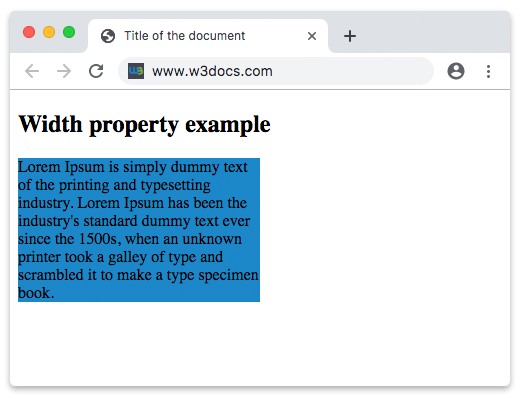
En el ejemplo anterior, el ancho del contenedor div es del 50%.
En el siguiente ejemplo, el ancho del primer elemento es 250px y el del segundo elemento es 25em:
Ejemplo de la propiedad width especificada en “px” y “em”:
Ejemplo de la propiedad CSS width con valores px y em
<!DOCTYPE html>
<html>
  <head>
    <title>Title of the document</title>
    <style>
      div.t1 {
        width: 250px;
        border: 1px solid black;
        background-color: #1c87c9;
      }
      div.t2 {
        width: 25em;
        border: 1px solid black;
        background-color: #8ebf42;
      }
    </style>
  </head>
  <body>
    <h2>Width property example</h2>
    <h3>width: 250px</h3>
    <div class="t1">
      Lorem Ipsum is dummy text of the printing and typesetting industry. Lorem Ipsum has been the industry's standard dummy text ever since the 1500s when an unknown printer took a galley of type and scrambled it to make a type specimen book. It has survived not only five centuries, but also the leap into electronic typesetting, remaining essentially unchanged. It was popularised in the 1960s with the release of Letraset sheets containing Lorem Ipsum passages, and more recently with desktop publishing software like Aldus PageMaker including versions of Lorem Ipsum.
    </div>
    <h3>width: 25em</h3>
    <div class="t2">
      Lorem Ipsum is simply dummy text of the printing and typesetting industry. Lorem Ipsum has been the industry's standard dummy text ever since the 1500s when an unknown printer took a galley of type and scrambled it to make a type specimen book. It has survived not only five centuries, but also the leap into electronic typesetting, remaining essentially unchanged. It was popularised in the 1960s with the release of Letraset sheets containing Lorem Ipsum passages, and more recently with desktop publishing software like Aldus PageMaker including versions of Lorem Ipsum.
    </div>
  </body>
</html>Valores
| Valor | Descripción | Probarlo » |
|---|---|---|
| auto | El navegador calculará un ancho para el elemento especificado. Este es el valor predeterminado. | Probarlo » |
| length | Define el ancho en px, pt, cm, etc. | Probarlo » |
| percentage | Define el ancho en porcentaje del elemento contenedor. | Probarlo » |
| initial | Hace que la propiedad use su valor predeterminado. | Probarlo » |
| inherit | Hereda la propiedad de su elemento padre. | |
| fit-content | Calcula el ancho en función del tamaño intrínseco del contenido. | Probarlo » |
| min-content | Calcula el ancho en función del tamaño mínimo del contenido. | Probarlo » |
| max-content | Calcula el ancho en función del tamaño máximo del contenido. | Probarlo » |
| stretch | Estira el elemento para llenar el contenedor. | Probarlo » |
Práctica
¿Cuál es la funcionalidad de la propiedad 'width' en CSS?