Propiedad CSS flex-direction
La propiedad flex-direction especifica el eje principal de un contenedor flex y establece el orden de los elementos flex. Es una de las propiedades CSS3. Esta propiedad forma parte del módulo Flexible Box Layout.
Los elementos flex se pueden mostrar:
- horizontalmente de izquierda a derecha (
flex-direction: row) o de derecha a izquierda (flex-direction: row-reverse) - verticalmente de arriba a abajo (
flex-direction: column) o de abajo a arriba (flex-direction: column-reverse)
INFO
Si no hay elementos flex, la propiedad flex-direction no tiene ningún efecto.
| Valor inicial | row |
|---|---|
| Se aplica a | Contenedores flex. |
| Heredable | No. |
| Animable | No. |
| Versión | CSS3 |
| Sintaxis DOM | object.style.flexDirection = "row-reverse"; |
Sintaxis
Sintaxis de la propiedad CSS flex-direction
flex-direction: row | row-reverse | column | column-reverse | initial | inherit;Ejemplo de la propiedad flex-direction:
Ejemplo de la propiedad CSS flex-direction con el valor column-reverse
<!DOCTYPE html>
<html>
  <head>
    <title>Title of the document</title>
    <style>
      .example {
        width: 350px;
        height: 350px;
        border: 1px solid #c3c3c3;
        display: flex;
        flex-direction: column-reverse;
      }
      .example div {
        width: 70px;
        height: 70px;
      }
    </style>
  </head>
  <body>
    <h2>Flex-direction property example</h2>
    <div class="example">
      <div style="background-color: #8ebf42;">A</div>
      <div style="background-color: #1c87c9;">B</div>
      <div style="background-color: #eeeeee;">C</div>
      <div style="background-color: #666666;">F</div>
    </div>
  </body>
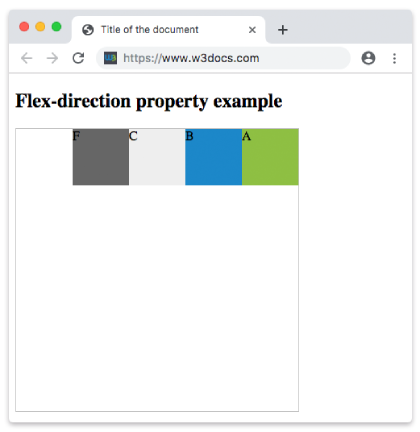
</html>En el siguiente ejemplo, los elementos se muestran horizontalmente en una fila de derecha a izquierda.
Ejemplo de la propiedad flex-direction con el valor "row-reverse":
Ejemplo de la propiedad CSS flex-direction con el valor row-reverse
<!DOCTYPE html>
<html>
  <head>
    <title>Title of the document</title>
    <style>
      .example {
        width: 350px;
        height: 350px;
        border: 1px solid #c3c3c3;
        display: flex;
        flex-direction: row-reverse;
      }
      .example div {
        width: 70px;
        height: 70px;
      }
    </style>
  </head>
  <body>
    <h2>Flex-direction property example</h2>
    <div class="example">
      <div style="background-color: #8ebf42;">A</div>
      <div style="background-color: #1c87c9;">B</div>
      <div style="background-color: #eeeeee;">C</div>
      <div style="background-color: #666666;">F</div>
    </div>
  </body>
</html>Resultado
La siguiente imagen muestra los elementos mostrados en orden inverso de derecha a izquierda.
Ejemplo de la propiedad flex-direction con el valor "row":
Ejemplo de la propiedad flex-direction con el valor “row”
<!DOCTYPE html>
<html>
  <head>
    <title>Title of the document</title>
    <style>
      .example {
        width: 350px;
        height: 350px;
        border: 1px solid #c3c3c3;
        display: flex;
        flex-direction: row;
      }
      .example div {
        width: 70px;
        height: 70px;
      }
    </style>
  </head>
  <body>
    <h2>Flex-direction property example</h2>
    <div class="example">
      <div style="background-color: #8ebf42;">A</div>
      <div style="background-color: #1c87c9;">B</div>
      <div style="background-color: #eeeeee;">C</div>
      <div style="background-color: #666666;">F</div>
    </div>
  </body>
</html>Ejemplo de la propiedad flex-direction con el valor "column":
Ejemplo de la propiedad flex-direction con el valor "column"
<!DOCTYPE html>
<html>
  <head>
    <title>Title of the document</title>
    <style>
      .example {
        width: 350px;
        height: 350px;
        border: 1px solid #c3c3c3;
        display: flex;
        flex-direction: column;
      }
      .example div {
        width: 70px;
        height: 70px;
      }
    </style>
  </head>
  <body>
    <h2>Flex-direction property example</h2>
    <div class="example">
      <div style="background-color: #DC143C;">A</div>
      <div style="background-color: #0000CD;">B</div>
      <div style="background-color: #9ACD32;">C</div>
      <div style="background-color: #666666;">F</div>
    </div>
  </body>
</html>Ejemplo de la propiedad flex-direction con el valor "column-reverse":
Ejemplo de la propiedad flex-direction con el valor "column-reverse"
<!DOCTYPE html>
<html>
  <head>
    <title>Title of the document</title>
    <style>
      .example {
        width: 350px;
        height: 340px;
        border: 1px solid #c3c3c3;
        display: flex;
        flex-direction: column-reverse;
      }
      .example div {
        width: 60px;
        height: 60px;
      }
    </style>
  </head>
  <body>
    <h2>Flex-direction property example</h2>
    <div class="example">
      <div style="background-color: #DC143C;">A</div>
      <div style="background-color: #0000CD;">B</div>
      <div style="background-color: #9ACD32;">C</div>
      <div style="background-color: #666666;">F</div>
    </div>
  </body>
</html>Valores
| Valor | Descripción | Probar |
|---|---|---|
| row | Los elementos se muestran horizontalmente en una fila. Este es el valor predeterminado de esta propiedad. | Probar » |
| row-reverse | Los elementos se muestran en una fila en orden inverso (de derecha a izquierda). | Probar » |
| column | Los elementos se muestran verticalmente de arriba a abajo. | Probar » |
| column-reverse | Los elementos se muestran verticalmente de abajo a arriba. | Probar » |
| initial | La propiedad utiliza su valor predeterminado. | Probar » |
| inherit | La propiedad hereda el valor de su elemento principal. | Probar » |
Práctica
¿Cuáles de los siguientes son valores válidos para la propiedad CSS flex-direction?