Propiedad CSS background-image
La propiedad background-image especifica las imágenes de fondo para los elementos. Puedes especificar una o más imágenes.
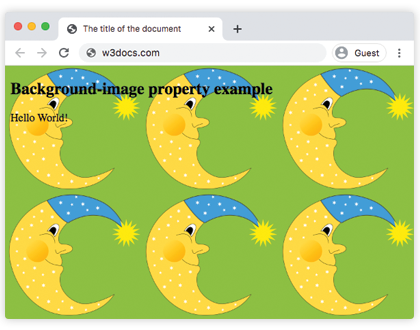
Por defecto, una imagen de fondo se repite vertical y horizontalmente y se coloca en la esquina superior izquierda del elemento.
El fondo de un elemento es el tamaño total del mismo, incluyendo padding y border (no margin).
Si la imagen no está disponible, necesitas especificar un background-color.
| Valor inicial | none |
|---|---|
| Se aplica a | Todos los elementos. También se aplica a ::first-letter y ::first-line. |
| Heredable | No. |
| Animable | No. |
| Versión | CSS1 + algunos valores nuevos en CSS3 |
| Sintaxis DOM | object.style.backgroundImage = "url(img_tree.png)"; |
Sintaxis
Sintaxis de la propiedad CSS background-image
background-image: url | none | linear-gradient | radial-gradient | repeating-linear-gradient | repeating-radial-gradient | initial | inherit;Ejemplo de la propiedad background-image:
Ejemplo de la propiedad CSS background-image
<!DOCTYPE html>
<html>
  <head>
    <title>The title of the document</title>
    <style>
      body {
        background-image: url("https://es.w3docs.com/uploads/media/default/0001/02/55a2f152f59bf42a99b576d44a4578ec9daa0ab6.png");
        background-color: #8ebf42;
      }
    </style>
  </head>
  <body>
    <h2>Background-image property example</h2>
    <p>Hello World!</p>
  </body>
</html>Resultado
Consulta otro ejemplo donde se utilizan dos imágenes y se especifican mediante la propiedad background-position.
Ejemplo de la propiedad background-image con otras propiedades de fondo:
Ejemplo de la propiedad CSS background-image con 2 imágenes
<!DOCTYPE html>
<html>
  <head>
    <title>The title of the document</title>
    <style>
      body {
        padding: 100px;
        background-image: url("https://es.w3docs.com/uploads/media/default/0001/02/55a2f152f59bf42a99b576d44a4578ec9daa0ab6.png"), url("https://es.w3docs.com/uploads/media/default/0001/01/b408569013c0bb32b2afb0f0d45e93e982347951.jpeg");
        background-attachment: fixed;
        background-position: 5px 50px;
        background-repeat: no-repeat, repeat;
      }
    </style>
  </head>
  <body>
    <h2>Background-image property example</h2>
    <p>The background image is positioned 5px from the left, and 50px down from the top.</p>
  </body>
</html>En este ejemplo, se especifica un "linear-gradient" con dos colores como imagen de fondo para un elemento <div>:
Ejemplo de la propiedad background-image con el valor "linear-gradient":
Ejemplo de la propiedad CSS background-image con el valor linear-gradient
<!DOCTYPE html>
<html>
  <head>
    <style>
      div {
        height: 300px;
        background-image: linear-gradient(#eee, #1c87c9);
      }
    </style>
  </head>
  <body>
    <h2>Linear gradient as a background image example</h2>
    <p>This linear gradient starts at the top. It starts gray, transitioning to blue:</p>
    <div></div>
  </body>
</html>Ejemplo de la propiedad background-image con el valor "repeating-radial-gradient":
Ejemplo de la propiedad CSS background-image con el valor repeating-radial-gradient
<!DOCTYPE html>
<html>
  <head>
    <title>The title of the document</title>
    <style>
      div {
        height: 300px;
        background-color: #cccccc;
        background-image: repeating-radial-gradient(#8ebf42, #eee 15%, #ccc 30%);
      }
    </style>
  </head>
  <body>
    <h2>Radial gradient as a background image example</h2>
    <div></div>
  </body>
</html>Valores
| Valor | Descripción |
|---|---|
| url | Define la url de la imagen. Se pueden especificar más de una imagen separadas por comas. |
| none | No habrá ninguna imagen de fondo. Es el valor predeterminado. |
| linear-gradient | Se especifica un degradado lineal como imagen de fondo. |
| radial-gradient | Se especifica un degradado radial como imagen de fondo. |
| repeating-linear-gradient | Repite un degradado lineal. |
| repeating-radial-gradient | Repite un degradado radial. |
| initial | Establece la propiedad en su valor predeterminado. |
| inherit | Hereda la propiedad de su elemento padre. |
Práctica
¿Cuáles son las propiedades de CSS que se pueden usar para controlar la imagen de fondo de un elemento?