Propiedad opacity de CSS
La propiedad opacity se utiliza para establecer el nivel de transparencia de un elemento.
Esta propiedad es una de las propiedades de CSS3.
Esta propiedad permite hacer que un elemento sea completamente transparente, semitransparente o predeterminado.
El número varía entre 0 y 1. 0 hace que el elemento sea completamente transparente. 1 es el valor predeterminado que hace que el elemento sea completamente opaco. Un valor entre 0 y 1 lo hace gradualmente transparente.
INFO
Los valores negativos no son válidos.
TIP
Al agregar transparencia al fondo de un elemento con la ayuda de la propiedad opacity, todos sus elementos hijos también se vuelven transparentes. Utilice colores RGBA si no desea aplicar opacity a los elementos hijos.
| Valor inicial | 1.0 |
|---|---|
| Se aplica a | Todos los elementos. |
| Heredable | No. |
| Animable | Sí. |
| Versión | CSS3 |
| Sintaxis DOM | object.style.opacity = "0.3"; |
Sintaxis
Sintaxis de CSS opacity
opacity: number | initial | inherit;Ejemplo de la propiedad opacity:
Ejemplo de código CSS opacity
<!DOCTYPE html>
<html>
  <head>
    <title>Title of the document</title>
    <style>
      .example1 {
        background-color: #8ebf42;
        opacity: 0.3;
      }
      .example2 {
        background-color: #8ebf42;
        opacity: 1;
      }
    </style>
  </head>
  <body>
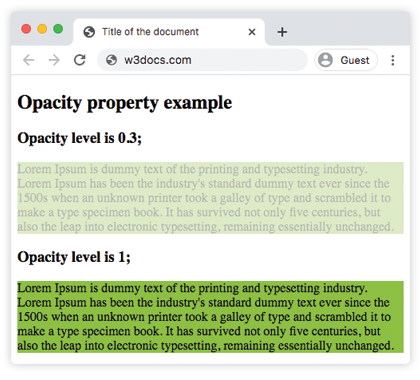
    <h2>Opacity property example</h2>
    <h3>Opacity level is 0.3;</h3>
    <div class="example1"> Lorem Ipsum is dummy text of the printing and typesetting industry. Lorem Ipsum has been the industry's standard dummy text ever since the 1500s when an unknown printer took a galley of type and scrambled it to make a type specimen book. It has survived not only five centuries, but also the leap into electronic typesetting, remaining essentially unchanged. </div>
    <h3>Opacity level is 1;</h3>
    <div class="example2">Lorem Ipsum is dummy text of the printing and typesetting industry. Lorem Ipsum has been the industry's standard dummy text ever since the 1500s when an unknown printer took a galley of type and scrambled it to make a type specimen book. It has survived not only five centuries, but also the leap into electronic typesetting, remaining essentially unchanged.</div>
  </body>
</html>Resultado
Otro ejemplo donde el nivel de opacidad de la primera imagen es 1.0, el de la segunda imagen es 0.6 y el nivel de opacidad de la tercera imagen es 0.2.
Ejemplo de la propiedad opacity con tres niveles de opacidad:
Otro ejemplo de código CSS opacity
<!DOCTYPE html>
<html>
  <head>
    <title>Title of the document</title>
    <style>
      img.a {
        opacity: 1;
      }
      img.b {
        opacity: 0.6;
      }
      img.c {
        opacity: 0.2;
      }
    </style>
  </head>
  <body>
    <h2>Opacity property example</h2>
    <h3>Opacity: 1.0;</h3>
    <img src="https://es.w3docs.com/uploads/media/default/0001/01/4982c4f43023330a662b9baed5a407e391ae6161.jpeg" alt="house" width="300" height="300" class="a" />
    <h3>Opacity: 0.6;</h3>
    <img src="https://es.w3docs.com/uploads/media/default/0001/01/4982c4f43023330a662b9baed5a407e391ae6161.jpeg" alt="house" width="300" height="300" class="b" />
    <h3>Opacity: 0.2;</h3>
    <img src="https://es.w3docs.com/uploads/media/default/0001/01/4982c4f43023330a662b9baed5a407e391ae6161.jpeg" alt="house" width="300" height="300" class="c" />
  </body>
</html>Valores
| Valor | Descripción | Probarlo |
|---|---|---|
| number | Define el nivel de opacidad. El valor predeterminado es 1.0. | Probarlo » |
| initial | Hace que la propiedad utilice su valor predeterminado. | Probarlo » |
| inherit | Hereda la propiedad de su elemento padre. |
Práctica
¿Qué es la propiedad 'opacity' en CSS y cómo se usa?