Propiedad CSS hanging-punctuation
La propiedad hanging-punctuation especifica si un signo de puntuación debe colgar al inicio o al final de la línea de un texto.
La puntuación colgante se utiliza con texto completamente justificado y controla la alineación de todas las líneas de un párrafo cuando se usa al final de las líneas.
| Valor inicial | none |
|---|---|
| Se aplica a | Todos los elementos. |
| Heredable | Sí. |
| Animable | No. |
| Versión | CSS3 |
| Sintaxis DOM | object.style.hangingPunctuation = "last"; |
Sintaxis
Sintaxis de la propiedad CSS hanging-punctuation
css
hanging-punctuation: none | first | last | allow-end | force-end | initial | inherit;Ejemplo de la propiedad hanging-punctuation:
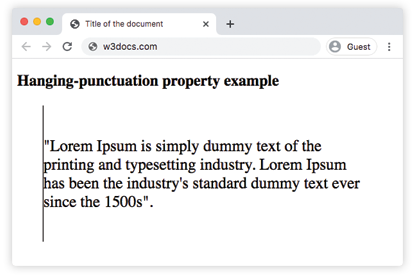
Ejemplo de la propiedad CSS hanging-punctuation con el valor first
html
<!DOCTYPE html>
<html>
  <head>
    <title>Title of the document</title>
    <style>
      blockquote {
        font-style: normal;
        font-size: 25px;
        width: 20em;
        border-left: 1px solid #000;
        padding: 3rem 0;
        hanging-punctuation: first;
      }
    </style>
  </head>
  <body>
    <h2>Hanging-punctuation property example</h2>
    <blockquote>"Lorem Ipsum is simply dummy text of the printing and typesetting industry. Lorem Ipsum has been the industry's standard dummy text ever since the 1500s".</blockquote>
  </body>
</html>Resultado
Valores
| Valor | Descripción |
|---|---|
| none | La puntuación colgante no se aplica. Este es el valor predeterminado de esta propiedad. |
| first | Un signo de puntuación colgará fuera del borde inicial de la primera línea. |
| last | Un signo de puntuación colgará fuera del borde final de la última línea. |
| allow-end | Un signo de puntuación colgará fuera del borde final de una línea si no cabe de otra manera antes de la justificación. |
| force-end | Un signo de puntuación colgará fuera del borde final de todas las líneas. Si la justificación está habilitada en esta línea, forzará que la puntuación cuelgue. |
Práctica
¿Qué hace la propiedad de puntuación colgante en CSS?