Propiedad column-width de CSS
La propiedad column-width define el ancho de las columnas. El navegador calcula automáticamente el número de columnas necesarias para mostrar el contenido dentro del elemento.
La propiedad column-width es una de las propiedades de CSS3.
Tiene dos valores: auto y length. auto es el valor predeterminado de la propiedad column-width. length especifica el ancho de las columnas en px, em y ch. La propiedad column-width es flexible. Las columnas se reducirán a una sola si el contenedor no es lo suficientemente ancho para contener dos columnas al ancho especificado. Si el ancho del contenedor es menor que el valor especificado, el ancho de la única columna será menor que el ancho de columna especificado. Ten en cuenta que si también se especifica column-count, column-width actúa como un ancho máximo, y el navegador ajusta el número real de columnas en función del espacio disponible del contenedor.
Con esta propiedad, también puedes crear diseños responsivos para diferentes tamaños de pantalla.
INFO
Los navegadores modernos admiten column-width sin prefijos de proveedor.
| Valor inicial | auto |
|---|---|
| Se aplica a | Contenedores de bloque, excepto cajas envolventes de tabla. |
| Heredado | No. |
| Animable | Sí. |
| Versión | CSS3 |
| Sintaxis DOM | object.style.columnWidth = "5px"; |
Sintaxis
Sintaxis de la propiedad column-width de CSS
column-width: auto | length | initial | inherit;Ejemplo de la propiedad column-width:
Ejemplo de la propiedad CSS column-width con la propiedad length
<!DOCTYPE html>
<html>
  <head>
    <title>Title of the document</title>
    <style>
      div {
        column-width: 80px;
      }
    </style>
  </head>
  <body>
    <h1>Column-width property example</h1>
    <p>Here the width of the column is set to 80px.</p>
    <div>
      Lorem Ipsum is dummy text of the printing and typesetting industry. Lorem Ipsum has been the industry's standard dummy text ever since the 1500s when an unknown printer took a galley of type and scrambled it to make a type specimen book. It has survived not only five centuries, but also the leap into electronic typesetting, remaining essentially unchanged. It was popularised in the 1960s with the release of Letraset sheets containing Lorem Ipsum passages, and more recently with desktop publishing software like Aldus PageMaker including versions of Lorem Ipsum.
    </div>
  </body>
</html>Resultado
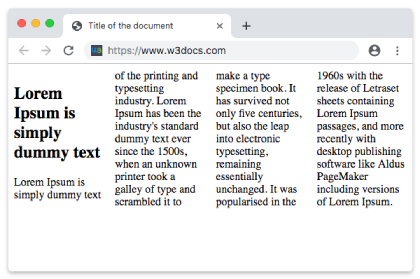
Ejemplo de la propiedad column-width con el valor "auto":
Ejemplo de la propiedad column-width con el valor "auto":
<!DOCTYPE html>
<html>
  <head>
    <title>Title of the document</title>
    <style>
      div {
        column-width: auto;
      }
    </style>
  </head>
  <body>
    <h1>Column-width property example</h1>
    <p>Here the width of the column is set to auto.</p>
    <div>
      Lorem Ipsum is dummy text of the printing and typesetting industry. Lorem Ipsum has been the industry's standard dummy text ever since the 1500s when an unknown printer took a galley of type and scrambled it to make a type specimen book. It has survived not only five centuries, but also the leap into electronic typesetting, remaining essentially unchanged. It was popularised in the 1960s with the release of Letraset sheets containing Lorem Ipsum passages, and more recently with desktop publishing software like Aldus PageMaker including versions of Lorem Ipsum.
    </div>
  </body>

</html>Valores
| Valor | Descripción | Probar |
|---|---|---|
| auto | El ancho de la columna lo especifica el navegador. Este es el valor predeterminado. | |
| length | El ancho de las columnas lo especifica length. | |
| initial | Establece la propiedad en su valor predeterminado. | |
| inherit | Hereda la propiedad de su elemento padre. |
Práctica
¿Qué hace la propiedad 'column-width' en CSS?