Propiedad CSS text-align-last
La propiedad CSS text-align-last establece la alineación de la última línea del texto. Es una de las propiedades CSS3.
La propiedad text-align-last establece la alineación para la última línea del contenedor de bloque al que se aplica. Por ejemplo, si un <div> contiene tres párrafos, text-align-last se aplicará solo a la última línea del propio <div>, no a los párrafos individuales dentro de él.
nota
Esta propiedad es más notable cuando se usa
text-align: justifyy el texto se ajusta a varias líneas. En una sola línea, se comporta idénticamente atext-align.
| Valor inicial | auto |
|---|---|
| Se aplica a | Contenedores de bloque. |
| Heredable | Sí. |
| Animable | No. |
| Versión | CSS3 |
| Sintaxis DOM | object.style.textAlignLast = "left"; |
Compatibilidad con navegadores
| Navegador | Compatibilidad |
|---|---|
| Chrome | 50+ |
| Edge | 12+ |
| Firefox | 49+ |
| Safari | 10.1+ |
| Opera | 37+ |
Sintaxis
Sintaxis de CSS text-align-last
text-align-last: auto | left | right | center | justify | start | end | initial | inherit;Ejemplo de la propiedad text-align-last:
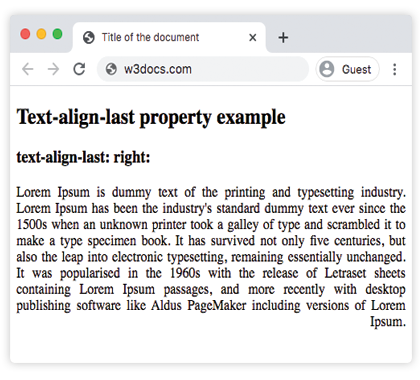
Ejemplo de código CSS text-align-last
<!DOCTYPE html>
<html>
  <head>
    <title>Title of the document</title>
    <style>
      .demo {
        text-align: justify;
        text-align-last: right;
      }
    </style>
  </head>
  <body>
    <h2>Text-align-last property example</h2>
    <h3>text-align-last: right:</h3>
    <div class="demo">
      Lorem Ipsum is dummy text of the printing and typesetting industry. Lorem Ipsum has been the industry's standard dummy text ever since the 1500s when an unknown printer took a galley of type and scrambled it to make a type specimen book. It has survived not only five centuries, but also the leap into electronic typesetting, remaining essentially unchanged. It was popularised in the 1960s with the release of Letraset sheets containing Lorem Ipsum passages, and more recently with desktop publishing software like Aldus PageMaker including versions of Lorem Ipsum.
    </div>
  </body>
</html>Resultado
Ejemplo de la propiedad text-align-last con los valores "start", "justify" y "center":
Ejemplo de todos los valores de CSS text-align-last
<!DOCTYPE html>
<html>
  <head>
    <title>Title of the document</title>
    <style>
      .demo1 {
        text-align: justify;
        text-align-last: start;
      }
      .demo2 {
        text-align: justify;
        text-align-last: center;
      }
      .demo3 {
        text-align: justify;
        text-align-last: justify;
      }
    </style>
  </head>
  <body>
    <h2>Text-align-last property example</h2>
    <h3>Text-align-last: start:</h3>
    <div class="demo1">
      Lorem Ipsum is dummy text of the printing and typesetting industry. Lorem Ipsum has been the industry's standard dummy text ever since the 1500s when an unknown printer took a galley of type and scrambled it to make a type specimen book. It has survived not only five centuries, but also the leap into electronic typesetting, remaining essentially unchanged. It was popularised in the 1960s with the release of Letraset sheets containing Lorem Ipsum passages, and more recently with desktop publishing software like Aldus PageMaker including versions of Lorem Ipsum.
    </div>
    <h3>Text-align-last: center:</h3>
    <div class="demo2">
      Lorem Ipsum is dummy text of the printing and typesetting industry. Lorem Ipsum has been the industry's standard dummy text ever since the 1500s when an unknown printer took a galley of type and scrambled it to make a type specimen book. It has survived not only five centuries, but also the leap into electronic typesetting, remaining essentially unchanged. It was popularised in the 1960s with the release of Letraset sheets containing Lorem Ipsum passages, and more recently with desktop publishing software like Aldus PageMaker including versions of Lorem Ipsum.
    </div>
    <h3>Text-align-last: justify:</h3>
    <div class="demo3">
      Lorem Ipsum is dummy text of the printing and typesetting industry. Lorem Ipsum has been the industry's standard dummy text ever since the 1500s when an unknown printer took a galley of type and scrambled it to make a type specimen book. It has survived not only five centuries, but also the leap into electronic typesetting, remaining essentially unchanged. It was popularised in the 1960s with the release of Letraset sheets containing Lorem Ipsum passages, and more recently with desktop publishing software like Aldus PageMaker including versions of Lorem Ipsum.
    </div>
  </body>
</html>Ejemplo de la propiedad text-align-last con el valor "end":
Ejemplo de la propiedad text-align-last con el valor "end":
<!DOCTYPE html>
<html>
  <head>
    <title>Title of the document</title>
    <style>
      .demo {
        text-align: justify;
        text-align-last: end;
      }
    </style>
  </head>
  <body>
    <h2>Text-align-last property example</h2>
    <h3>text-align-last: end:</h3>
    <div class="demo">
      <p>
        Lorem Ipsum is dummy text of the printing and typesetting industry. Lorem Ipsum has been the industry's standard dummy text ever since the 1500s when an unknown printer took a galley of type and scrambled it to make a type specimen book. It has survived not only five centuries, but also the leap into electronic typesetting, remaining essentially unchanged. It was popularised in the 1960s with the release of Letraset sheets containing Lorem Ipsum passages, and more recently with desktop publishing software like Aldus PageMaker including versions of Lorem Ipsum.
      </p>
      <p>
        Lorem Ipsum is dummy text of the printing and typesetting industry. Lorem Ipsum has been the industry's standard dummy text ever since the 1500s when an unknown printer took a galley of type and scrambled it to make a type specimen book. It has survived not only five centuries, but also the leap into electronic typesetting, remaining essentially unchanged.
      </p>
      <p>
        Lorem Ipsum is dummy text of the printing and typesetting industry. Lorem Ipsum has been the industry's standard dummy text ever since the 1500s when an unknown printer took a galley of type and scrambled it to make a type specimen book.
      </p>
    </div>
  </body>
</html>Valores
| Valor | Descripción | Probarlo |
|---|---|---|
| auto | Usa el valor de la propiedad text-align. Este es el valor predeterminado. | Probarlo » |
| left | Alinea la última línea a la izquierda. | Probarlo » |
| right | Alinea la última línea a la derecha. | Probarlo » |
| center | Alinea la última línea al centro. | Probarlo » |
| justify | La última línea se justifica como las demás líneas. | Probarlo » |
| start | La última línea se alinea al principio de la línea. Izquierda si la dirección es de izquierda a derecha y derecha si la dirección es de derecha a izquierda. | Probarlo » |
| end | La última línea se alinea al final de la línea. Derecha si la dirección es de izquierda a derecha, izquierda si la dirección es de derecha a izquierda. | Probarlo » |
| initial | Hace que la propiedad use su valor predeterminado. | Probarlo » |
| inherit | Hereda la propiedad de su elemento padre. | Probarlo » |
Práctica
¿Qué hace la propiedad 'text-align-last' en CSS?