Propiedad CSS line-clamp
La propiedad line-clamp trunca el texto a un número específico de líneas. Limita el texto al número deseado de líneas y añade puntos suspensivos después de la última palabra visible o de una parte de una palabra.
Sintaxis
Sintaxis de la propiedad CSS line-clamp
css
line-clamp: none | <integer>;Ejemplo de la propiedad line-clamp:
Ejemplo de la propiedad CSS line-clamp
html
<!DOCTYPE html>
<html>
  <head>
    <title>Title of the document</title>
    <style>
      body {
        align-items: center;
        background: radial-gradient( farthest-side at bottom left, #eee, #ccc),
        radial-gradient( farthest-corner at bottom right, #eee, #ccc 400px);
        display: flex;
        flex-direction: column;
        height: 100vh;
        justify-content: center;
        line-height: 1.5;
      }
      .element {
        background-color: #fff;
        box-shadow: 1px 1px 10px #666;
        padding: 2em;
        width: 200px;
      }
      .element p {
        display: -webkit-box;
        line-clamp: 3;
        -webkit-box-orient: vertical;
        overflow: hidden;
      }
    </style>
  </head>
  <body>
    <h2>CSS line-clamp  property example</h2>
    <div class="element">
      <p>Lorem Ipsum is simply dummy text of the printing and typesetting industry. Lorem Ipsum has been the industry's standard dummy text ever since the 1500s.</p>
    </div>
  </body>
</html>Resultado
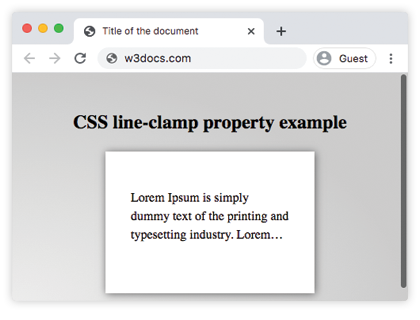
En el ejemplo dado, el texto se corta en la tercera línea.
Valores
| Value | Description |
|---|---|
| none | No maximum number of lines and no truncation. |
<integer> | Sets maximum number of lines before truncating the content and then displays an ellipsis. |
Desventajas de la propiedad CSS line-clamp
La propiedad CSS line-clamp tiene algunas limitaciones:
- La propiedad
line-clampahora es ampliamente compatible con todos los navegadores modernos. Para navegadores antiguos que no la admiten, puedes usar una consulta de características para aplicarla condicionalmente:@supports (line-clamp: 2) { ... }. - No permite personalizar los puntos suspensivos. Esto puede causar problemas, ya que los puntos suspensivos predeterminados pueden no encajar bien con distintos idiomas o renderizados de fuente.
- La propiedad requiere varias propiedades de apoyo para funcionar correctamente:
Propiedad CSS line-clamp
css
.element {
  overflow: hidden;
  display: -webkit-box;
  line-clamp: 2;
  -webkit-box-orient: vertical;
}| Initial Value | none |
|---|---|
| Applies to | - |
| Inherited | Yes. |
| Animatable | No. |
| Version | CSS Overflow Module Level 4 |
| DOM Syntax | object.style.lineClamp = "2"; |
WARNING
Nota: display: -webkit-box es una implementación de flexbox heredada y no estándar, utilizada por navegadores WebKit antiguos. Se mantiene aquí únicamente como alternativa de compatibilidad.
Práctica
What is the function of line-clamp in CSS?