Propiedad flex-grow de CSS
La propiedad flex-grow especifica cuánto crecerá el elemento en relación con el resto de los elementos en el contenedor flex. Si todos los elementos del contenedor tienen un factor flex-grow establecido, dividen el espacio libre restante de manera proporcional según sus factores. El tamaño principal de un elemento flexible es su altura o su ancho, lo cual depende del valor de flex-direction.
Esta propiedad es una de las propiedades de CSS3. Se utiliza junto con las propiedades flex-shrink y flex-basis.
INFO
Si no hay elementos flexibles, la propiedad flex-grow no tendrá ningún efecto.
| Valor inicial | 0 |
|---|---|
| Se aplica a | Elementos flex, incluidos pseudo-elementos en flujo. |
| Heredable | No. |
| Animable | Sí. Los elementos son animables. |
| Versión | CSS3 |
| Sintaxis DOM | object.style.flexGrow = 3; |
Sintaxis
Sintaxis de la propiedad flex-grow de CSS
flex-grow: number | initial | inherit;Ejemplo de la propiedad flex-grow:
Ejemplo de la propiedad CSS flex-grow con valor numérico
<!DOCTYPE html>
<html>
  <head>
    <title>Title of the document</title>
    <style>
      .box {
        width: 320px;
        height: 120px;
        border: 2px solid #cccccc;
        display: flex;
      }
      .box div:nth-of-type(1) {
        flex-grow: 1;
      }
      .box div:nth-of-type(2) {
        flex-grow: 2;
      }
      .box div:nth-of-type(3) {
        flex-grow: 1;
      }
      .box div:nth-of-type(4) {
        flex-grow: 1;
      }
      .box div:nth-of-type(5) {
        flex-grow: 1;
      }
    </style>
  </head>
  <body>
    <h2>Flex-grow property example</h2>
    <div class="box">
      <div style="background-color: #eeeeee;"></div>
      <div style="background-color: #1c87c9;"></div>
      <div style="background-color: #8ebf42;"></div>
      <div style="background-color: #cccccc;"></div>
      <div style="background-color: #666666;"></div>
    </div>
  </body>
</html>Resultado
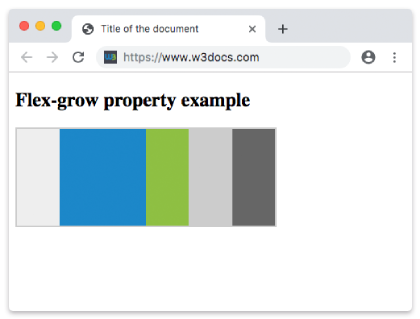
Ejemplo de la propiedad flex-grow con un factor de crecimiento mayor:
Propiedad CSS flex-grow con un número como valor
<!DOCTYPE html>
<html>
  <head>
    <title>The title of the document</title>
    <style>
      .box {
        width: 320px;
        height: 120px;
        border: 2px solid #cccccc;
        display: flex;
      }
      .box div:nth-of-type(1) {
        flex-grow: 1;
      }
      .box div:nth-of-type(2) {
        flex-grow: 6;
      }
      .box div:nth-of-type(3) {
        flex-grow: 1;
      }
      .box div:nth-of-type(4) {
        flex-grow: 1;
      }
      .box div:nth-of-type(5) {
        flex-grow: 1;
      }
    </style>
  </head>
  <body>
    <h2>Flex-grow property example</h2>
    <div class="box">
      <div style="background-color: #eeeeee;"></div>
      <div style="background-color: #1c87c9;"></div>
      <div style="background-color: #8ebf42;"></div>
      <div style="background-color: #cccccc;"></div>
      <div style="background-color: #666666;"></div>
    </div>
  </body>
</html>Valores
| Valor | Descripción | Probar |
|---|---|---|
| number | Especifica cuánto crecerá el elemento en relación con el resto de elementos flexibles del mismo contenedor. El valor predeterminado es 0. | Probar » |
| initial | Establece la propiedad en su valor predeterminado. | Probar » |
| inherit | Hereda esta propiedad de su elemento padre. |
Práctica
¿Cuál es la función de la propiedad 'flex-grow' en CSS?