Propiedad CSS align-content
La propiedad CSS align-content alinea las líneas de un contenedor flex cuando hay espacio disponible en el eje transversal.
La propiedad align-content es una de las propiedades CSS3.
Cuando solo hay una línea en el flexbox, esta propiedad no tiene efecto. Necesita múltiples líneas dentro de un contenedor flexible.
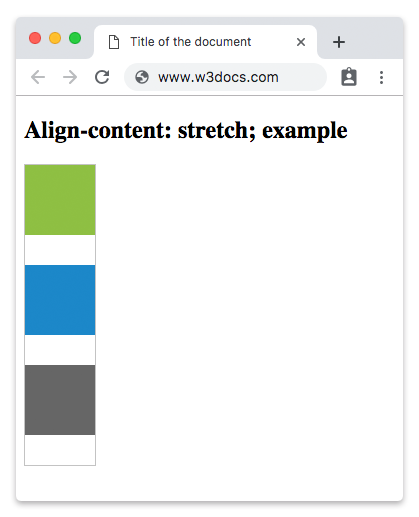
El valor stretch es el valor predeterminado de esta propiedad.
La propiedad align-content acepta los siguientes valores:
- flex-start
- flex-end
- center
- space-between
- space-around
- space-evenly
- stretch
| Valor inicial | stretch |
|---|---|
| Se aplica a | Contenedores flex de varias líneas. |
| Heredable | No. |
| Animable | No. |
| Versión | CSS3 |
| Sintaxis DOM | object.style.alignContent = "flex-end"; |
Sintaxis
Sintaxis de la propiedad CSS align-content
css
align-content: flex-start | flex-end | center | space-between | space-around | space-evenly | stretch | initial | inherit;Ejemplo de la propiedad align-content con el valor stretch:
html
<!DOCTYPE html>
<html>
  <head>
    <title>Title of the document</title>
    <style>
      #example {
        width: 70px;
        height: 300px;
        padding: 0;
        border: 1px solid #c3c3c3;
        display: flex;
        flex-flow: row wrap;
        align-content: stretch;
      }
      #example li {
        width: 70px;
        height: 70px;
        list-style: none;
      }
    </style>
  </head>
  <body>
    <h2>Align-content: stretch; example</h2>
    <ul id="example">
      <li style="background-color:#8ebf42;"></li>
      <li style="background-color:#1c87c9;"></li>
      <li style="background-color:#666;"></li>
    </ul>
  </body>
</html>Resultado
Ejemplo de la propiedad align-content con el valor "center":
html
<!DOCTYPE html>
<html>
  <head>
    <style>
      #example {
        width: 70px;
        height: 300px;
        padding: 0;
        border: 1px solid #c3c3c3;
        display: flex;
        flex-flow: row wrap;
        align-content: center;
      }
      #example li {
        width: 70px;
        height: 70px;
        list-style: none;
      }
    </style>
  </head>
  <body>
    <h2>Align-content: center; example</h2>
    <ul id="example">
      <li style="background-color:#8ebf42;"></li>
      <li style="background-color:#1c87c9;"></li>
      <li style="background-color:#666;"></li>
    </ul>
  </body>
</html>Ejemplo de la propiedad align-content con el valor "flex-start":
html
<!DOCTYPE html>
<html>
  <head>
    <style>
      #example {
        width: 70px;
        height: 300px;
        padding: 0;
        border: 1px solid #c3c3c3;
        display: flex;
        flex-flow: row wrap;
        align-content: flex-start;
      }
      #example li {
        width: 70px;
        height: 70px;
        list-style: none;
      }
    </style>
  </head>
  <body>
    <h2>Align-content: flex-start; example</h2>
    <ul id="example">
      <li style="background-color:#8ebf42;"></li>
      <li style="background-color:#1c87c9;"></li>
      <li style="background-color:#666;"></li>
    </ul>
  </body>
</html>Ejemplo de la propiedad align-content con el valor "flex-end":
html
<!DOCTYPE html>
<html>
  <head>
    <style>
      #example {
        width: 70px;
        height: 300px;
        padding: 0;
        border: 1px solid #c3c3c3;
        display: flex;
        flex-flow: row wrap;
        align-content: flex-end;
      }
      #example li {
        width: 70px;
        height: 70px;
        list-style: none;
      }
    </style>
  </head>
  <body>
    <h2>Align-content: flex-end; example</h2>
    <ul id="example">
      <li style="background-color:#8ebf42;"></li>
      <li style="background-color:#1c87c9;"></li>
      <li style="background-color:#666;"></li>
    </ul>
  </body>
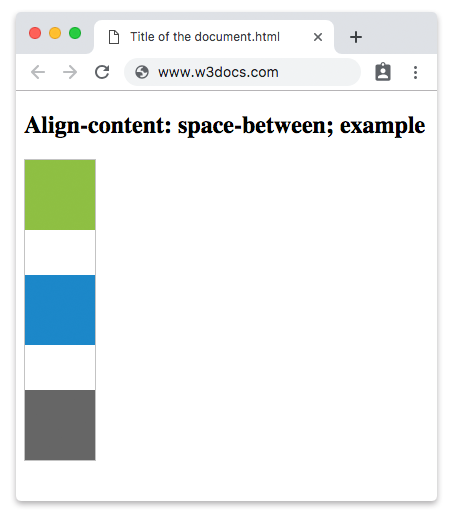
</html>En el siguiente ejemplo, el espacio se distribuye uniformemente entre las líneas flex.
Ejemplo de la propiedad align-content con el valor "space-between":
html
<!DOCTYPE html>
<html>
  <head>
    <style>
      #example {
        width: 70px;
        height: 300px;
        padding: 0;
        border: 1px solid #c3c3c3;
        display: flex;
        flex-flow: row wrap;
        align-content: space-between;
      }
      #example li {
        width: 70px;
        height: 70px;
        list-style: none;
      }
    </style>
  </head>
  <body>
    <h2>Align-content: space-between; example</h2>
    <ul id="example">
      <li style="background-color:#8ebf42;"></li>
      <li style="background-color:#1c87c9;"></li>
      <li style="background-color:#666;"></li>
    </ul>
  </body>
</html>Resultado
Otro ejemplo con el valor "space-around". Hay un espacio igual entre las líneas flex.
Ejemplo de la propiedad align-content con el valor “space-around”:
html
<!DOCTYPE html>
<html>
  <head>
    <style>
      #example {
        width: 70px;
        height: 300px;
        padding: 0;
        border: 1px solid #c3c3c3;
        display: flex;
        flex-flow: row wrap;
        align-content: space-around;
      }
      #example li {
        width: 70px;
        height: 70px;
        list-style: none;
      }
    </style>
  </head>
  <body>
    <h2>Align-content: space-around; example</h2>
    <ul id="example">
      <li style="background-color:#8ebf42;"></li>
      <li style="background-color:#1c87c9;"></li>
      <li style="background-color:#666;"></li>
    </ul>
  </body>
</html>Valores
| Valor | Descripción | Probarlo |
|---|---|---|
| stretch | Estira los elementos para que se ajusten al contenedor. Este es el valor predeterminado de esta propiedad. | Probarlo » |
| center | Los elementos se colocan en el centro del contenedor. | Probarlo » |
| flex-start | Los elementos se colocan al principio del contenedor. | Probarlo » |
| flex-end | Los elementos se colocan al final del contenedor. | Probarlo » |
| space-between | Distribuye el espacio uniformemente entre las líneas flex. | Probarlo » |
| space-around | Los elementos se distribuyen con un espacio igual entre ellos. | Probarlo » |
| space-evenly | Distribuye los elementos con un espacio igual entre ellos, así como antes del primero y después del último elemento. | Probarlo » |
| initial | Hace que la propiedad use su valor predeterminado. | Probarlo » |
| inherit | Hereda la propiedad de su elemento padre. |
Práctica
¿Cuáles son los valores posibles para la propiedad CSS align-content?