Propiedad top de CSS
La propiedad top define la posición superior de un elemento en combinación con la propiedad position.
El efecto de la propiedad top depende de cómo se posicione el elemento (consulta la propiedad position).
- Si
positionse establece en "absolute" o "fixed", la propiedadtopespecifica el borde superior de un elemento en relación con una unidad por encima/debajo del borde superior de su ancestro posicionado más cercano. - Si
positionse establece en "relative", la propiedadtopespecifica el borde superior para moverlo por encima/debajo de su posición normal. - Si
positionse establece en "sticky", la propiedadtopcambia su posición a relative cuando el elemento está dentro del viewport, y a fixed cuando está fuera. - Cuando la propiedad
positionse establece en "static", la propiedad de posición no se aplica.
INFO
Se permiten valores negativos.
| Valor inicial | auto |
|---|---|
| Se aplica a | Elementos posicionados. |
| Heredable | No. |
| Animable | Sí. |
| Versión | CSS2 |
| Sintaxis DOM | Object.style.top = "50px"; |
Sintaxis
Sintaxis de la propiedad top de CSS
css
top: auto | length | initial | inherit;Ejemplo de la propiedad top:
Ejemplo de la propiedad top de CSS con un valor de longitud
html
<!DOCTYPE html>
<html>
  <head>
    <title>Title of the document</title>
    <style>
      div {
        background-color: #8ebf42;
        height: 200px;
        width: 600px;
        position: relative;
      }
      p {
        margin: 0;
        color: #eee;
        position: absolute;
        border: 2px solid #666;
      }
      .ex1 {
        top: 0;
      }
      .ex2 {
        top: 50px;
      }
    </style>
  </head>
  <body>
    <h2>Top property example</h2>
    <div>
      <p class="ex1">Some text (top: 0;)</p>
      <p class="ex2">
        Lorem ipsum is simply dummy text...(this text is positioned 50 pixels down from the top edge of the containing positioned element.)
      </p>
    </div>
  </body>
</html>Resultado
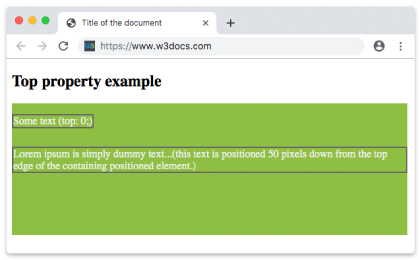
Ejemplo de la propiedad top con un valor negativo:
Ejemplo de la propiedad top de CSS con valor negativo
html
<!DOCTYPE html>
<html>
  <head>
    <title>Title of the document</title>
    <style>
      div {
        background-color: #666;
        height: 200px;
        position: relative;
      }
      p {
        margin: 0;
        color: #fff;
      }
      .top {
        position: absolute;
        top: -35px;
        color: #000000;
      }
    </style>
  </head>
  <body>
    <h2>Top property example</h2>
    <div>
      <p>Some text.</p>
      <p class="top">Text with the top property.</p>
    </div>
  </body>
</html>Ejemplo de la propiedad top definida en "pt", "%" y "em":
Ejemplo de la propiedad top con valores "pt", "%" y "em":
html
<!DOCTYPE html>
<html>
  <head>
    <title>Title of the document</title>
    <style>
      div {
        background-color: #8ebf42;
        height: 200px;
        width: 600px;
        position: relative;
      }
      p {
        margin: 0;
        color: #eee;
        position: absolute;
        border: 2px solid #666;
      }
      .ex1 {
        top: 5em;
      }
      .ex2 {
        top: 10pt;
      }
      .ex3 {
        top: 75%;
      }
    </style>
  </head>
  <body>
    <h2>Top property example</h2>
    <div>
      <p class="ex1">Some text (top: 0;)</p>
      <p class="ex2">
        Lorem ipsum is simply dummy text...(this text is positioned 50 pixels down from the top edge of the containing positioned element.)
      </p>
      <p class="ex3">
        Lorem ipsum is simply dummy text...(this text is positioned 50 pixels down from the top edge of the containing positioned element.)
      </p>
    </div>
  </body>
</html>Valores
| Valor | Descripción | Probarlo |
|---|---|---|
| auto | Establece la posición del borde superior. Es el valor predeterminado de esta propiedad. | Probarlo » |
| length | Establece la posición del borde superior con px, cm, etc. Los valores negativos son válidos. | Probarlo » |
| % | Establece la posición del borde superior en % del elemento contenedor. Los valores negativos son válidos. | Probarlo » |
| initial | Hace que la propiedad use su valor predeterminado. | Probarlo » |
| inherit | Hereda la propiedad de su elemento padre. |
Práctica
¿Qué hace la propiedad CSS 'top'?