Propiedad CSS border-left-width
La propiedad border-left-width se utiliza para definir el ancho del borde izquierdo de un elemento.
El ancho del borde izquierdo, así como todos los demás lados del borde, también se pueden definir con las propiedades abreviadas border o border-width.
Para establecer border-left-width, primero debes definir la propiedad border-style, ya que necesitas bordes antes de establecer su ancho. Puedes usar tanto border-left-style como border-style para definir el estilo del borde.
INFO
La especificación no define el grosor exacto de cada palabra clave. Sin embargo, siempre siguen este orden: thin ≤ medium ≤ thick.
INFO
La especificación no define cómo se conectan los bordes de diferentes anchos y estilos en las esquinas.
| Valor inicial | medium |
|---|---|
| Se aplica a | Todos los elementos. También se aplica a ::first-letter. |
| Heredable | No |
| Animable | Sí. El ancho del borde es animable. |
| Versión | CSS1 |
| Sintaxis DOM | object.style.borderLeftWidth = "4px"; |
Sintaxis
Sintaxis de la propiedad CSS border-left-width
border-left-width: medium | thin | thick | length | initial | inherit;Ejemplo de la propiedad border-left-width con el valor "thick":
Ejemplo de la propiedad CSS border-left-width con el valor thick
<!DOCTYPE html>
<html>
  <head>
    <title>Title of the document</title>
    <style>
      p {
        padding: 10px;
        border-style: dashed;
        border-left-width: thick;
      }
    </style>
  </head>
  <body>
    <h2>Border-left-width example</h2>
    <p>As you can see the width of the left border is set to thick.</p>
  </body>
</html>Ejemplo de la propiedad border-left-width con todos los valores:
Ejemplo de la propiedad CSS border-left-width con los valores medium, thin, thick, px, initial e inherit
<!DOCTYPE html>
<html>
  <head>
    <title>Title of the document</title>
    <style>
      body {
        background: #ccc;
        font-size: 20px;
        text-align: center;
      }
      main div {
        display: flex;
        align-items: center;
        justify-content: center;
        color: black;
        padding-top: 30px;
        padding-bottom: 30px;
        width: 200px;
        height: 100px;
        margin: 15px;
        font-weight: bold;
        border: solid;
      }
      .flex-center {
        display: flex;
        justify-content: center;
      }
      /* border-left-width example classes */
      .b1 {
        border-left-width: medium;
      }
      .b2 {
        border-left-width: thin;
      }
      .b3 {
        border-left-width: thick;
      }
      .b4 {
        border-left-width: 10px;
      }
      .b5 {
        border-left-width: initial;
      }
      .b6 {
        border-left-width: inherit;
      }
    </style>
  </head>
  <body>
    <h1>Border-left-width value examples</h1>
    <main class="flex-center">
      <div class="b1">
        medium
      </div>
      <div class="b2">
        thin
      </div>
      <div class="b3">
        thick
      </div>
    </main>
    <main class="flex-center">
      <div class="b4">
        10px length
      </div>
      <div class="b5">
        initial
      </div>
      <div class="b6">
        inherit
      </div>
    </main>
  </body>
</html>Resultado
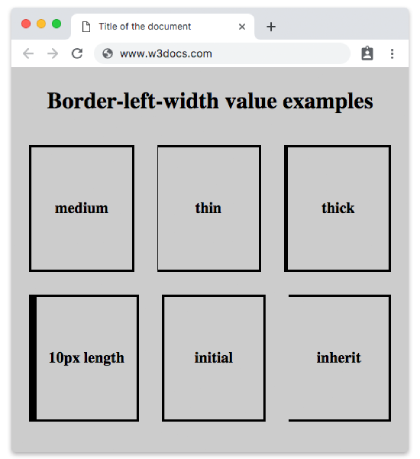
Valores
| Valor | Descripción | Probarlo |
|---|---|---|
| medium | Define un borde izquierdo de grosor medio. Es el valor predeterminado de esta propiedad. | Probarlo » |
| thin | Define un borde izquierdo fino. Depende del agente de usuario determinar el ancho exacto. | Probarlo » |
| thick | Define un borde izquierdo grueso. Depende del agente de usuario determinar el ancho exacto. | Probarlo » |
| length | Define el grosor del borde izquierdo. Por ejemplo, 10px, 5em, 8pt, etc. | Probarlo » |
| initial | Establece la propiedad en su valor predeterminado. | Probarlo » |
| inherit | Hereda la propiedad de su elemento padre. |
Práctica
¿Cuáles de los siguientes valores se pueden usar con la propiedad border-left-width en CSS?