Propiedad CSS counter-increment
La propiedad counter-increment define cuánto deben aumentar o disminuir los valores de los contadores. Esta propiedad se utiliza junto con las propiedades content y counter-reset.
La propiedad counter-increment se especifica mediante dos valores: none y números de identificador (id). "None" es el valor predeterminado de esta propiedad. Permite usar valores negativos en el caso del valor "id number". El incremento predeterminado es 1. Si el identificador del contador no se inicializa con counter-reset, el valor predeterminado es 0. El valor del contador se puede establecer en un número arbitrario con la propiedad counter-reset.
| Valor inicial | none |
|---|---|
| Se aplica a | Todos los elementos. |
| Heredable | No. |
| Animable | Discreto. |
| Versión | CSS2 |
| Sintaxis DOM | object.style.counterIncrement = "subsection"; |
Sintaxis
Sintaxis de la propiedad CSS counter-increment
counter-increment: none | id number | initial | inherit;Ejemplo de la propiedad counter-increment:
Ejemplo de la propiedad CSS counter-increment
<!DOCTYPE html>
<html>
  <head>
    <title>Title of the document</title>
    <style>
      body {
        /* "my-counter" to 0 */
        counter-reset: my-counter;
      }
      h2::before {
        /* "my-counter" by 1 */
        counter-increment: my-counter;
        content: "Section " counter(my-counter) ". ";
      }
    </style>
  </head>
  <body>
    <h2>HTML Tutorial</h2>
    <h2>CSS Tutorial</h2>
    <h2>JavaScript Tutorial</h2>
    <h2>PHP Tutorial</h2>
  </body>
</html>Resultado
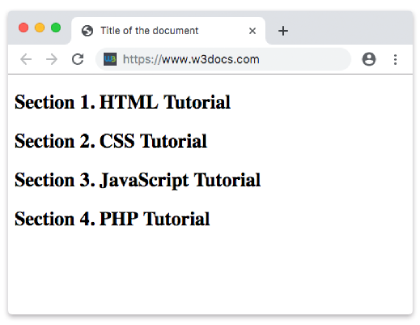
Ejemplo de la propiedad counter-increment con secciones y subsecciones numeradas:
Propiedad CSS counter-increment con valor de subsección
<!DOCTYPE html>
<html>
  <head>
    <title>Title of the document</title>
    <style>
      body {
        /* Set "section" to 0 */
        counter-reset: section;
      }
      h2 {
        /* Set "subsection" to 0 */
        counter-reset: subsection;
      }
      h2::before {
        counter-increment: section;
        content: "Book " counter(section) ": ";
      }
      h3::before {
        counter-increment: subsection;
        content: counter(section) "." counter(subsection) " ";
      }
    </style>
  </head>
  <body>
    <h2>HTML</h2>
    <h3>HTML Basics</h3>
    <h3>HTML Templates</h3>
    <h3>HTML References</h3>
    <h3>HTML Tags</h3>
    <h2>CSS</h2>
    <h3>CSS Basics</h3>
    <h3>CSS References</h3>
    <h3>CSS Advanced</h3>
    <h3>CSS Guides</h3>
    <h3>CSS Selectors</h3>
    <h3>CSS Properties</h3>
  </body>
</html>Ejemplo de la propiedad counter-increment con números romanos:
Ejemplo de la propiedad counter-increment con números romanos:
<!DOCTYPE html>
<html>
  <head>
    <title>Title of the document</title>
    <style>
      body {
        /* "my-counter" to 0 */
        counter-reset: my-counter;
      }
      h2::before {
        /* "my-counter" by 1 */
        counter-increment: my-counter;
        content: counter(my-counter, upper-roman) ". ";
      }
    </style>
  </head>
  <body>
    <h2>HTML Tutorial</h2>
    <h2>CSS Tutorial</h2>
    <h2>JavaScript Tutorial</h2>
    <h2>PHP Tutorial</h2>
  </body>
</html>Valores
| Valor | Descripción |
|---|---|
| none | Los contadores no se incrementan. Este es el valor predeterminado. |
| id number | Id define qué contador incrementar. Number define cuánto se incrementará el contador. |
| initial | Establece la propiedad en su valor predeterminado. |
| inherit | Hereda la propiedad de su elemento padre. |
Práctica
¿Cuál es la función de la propiedad 'counter-increment' en CSS?