Propiedad CSS padding-left
La propiedad CSS padding-left establece el espacio de relleno en el lado izquierdo de un elemento.
INFO
Los valores negativos no son válidos.
INFO
Esta propiedad no tiene ningún efecto en los elementos en línea, como <span>.
| Valor inicial | 0 |
|---|---|
| Se aplica a | Todos los elementos, con la excepción de cuando la propiedad display está configurada como table-row-group, table-header-group, table-footer-group, table-row, table-column-group y table-column. También se aplica a ::first-letter. |
| Heredado | No. |
| Animable | Sí. El espacio de relleno es animable. |
| Versión | CSS1 |
| Sintaxis DOM | object.style.paddingLeft = "40px"; |
Sintaxis
Sintaxis de la propiedad CSS padding-left
css
padding-left: length | initial | inherit;Ejemplo de la propiedad padding-left:
Ejemplo de la propiedad CSS padding-left con valor en píxeles (px)
html
<!DOCTYPE html>
<html>
  <head>
    <title>Title of the document</title>
    <style>
      p {
        border: 2px solid #000;
        color: #1c87c9;
        padding-left: 100px;
      }
    </style>
  </head>
  <body>
    <h2>Padding-left property example</h2>
    <p>Lorem Ipsum is simply dummy text of the printing and typesetting industry.</p>
  </body>
</html>Resultado
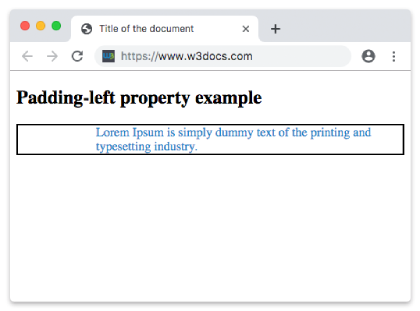
Ejemplo de la propiedad padding-left definida como "3cm":
Ejemplo de la propiedad CSS padding-left con valor en centímetros (cm)
html
<!DOCTYPE html>
<html>
  <head>
    <title>Title of the document</title>
    <style>
      p {
        border: 2px solid #000;
        color: #1c87c9;
        padding-left: 3cm;
      }
    </style>
  </head>
  <body>
    <h2>Padding-left property example</h2>
    <p>Lorem Ipsum is simply dummy text of the printing and typesetting industry.</p>
  </body>
</html>Ejemplo de la propiedad padding-left con el valor "porcentaje":
Ejemplo de la propiedad CSS padding-left con el valor %
html
<!DOCTYPE html>
<html>
  <head>
    <title>Title of the document</title>
    <style>
      p {
        border: 3px solid #cccccc;
        color: deepskyblue;
        padding: 20px;
        padding-left: 15%;
      }
    </style>
  </head>
  <body>
    <h2>Padding-left property example</h2>
    <p>Lorem Ipsum is simply dummy text of the printing and typesetting industry.</p>
  </body>
</html>Valores
| Valor | Descripción | Probar » |
|---|---|---|
| length | Establece el relleno izquierdo en px, pt, cm, etc. Su valor predeterminado es 0px. | Probar » |
| % | Establece el relleno izquierdo en porcentaje del ancho del elemento contenedor. | Probar » |
| initial | Hace que la propiedad use su valor predeterminado. | Probar » |
| inherit | Hereda la propiedad de su elemento padre. |
Práctica
¿Cuál es el uso correcto de padding-left en CSS según el contenido de la página?