Propiedad CSS justify-content
La propiedad justify-content alinea los elementos cuando estos no utilizan todo el espacio disponible a lo largo del eje principal. Controla la alineación de los elementos que desbordan la línea. Esta propiedad es una subpropiedad del módulo Flexible Box Layout.
La propiedad justify-content es una de las propiedades CSS3.
INFO
La propiedad justify-content debe usarse con la propiedad display establecida en "flex". Para alinear los elementos verticalmente, usa la propiedad align-items.
| Valor inicial | flex-start |
|---|---|
| Se aplica a | Contenedores flex. |
| Heredable | No. |
| Animable | No. |
| Versión | CSS3 |
| Sintaxis DOM | object.style.justifyContent = "center"; |
Sintaxis
Sintaxis de CSS justify-content
justify-content: flex-start | flex-end | center | space-between | space-around | space-evenly | initial | inherit;Ejemplo de la propiedad justify-content:
Ejemplo de código CSS justify-content
<!DOCTYPE html>
<html>
  <head>
    <title>Title of the document </title>
    <style>
      .center {
        width: 400px;
        height: 150px;
        border: 1px solid #666;
        display: flex;
        justify-content: center;
      }
      .center div {
        width: 70px;
        height: 70px;
        background-color: #ccc;
        border: 1px solid #666;
      }
    </style>
  </head>
  <body>
    <h2>Justify-content property example</h2>
    <p>Here the "justify-content: center" is set:</p>
    <div class="center">
      <div>1</div>
      <div>2</div>
      <div>3</div>
    </div>
  </body>
</html>Resultado
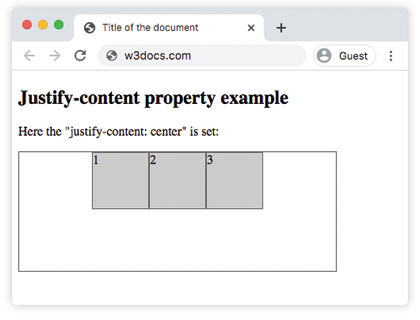
Ejemplo de la propiedad justify-content con el valor "flex-start":
Ejemplo de CSS justify-content flex-start
<!DOCTYPE html>
<html>
  <head>
    <title>Title of the document </title>
    <style>
      .start {
        width: 400px;
        height: 150px;
        border: 1px solid #666;
        display: flex;
        justify-content: flex-start;
      }
      .start div {
        width: 70px;
        height: 70px;
        background-color: #ccc;
        border: 1px solid #666;
      }
    </style>
  </head>
  <body>
    <h2>Justify-content property example</h2>
    <p>Here the "justify-content: flex-start" is set:</p>
    <div class="start">
      <div>1</div>
      <div>2</div>
      <div>3</div>
    </div>
  </body>
</html>Ejemplo de la propiedad justify-content con el valor "flex-end":
Ejemplo de CSS justify-content flex-end
<!DOCTYPE html>
<html>
  <head>
    <title>Title of the document </title>
    <style>
      .end {
        width: 400px;
        height: 150px;
        border: 1px solid #666;
        display: flex;
        justify-content: flex-end;
      }
      .end div {
        width: 70px;
        height: 70px;
        background-color: #ccc;
        border: 1px solid #666;
      }
    </style>
  </head>
  <body>
    <h2>Justify-content property example</h2>
    <p>Here the "justify-content: flex-end" is set:</p>
    <div class="end">
      <div>1</div>
      <div>2</div>
      <div>3</div>
    </div>
  </body>
</html>Ejemplo de la propiedad justify-content con el valor "space-between":
Ejemplo de CSS justify-content space-between
<!DOCTYPE html>
<html>
  <head>
    <title>Title of the document </title>
    <style>
      .space-between {
        width: 400px;
        height: 150px;
        border: 1px solid #666;
        display: flex;
        justify-content: space-between;
      }

      .space-between div {
        width: 70px;
        height: 70px;
        background-color: #ccc;
        border: 1px solid #666;
      }
    </style>
  </head>
  <body>
    <h2>Justify-content property example</h2>
    <p>Here the "justify-content: space-between" is set:</p>
    <div class="space-between">
      <div>1</div>
      <div>2</div>
      <div>3</div>
    </div>
  </body>
</html>Ejemplo de la propiedad justify-content con el valor "space-around":
Ejemplo de CSS justify-content space-around
<!DOCTYPE html>
<html>
  <head>
    <title>Title of the document </title>
    <style>
      .space-around {
        width: 400px;
        height: 150px;
        border: 1px solid #666;
        display: flex;
        justify-content: space-around;
      }
      .space-around div {
        width: 70px;
        height: 70px;
        background-color: #ccc;
        border: 1px solid #666;
      }
    </style>
  </head>
  <body>
    <h2>Justify-content property example</h2>
    <p>Here the "justify-content: space-around" is used:</p>
    <div class="space-around">
      <div>1</div>
      <div>2</div>
      <div>3</div>
    </div>
  </body>
</html>Valores
| Valor | Descripción | Pruébalo |
|---|---|---|
| flex-start | Los elementos comienzan desde el inicio del contenedor. | Pruébalo » |
| flex-end | Los elementos se colocan al final del contenedor. | Pruébalo » |
| center | Los elementos se colocan en el centro del contenedor. | Pruébalo » |
| space-around | Hay espacio antes, entre y después de los elementos. | Pruébalo » |
| space-between | Hay espacio entre los elementos. | Pruébalo » |
| space-evenly | Hay espacio igual antes, entre y después de los elementos. | Pruébalo » |
| initial | Hace que la propiedad use su valor predeterminado. | Pruébalo » |
| inherit | Hereda la propiedad de su elemento padre. |
Práctica
¿Qué hace la propiedad 'justify-content' en CSS?