Propiedad table-layout de CSS
La propiedad table-layout especifica los algoritmos que se utilizan para distribuir las celdas, filas y columnas de una tabla.
La propiedad table-layout especifica dos algoritmos para distribuir tablas: fixed y auto.
Cuando se especifica el diseño de tabla "auto", el ancho de la tabla se establece en función del ancho de sus columnas.
Cuando se especifica el diseño de tabla "fixed", la disposición de la tabla utiliza el ancho de la tabla, cualquier ancho especificado para las columnas, y los valores de border y cellspacing. La ventaja de establecer la propiedad table-layout en "fixed" es su rendimiento. En tablas grandes, la tabla no se mostrará hasta que toda la tabla se haya renderizado. Esto crea la impresión de que la página carga más rápido.
| Valor inicial | auto |
|---|---|
| Se aplica a | Elementos de tabla e inline-table. |
| Heredable | No. |
| Animable | No. |
| Versión | CSS2 |
| Sintaxis DOM | object.style.tableLayout = "fixed"; |
Sintaxis
Sintaxis de CSS table-layout
table-layout: auto | fixed | initial | inherit;Ejemplo de la propiedad table-layout con el valor "fixed":
Ejemplo de código CSS table-layout
<!DOCTYPE html>
<html>
  <head>
    <title>Title of the document</title>
    <style>
      th,
      td {
        border: 2px solid #666;
      }
      table.t1 {
        table-layout: fixed;
        width: 40%;
      }
    </style>
  </head>
  <body>
    <h2>Table-layout property example</h2>
    <h3>Table-layout: fixed; width: 20%</h3>
    <table class="t1">
      <tr>
        <th>Country</th>
        <th>Capital</th>
        <th>City</th>
      </tr>
      <tr>
        <td>Russia</td>
        <td>Moscow</td>
        <td>Saint Petersburg</td>
      </tr>
      <tr>
        <td>England</td>
        <td>London</td>
        <td>Manchester</td>
      </tr>
      <tr>
        <td>The Netherlands</td>
        <td>Amsterdam</td>
        <td>Haage</td>
      </tr>
    </table>
  </body>
</html>Resultado
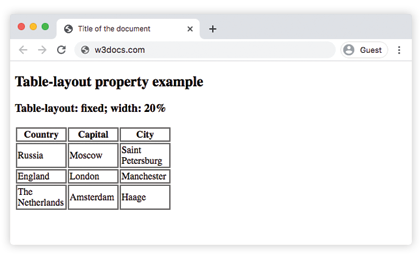
Ejemplo de la propiedad table-layout con los valores "auto" y "fixed":
Ejemplo de valores CSS table-layout
<!DOCTYPE html>
<html>
  <head>
    <title>Title of the document</title>
    <style>
      th,
      td {
        border: 2px solid #666;
      }
      table.t1 {
        table-layout: fixed;
        width: 250px;
      }
      table.t2 {
        table-layout: auto;
        width: 100%;
      }
    </style>
  </head>
  <body>
    <h2>Table-layout property example</h2>
    <h3>Table-layout: fixed; width: 160px</h3>
    <table class="t1">
      <tr>
        <th>Country</th>
        <th>Capital</th>
        <th>City</th>
      </tr>
      <tr>
        <td>Russia</td>
        <td>Moscow</td>
        <td>Saint Petersburg</td>
      </tr>
      <tr>
        <td>England</td>
        <td>London</td>
        <td>Manchester</td>
      </tr>
      <tr>
        <td>The Netherlands</td>
        <td>Amsterdam</td>
        <td>Haage</td>
      </tr>
    </table>
    <h3>Table-layout: auto; width: 100%</h3>
    <table class="t2">
      <tr>
        <th>Country</th>
        <th>Capital</th>
        <th>City</th>
      </tr>
      <tr>
        <td>Russia</td>
        <td>Moscow</td>
        <td>Saint Petersburg</td>
      </tr>
      <tr>
        <td>England</td>
        <td>London</td>
        <td>Manchester</td>
      </tr>
      <tr>
        <td>The Netherlands</td>
        <td>Amsterdam</td>
        <td>Hague</td>
      </tr>
    </table>
  </body>
</html>Valores
| Valor | Descripción | Probarlo |
|---|---|---|
| auto | Utiliza un algoritmo de diseño automático cuando la tabla y sus celdas se ajustan al contenido. Este es el valor predeterminado de esta propiedad. | Probarlo » |
| fixed | Utiliza el algoritmo de diseño de tabla fijo. Los anchos de la tabla, col y la primera fila de celdas determinan los anchos de la tabla y las columnas. | Probarlo » |
| initial | Establece la propiedad en su valor predeterminado. | Probarlo » |
| inherit | Hereda la propiedad de su elemento padre. |
Práctica
¿Qué hace la propiedad CSS table-layout?