Propiedad text-indent de CSS
La propiedad text-indent especifica la longitud del espacio vacío de la primera línea en un bloque de texto. La dirección del texto está especificada por la propiedad direction. Si se especifica un valor negativo, la primera línea se sangrará hacia la izquierda. text-indent solo se aplica a la primera línea de texto en un elemento.
WARNING
Los valores "each-line" y "hanging" son experimentales.
| Valor inicial | 0 |
|---|---|
| Se aplica a | Contenedores de bloque. |
| Heredable | Sí. |
| Animable | Sí. text-indent es animable. |
| Versión | CSS1 |
| Sintaxis DOM | object.style.textIndent = "100px"; |
Sintaxis
Sintaxis de la propiedad text-indent de CSS
css
text-indent: length | percentage | each-line | hanging | initial | inherit;Ejemplo de la propiedad text-indent:
Ejemplo de la propiedad text-indent de CSS con valor en px
html
<!DOCTYPE html>
<html>
  <head>
    <title>Title of the document</title>
    <style>
      p {
        text-indent: 100px;
      }
    </style>
  </head>
  <body>
    <h2>Text-indent property example</h2>
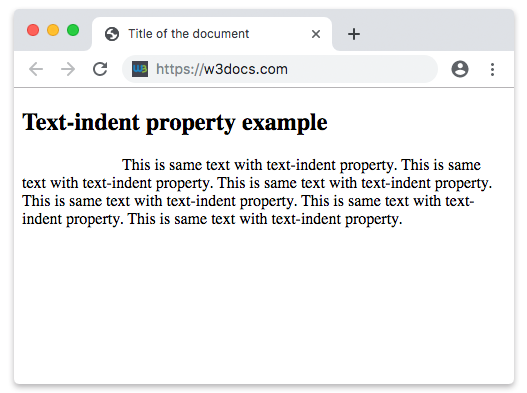
    <p>
      This is same text with text-indent property. This is same text with text-indent property. This is same text with text-indent property. This is same text with text-indent property. This is same text with text-indent property. This is same text with text-indent property.
    </p>
  </body>
</html>Resultado
Ejemplo de la propiedad text-indent especificada en "pt", "em", "%" y "cm":
Ejemplo de la propiedad text-indent de CSS con valores en pt, cm, % y em
html
<!DOCTYPE html>
<html>
  <head>
    <title>Title of the document</title>
    <style>
      div.a {
        text-indent: 20pt;
      }
      div.b {
        text-indent: -5em;
      }
      div.c {
        text-indent: 70%;
      }
      div.d {
        text-indent: 4em;
      }
      div.e {
        text-indent: 5cm;
      }
    </style>
  </head>
  <body>
    <h2>Text-indent property example</h2>
    <h3>text-indent: 20pt</h3>
    <div class="a">
      Lorem Ipsum is simply dummy text of the printing and typesetting industry. Lorem Ipsum has been the industry's standard dummy text ever since the 1500s, when an unknown printer took a galley of type and scrambled it to make a type specimen book.
    </div>
    <h3>text-indent: -5em</h3>
    <div class="b">
      Lorem Ipsum is dummy text of the printing and typesetting industry. Lorem Ipsum has been the industry's standard dummy text ever since the 1500s when an unknown printer took a galley of type and scrambled it to make a type specimen book.
    </div>
    <h3>text-indent: 70%</h3>
    <div class="c">
      Lorem Ipsum is dummied text of the printing and typesetting industry. Lorem Ipsum has been the industry's standard dummy text ever since the 1500s when an unknown printer took a galley of type and scrambled it to make a type specimen book.
    </div>
    <h3>text-indent: 4em</h3>
    <div class="d">
      Lorem Ipsum is dummied text of the printing and typesetting industry. Lorem Ipsum has been the industry's standard dummy text ever since the 1500s when an unknown printer took a galley of type and scrambled it to make a type specimen book.
    </div>
    <h3>text-indent: 5cm</h3>
    <div class="e">
      Lorem Ipsum is dummied text of the printing and typesetting industry. Lorem Ipsum has been the industry's standard dummy text ever since the 1500s when an unknown printer took a galley of type and scrambled it to make a type specimen book.
    </div>
  </body>
</html>Valores
| Valor | Descripción | Probar |
|---|---|---|
| length | Especifica la sangría en px, pt, cm, em, etc. El valor predeterminado es 0. Se permiten valores negativos. | Probar » |
| percentage | Especifica la sangría en porcentaje del ancho del bloque contenedor. | Probar » |
| each-line | La sangría afecta a la primera línea, así como a cada línea después de un salto de línea forzado, pero no afecta a las líneas después de un salto de línea suave. Este valor es una tecnología experimental. | |
| hanging | Invierte qué líneas se sangran. La primera línea no se sangra. Este valor es una tecnología experimental. | |
| initial | Hace que la propiedad use su valor predeterminado. | Probar » |
| inherit | Hereda la propiedad de su elemento padre. |
Practice
¿Qué hace la propiedad text-indent en CSS?