Propiedad CSS outline-style
La propiedad outline-style define el estilo de un contorno.
Es similar a la propiedad border, pero hay una diferencia. El contorno está fuera del borde de un elemento y no ocupa espacio. Por defecto, se dibuja alrededor de los cuatro lados de un elemento.
La propiedad outline-style tiene los siguientes valores:
- none
- hidden
- dotted
- dashed
- solid
- double
- groove
- ridge
- inset
- outset
Las propiedades width y height de un elemento no incluyen el ancho del contorno porque el contorno no se considera parte de las dimensiones del elemento.
| Initial Value | none |
|---|---|
| Applies to | All elements. |
| Inherited | No. |
| Animatable | No. |
| Version | CSS2 |
| DOM Syntax | object.style.outlineStyle = "dotted" |
Sintaxis
Sintaxis de CSS outline-style
outline-style: none | hidden | dotted | dashed | solid | double | groove | ridge | inset | outset | initial | inherit;Ejemplo de la propiedad outline-style:
Ejemplo de la propiedad outline-style:
<!DOCTYPE html>
<html>
  <head>
    <title>Title of the document</title>
    <style>
      .p1 {
        outline-style: solid;
      }
      .p2 {
        outline-style: dashed;
      }
      .p3 {
        outline-style: dotted;
      }
      .p4 {
        outline-style: double;
      }
      .p5 {
        outline-style: none;/*hidden*/
      }
      .p6 {
        outline-style: groove;
        outline-color: #ccc;
      }
      .p7 {
        outline-style: ridge;
        outline-color: #ccc;
      }
      .p8 {
        outline-style: inset;
        outline-color: #ccc;
      }
      .p9 {
        outline-style: outset;
        outline-color: #ccc;
      }
    </style>
  </head>
  <body>
    <h2>Outline property example</h2>
    <p class="p1">This is a paragraph with outline set to solid.</p>
    <p class="p2">This is a paragraph with outline set to dashed.</p>
    <p class="p3">This is a paragraph with outline set to dotted.</p>
    <p class="p4">This is a paragraph with outline set to double.</p>
    <p class="p5">This is a paragraph with outline set to none.</p>
    <p class="p6">This is a paragraph with outline set to groove.</p>
    <p class="p7">This is a paragraph with outline set to ridge.</p>
    <p class="p8">This is a paragraph with outline set to inset.</p>
    <p class="p9">This is a paragraph with outline set to outset.</p>
  </body>
</html>Resultado
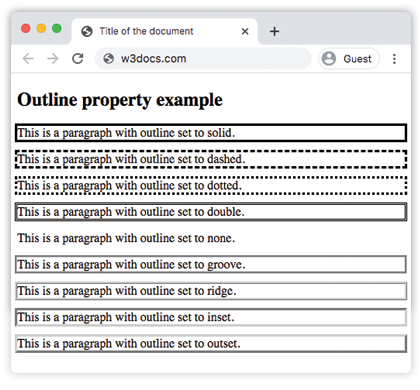
Ejemplo de la propiedad outline-style con todos los valores:
Otro ejemplo de código CSS outline-style
<!DOCTYPE html>
<html>
  <head>
    <title>Title of the document</title>
    <style>
      p.dotted {
        outline: 4px dotted gray;
      }
      p.dashed {
        outline: 0.2em dashed rgb(142, 191, 66);
      }
      p.solid {
        outline: 4px solid #ccc;
      }
      p.double {
        outline: 4px double #000;
      }
      p.groove {
        outline: 4px groove #666;
      }
      p.ridge {
        outline: thick ridge #1c87c9;
      }
      p.inset {
        outline: medium inset #1c87c9;
      }
      p.outset {
        outline: 4px outset #1c87c9;
      }
    </style>
  </head>
  <body>
    <h2>Outline property example</h2>
    <p class="dotted">Lorem Ipsum is simply dummy text of the printing...</p>
    <p class="dashed">Lorem Ipsum is simply dummy text of the printing...</p>
    <p class="solid">Lorem Ipsum is simply dummy text of the printing...</p>
    <p class="double">Lorem Ipsum is simply dummy text of the printing...</p>
    <p class="groove">Lorem Ipsum is simply dummy text of the printing...</p>
    <p class="ridge">Lorem Ipsum is simply dummy text of the printing...</p>
    <p class="inset">Lorem Ipsum is simply dummy text of the printing...</p>
    <p class="outset">Lorem Ipsum is simply dummy text of the printing...</p>
  </body>
</html>Ejemplo de la propiedad outline-style con el valor "groove":
Ejemplo de la propiedad outline-style con el valor groove
<!DOCTYPE html>
<html>
  <head>
    <title>Title of the document</title>
    <style>
      p {
        color: #7f7fa7;
        text-align: center;
        outline-width: 8px;
        outline-style: groove;
        padding: 10px;
      }
    </style>
  </head>
  <body>
    <h1>Outline property example</h1>
    <p>This is a paragraph with outline set to groove.</p>
  </body>
</html>Ejemplo de la propiedad outline-style con el valor "ridge":
Ejemplo de la propiedad outline-style con el valor ridge
<!DOCTYPE html>
<html>
  <head>
    <title>Title of the document</title>
    <style>
      p {
        color: #69afad;
        text-align: center;
        outline-width: 8px;
        outline-style: ridge;
        padding: 10px;
      }
    </style>
  </head>
  <body>
    <h1>Outline property example</h1>
    <p>This is a paragraph with outline set to ridge.</p>
  </body>
</html>Ejemplo de la propiedad outline-style con el valor "inset":
Ejemplo de la propiedad outline-style con el valor inset
<!DOCTYPE html>
<html>
  <head>
    <title>Title of the document</title>
    <style>
      p {
        color: #69afad;
        text-align: center;
        outline-width: 8px;
        outline-style: inset;
        padding: 10px;
      }
    </style>
  </head>
  <body>
    <h1>Outline property example</h1>
    <p>This is a paragraph with outline set to ridge.</p>
  </body>
</html>Ejemplo de la propiedad outline-style con el valor "outset":
Ejemplo de la propiedad outline-style con el valor outset:
<!DOCTYPE html>
<html>
  <head>
    <title>Title of the document</title>
    <style>
      p {
        color: #69afad;
        text-align: center;
        outline-width: 8px;
        outline-style: outset;
        padding: 10px;
      }
    </style>
  </head>
  <body>
    <h1>Outline property example</h1>
    <p>This is a paragraph with outline set to ridge.</p>
  </body>
</html>Ejemplo de la propiedad outline-style con el valor "dotted":
Ejemplo de la propiedad outline-style con el valor dotted:
<!DOCTYPE html>
<html>
  <head>
    <title>Title of the document</title>
    <style>
      p {
        color: #69afad;
        text-align: center;
        outline-width: 4px;
        outline-style: dotted;
        padding: 10px;
      }
    </style>
  </head>
  <body>
    <h1>Outline property example</h1>
    <p>This is a paragraph with outline set to ridge.</p>
  </body>
</html>Ejemplo de la propiedad outline-style con el valor "dashed":
Ejemplo de la propiedad outline-style con el valor dashed:
<!DOCTYPE html>
<html>
  <head>
    <title>Title of the document</title>
    <style>
      p {
        color: #69afad;
        text-align: center;
        outline-width: 4px;
        outline-style: dashed;
        padding: 10px;
      }
    </style>
  </head>
  <body>
    <h1>Outline property example</h1>
    <p>This is a paragraph with outline set to ridge.</p>
  </body>
</html>Valores
| Value | Description | Play it |
|---|---|---|
| none | No mostrará ningún contorno. Este es el valor predeterminado de esta propiedad. | Play it » |
| hidden | Define un contorno oculto. | Play it » |
| dotted | El outline se especifica como una serie de puntos. | Play it » |
| dashed | El contorno se especifica como una serie de guiones. | Play it » |
| solid | El contorno se especifica como líneas sólidas. | Play it » |
| double | El contorno se especifica como líneas sólidas dobles. | Play it » |
| groove | Especifica un contorno 3D con ranura. | Play it » |
| ridge | Especifica un contorno 3D con relieve. | Play it » |
| inset | Especifica un contorno incrustado. | Play it » |
| outset | Especifica un contorno en relieve. | Play it » |
| initial | Establece la propiedad en su valor predeterminado. | Play it » |
| inherit | Hereda la propiedad del elemento padre. |
Practice
Which of the following are valid values for the 'outline-style' property in CSS?