Propiedad column-gap de CSS
La propiedad column-gap establece la longitud del espacio entre columnas.
La propiedad column-gap es una de las propiedades de CSS3.
Acepta la palabra clave normal o un valor <length>. normal es el valor predeterminado. El espacio puede especificarse en em, px o porcentajes. La propiedad también admite las palabras clave estándar initial e inherit.
INFO
Los prefijos de proveedor ya no son necesarios para los navegadores modernos. El soporte nativo está disponible en todos los navegadores principales.
Cuando se utiliza una column-rule entre columnas, se ubicará en el centro del espacio.
| Valor inicial | normal |
|---|---|
| Se aplica a | Elementos de varias columnas, flex contenedores, grid contenedores. |
| Heredable | No. |
| Animable | Sí. La longitud del espacio entre columnas es animable. |
| Versión | CSS3 |
| Sintaxis DOM | object.style.columnGap = "100px"; |
Sintaxis
Sintaxis de la propiedad column-gap de CSS
column-gap: length | normal | initial | inherit;Ejemplo de la propiedad column-gap:
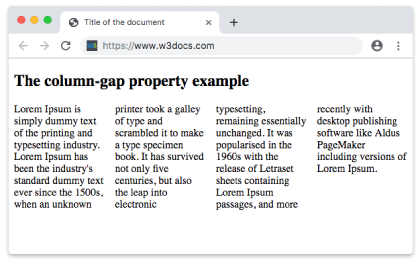
Ejemplo de la propiedad CSS column-gap con valor normal
<!DOCTYPE html>
<html>
  <head>
    <title>Title of the document</title>
    <style>
      div {
        column-count: 4;
        column-gap: normal;
      }
    </style>
  </head>
  <body>
    <h2>The column-gap property example</h2>
    <div>
      Lorem Ipsum is dummy text of the printing and typesetting industry. Lorem Ipsum has been the industry's standard dummy text ever since the 1500s when an unknown printer took a galley of type and scrambled it to make a type specimen book. It has survived not only five centuries, but also the leap into electronic typesetting, remaining essentially unchanged. It was popularised in the 1960s with the release of Letraset sheets containing Lorem Ipsum passages, and more recently with desktop publishing software like Aldus PageMaker including versions of Lorem Ipsum.
    </div>
  </body>
</html>Resultado
Ejemplo de la propiedad column-gap con el valor "length":
Ejemplo de la propiedad CSS column-gap con valor length
<!DOCTYPE html>
<html>
  <head>
    <title>Title of the document</title>
    <style>
      div {
        column-count: 4;
        column-gap: 30px;
      }
    </style>
  </head>
  <body>
    <h2>Column-gap property example</h2>
    <div>
      Lorem Ipsum is dummy text of the printing and typesetting industry. Lorem Ipsum has been the industry's standard dummy text ever since the 1500s when an unknown printer took a galley of type and scrambled it to make a type specimen book. It has survived not only five centuries, but also the leap into electronic typesetting, remaining essentially unchanged. It was popularised in the 1960s with the release of Letraset sheets containing Lorem Ipsum passages, and more recently with desktop publishing software like Aldus PageMaker including versions of Lorem Ipsum.
    </div>
  </body>
</html>Valores
| Valor | Descripción |
|---|---|
| normal | El tamaño de espacio predeterminado entre columnas. |
| length | Especifica la longitud que establece el espacio entre columnas. Puede especificarse en em, px o porcentajes. |
| initial | Establece la propiedad en su valor predeterminado. |
| inherit | Hereda la propiedad de su elemento principal. |
Práctica
¿Cuál es el propósito de la propiedad column-gap en CSS?