Propiedad CSS border-top-color
La propiedad border-top-color define el color del borde superior de un elemento.
Puedes especificar el color del borde superior, así como los colores de los bordes inferior, derecho e izquierdo, con la propiedad abreviada border-color.
Si utilizas la propiedad border-top-color, primero debes establecer las propiedades border-style o border-top-style y luego cambiar el color del estilo definido.
El ancho predeterminado de un borde es medium. Puedes especificar el ancho utilizando las propiedades border-width o border-top-width.
| Valor inicial | currentColor |
|---|---|
| Se aplica a | Todos los elementos. También se aplica a ::first-letter. |
| Heredado | No |
| Animable | Sí. El color del borde superior es animable. |
| Versión | CSS1 |
| Sintaxis DOM | object.style.borderTopColor = "black"; |
Sintaxis
Sintaxis de la propiedad CSS border-top-color
border-top-color: color | transparent | initial | inherit;Ejemplo de la propiedad border-top-color:
Ejemplo de la propiedad CSS border-top-color
<!DOCTYPE html>
<html>
  <head>
    <title>Title of the document</title>
    <style>
      div {
        width: 300px;
        padding: 20px;
        border-style: solid;
        border-color: #666;
        border-top-color: #1c87c9;
      }
    </style>
  </head>
  <body>
    <h2>Border-top-color example</h2>
    <div>Example for the border-top-color property with different top border color.</div>
  </body>
</html>Resultado
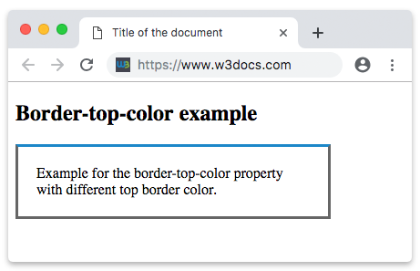
Ejemplo de la propiedad border-top-color con el valor "transparent":
Ejemplo de la propiedad CSS border-top-color con valor transparente
<!DOCTYPE html>
<html>
  <head>
    <title>Title of the document</title>
    <style>
      h2 {
        padding-bottom: 8px;
        text-align: center;
        border: 12px groove #1c87c9;
        border-top-color: transparent;
      }
    </style>
  </head>
  <body>
    <h2>A heading with a transparent top border</h2>
  </body>
</html>INFO
Se pueden aplicar valores hexadecimales, RGB, RGBA, HSL, HSLA o nombres de colores como valor para la propiedad border-top-color.
Ejemplo de la propiedad border-top-color con un valor de color con nombre:
Ejemplo de la propiedad CSS border-top-color con valor darkred (color con nombre)
<!DOCTYPE html>
<html>
  <head>
    <title>Title of the document</title>
    <style>
      div {
        padding: 10px;
        width: 50%;
        border: solid #666;
        border-top-color: darkred;
      }
    </style>
  </head>
  <body>
    <div>Border-top-color property with a named color value.</div>
  </body>
</html>Ejemplo de la propiedad border-top-color con un valor hexadecimal:
Ejemplo de la propiedad CSS border-top-color con valor hexadecimal
<!DOCTYPE html>
<html>
  <head>
    <title>Title of the document</title>
    <style>
      div {
        padding: 10px;
        width: 50%;
        border: solid #666;
        border-top-color: #1c87c9;
      }
    </style>
  </head>
  <body>
    <div>Border-top-color property with a hexadecimal value.</div>
  </body>
</html>Ejemplo de la propiedad border-top-color con un valor RGB:
Ejemplo de la propiedad CSS border-top-color con valor RGB
<!DOCTYPE html>
<html>
  <head>
    <title>Title of the document</title>
    <style>
      div {
        padding: 10px;
        width: 50%;
        border: solid #666;
        border-top-color: rgb(142, 191, 66);
      }
    </style>
  </head>
  <body>
    <div>Border-top-color property with a RGB value.</div>
  </body>
</html>Ejemplo de la propiedad border-top-color con un valor HSL:
Ejemplo de la propiedad CSS border-top-color con valor HSL
<!DOCTYPE html>
<html>
  <head>
    <title>Title of the document</title>
    <style>
      div {
        padding: 10px;
        width: 50%;
        border: solid #666;
        border-top-color: hsl(24, 80%, 50%);
      }
    </style>
  </head>
  <body>
    <div>Border-top-color property with a HSL value.</div>
  </body>
</html>Valores
| Valor | Descripción | Probar |
|---|---|---|
| color | Define el color del borde superior. El color predeterminado es el del elemento actual. Se pueden usar nombres de colores, códigos hexadecimales, rgb(), rgba(), hsl(), hsla(). Valor obligatorio. | Probar » |
| transparent | Aplica un color transparente al borde superior. El borde superior seguirá ocupando el espacio definido por el valor border-width. | Probar » |
| initial | Establece la propiedad en su valor predeterminado. | Probar » |
| inherit | Hereda la propiedad de su elemento padre. |
Práctica
¿Para qué se utiliza la propiedad 'border-top-color' en CSS?