Propiedad margin-left de CSS
La propiedad margin-left establece el ancho del margen izquierdo.
Cuando la suma de width, margin-left, border, padding, el área de contenido y margin-right supera el ancho del contenedor, los márgenes se vuelven auto.
La propiedad margin-left se define como la palabra clave <auto>, <percentage> o un <length>. Su valor puede ser negativo, positivo o cero.
INFO
Se permiten valores negativos.
| Valor inicial | 0 |
|---|---|
| Se aplica a | Todos los elementos. También se aplica a ::first-letter. |
| Heredable | No. |
| Animable | Sí. El margen izquierdo del elemento es animable. |
| Versión | CSS2 |
| Sintaxis DOM | object.style.marginLeft = "20px"; |
Sintaxis
Sintaxis de la propiedad margin-left de CSS
css
margin-left: auto | <length> | <percentage> | initial | inherit;Ejemplo de la propiedad margin-left definida como "px":
Ejemplo de la propiedad CSS margin-left con valor px
html
<!DOCTYPE html>
<html>
  <head>
    <title>Title of the document</title>
    <style>
      .left {
        margin-left: 25px;
      }
    </style>
  </head>
  <body>
    <h2>Margin-left property example</h2>
    <p>Lorem Ipsum is simply dummy text of the printing and typesetting industry.</p>
    <p class="left">Lorem Ipsum is simply dummy text of the printing and typesetting industry.</p>
  </body>
</html>Resultado
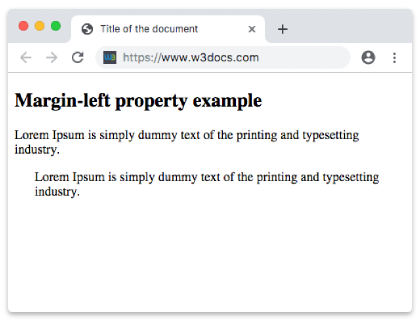
Ejemplo de la propiedad margin-left definida como "em":
Ejemplo de la propiedad CSS margin-left con valor em
html
<!DOCTYPE html>
<html>
  <head>
    <title>Title of the document</title>
    <style>
      .left {
        margin-left: 8em;
      }
    </style>
  </head>
  <body>
    <h2>Margin-left property example</h2>
    <p>Lorem Ipsum is simply dummy text of the printing and typesetting industry.</p>
    <p class="left">Lorem Ipsum is simply dummy text of the printing and typesetting industry.</p>
  </body>
</html>Ejemplo de la propiedad margin-left definida como "px", "em" y "%":
Ejemplo de la propiedad CSS margin-left con valores em, px y %
html
<!DOCTYPE html>
<html>
  <head>
    <title>Title of the document</title>
    <style>
      p.p1 {
        margin-left: 6em;
      }
      p.p2 {
        margin-left: 40px;
      }
      p.p3 {
        margin-left: 10%;
      }
    </style>
  </head>
  <body>
    <h2>Margin-left property example</h2>
    <p>No specified margin.</p>
    <p class="p1"> Left margin is set to 6em.</p>
    <p class="p2">Left margin is set to 40px.</p>
    <p class="p3">Left margin is set to 10%.</p>
    <p>No specified margin</p>
  </body>
</html>Valores
| Valor | Descripción | Probarlo |
|---|---|---|
| auto | Establece el margen izquierdo. Es el valor predeterminado de esta propiedad. | Probarlo » |
| length | Define un margen izquierdo en px, pt, cm, etc. El valor predeterminado es 0. | Probarlo » |
| % | Establece el margen izquierdo en % del elemento contenedor. | Probarlo » |
| initial | Hace que la propiedad use su valor predeterminado. | Probarlo » |
| inherit | Hereda la propiedad de su elemento padre. |
Práctica
¿Qué especifica la propiedad 'margin-left' en CSS?