Propiedad CSS text-orientation
La propiedad text-orientation especifica la orientación de los caracteres en una línea.
Tiene cinco valores: mixed, upright, sideways, sideways-right y use-glyph-orientation. Todos funcionan en modos tipográficos verticales. El valor sideways-left se eliminó de la especificación, y sideways-right se mantiene ahora solo como un alias de sideways. Para sistemas de escritura no verticales, los valores sideways-lr y sideways-rl se agregaron en su lugar a la propiedad writing-mode.
INFO
La propiedad text-orientation solo tiene efecto cuando writing-mode es "vertical".
| Valor inicial | mixed |
|---|---|
| Se aplica a | Todos los elementos, excepto grupos de filas de tabla, filas, grupos de columnas y columnas. |
| Heredable | Sí. |
| Animable | No. |
| Versión | CSS3 |
| Sintaxis DOM | object.style.textOrientation = "upright"; |
Sintaxis
Valores de CSS text-orientation
text-orientation: mixed | upright | sideways | sideways-right | use-glyph-orientation | initial | inherit;Ejemplo de la propiedad text-orientation con el valor "mixed":
Ejemplo de código CSS text-orientation
<!DOCTYPE html>
<html>
  <head>
    <title>Title of the document</title>
    <style>
      p {
        writing-mode: vertical-rl;
        text-orientation: mixed;
      }
    </style>
  </head>
  <body>
    <h2>Text-orientation property example</h2>
    <p>Lorem ipsum is simply dummy text.</p>
  </body>
</html>Resultado
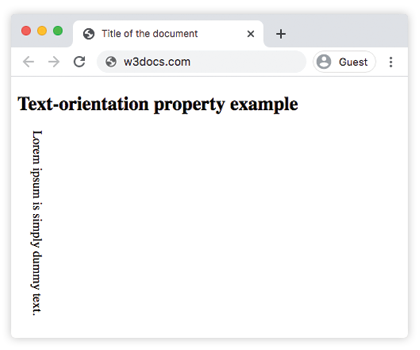
Ejemplo de la propiedad text-orientation con el valor "upright":
Ejemplo de CSS text-orientation con valor upright
<!DOCTYPE html>
<html>
  <head>
    <title>Title of the document</title>
    <style>
      p {
        writing-mode: vertical-lr;
        text-orientation: upright;
      }
    </style>
  </head>
  <body>
    <h2>Text-orientation property example</h2>
    <p>Lorem ipsum is simply dummy text.</p>
  </body>
</html>Ejemplo de la propiedad text-orientation:
Otro ejemplo de código CSS text-orientation
<!DOCTYPE html>
<html>
  <head>
    <title>Title of the document</title>
    <style>
      body {
        background-color: #ffffff;
        color: #000000;
        font-size: 1.1em;
      }
      .example {
        background: #cccccc;
        color: #fff;
        padding: 3em;
        margin: 40px auto 0;
        width: 400px;
        max-width: 400px;
        display: flex;
      }
      h1 {
        color: #8ebf42;
        margin: 0.15em 0.75em 0 0;
        font-family: 'Bungee Shade', cursive;
        -webkit-writing-mode: vertical-lr;
        -ms-writing-mode: tb-lr;
        writing-mode: vertical-lr;
        text-orientation: upright;
        -webkit-font-feature-settings: "vkrn", "vpal";
        font-feature-settings: "vkrn", "vpal";
      }
      p {
        margin: 0;
        line-height: 1.5;
        font-size: 1.15em;
      }
    </style>
  </head>
  <body>
    <h2>Text-orientation property example</h2>
    <div class="example">
      <h1>Lorem Ipsum</h1>
      <p>
        Lorem Ipsum is dummy text of the printing and typesetting industry. Lorem Ipsum has been the industry's standard dummy text ever since the 1500s when an unknown printer took a galley of type and scrambled it to make a type specimen book. It has survived not only five centuries, but also the leap into electronic typesetting, remaining essentially unchanged.
      </p>
    </div>
  </body>
</html>Valores
| Valor | Descripción |
|---|---|
| mixed | Los scripts horizontales se disponen en posición vertical, mientras que los scripts verticales se rotan 90° en sentido horario. Este es el valor predeterminado de esta propiedad. |
| upright | Todos los caracteres se disponen en posición vertical, independientemente de su script. No afecta a la propiedad direction. |
| sideways | Los caracteres se disponen como lo harían horizontalmente, pero con toda la línea rotada 90° en sentido horario. |
| sideways-right | Un alias de sideways que se mantiene por motivos de compatibilidad. |
| use-glyph-orientation | Obsoleto. Anteriormente se mapeaba a las propiedades SVG obsoletas glyph-orientation-vertical y glyph-orientation-horizontal. Ya no es compatible con los navegadores modernos. |
| initial | Hace que la propiedad utilice su valor predeterminado. |
| inherit | Hereda la propiedad de su elemento padre. |
Práctica
En CSS, ¿qué propiedades se utilizan para controlar la orientación vertical del texto?