Propiedad CSS overflow-y
La propiedad overflow-y especifica si el contenido debe ocultarse, mostrarse o desplazarse verticalmente cuando el contenido desborda los bordes superior e inferior del elemento. Esta propiedad es una de las propiedades CSS3.
La propiedad overflow-y tiene cuatro valores principales: visible, hidden, auto y scroll.
INFO
Si el valor de overflow-y se establece en visible, el valor de overflow-x, de forma predeterminada, se establecerá en visible. Si el valor de overflow-y se establece en scroll, auto o hidden, el valor de overflow-x se establecerá en auto.
| Initial Value | visible |
|---|---|
| Applies to | Contenedores de bloque, contenedores flex y contenedores grid. |
| Inherited | No. |
| Animatable | No. |
| Version | CSS3 |
| DOM Syntax | object.style.overflowY = "auto"; |
INFO
La propiedad overflow-x se puede usar para definir el recorte de los lados derecho e izquierdo.
Sintaxis
CSS overflow-y
overflow-y: visible | hidden | scroll | auto | initial | inherit;Ejemplo de la propiedad overflow-y:
Ejemplo de código CSS overflow-y
<!DOCTYPE html>
<html>
  <head>
    <title>Title of the document</title>
    <style>
      div.scroll {
        background-color: #1c87c9;
        color: #fff;
        height: 60px;
        width: 200px;
        overflow-y: scroll;
      }
    </style>
  </head>
  <body>
    <h2>Overflow-y property example</h2>
    <h3>Overflow-y: scroll</h3>
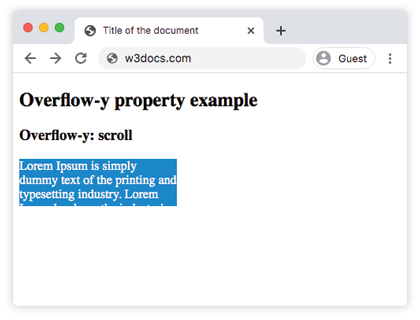
    <div class="scroll">Lorem Ipsum is simply dummy text of the printing and typesetting industry. Lorem Ipsum has been the industry's standard dummy text ever since the 1500s, when an unknown printer took a galley of type and scrambled it to make a type specimen book.</div>
  </body>
</html>Resultado
Ejemplo de la propiedad overflow-y con el valor "visible":
Ejemplo de CSS overflow-y visible
<!DOCTYPE html>
<html>
  <head>
    <title>Title of the document</title>
    <style>
      div.visible {
        background-color: #8ebf42;
        color: #666;
        height: 40px;
        width: 200px;
        overflow-y: visible;
      }
    </style>
  </head>
  <body>
    <h2>Overflow-y property example</h2>
    <h3>Overflow-y: visible</h3>
    <div class="visible">Lorem Ipsum is simply dummy text of the printing and typesetting industry. Lorem Ipsum has been the industry's standard dummy text ever since the 1500s, when an unknown printer took a galley of type and scrambled it to make a type specimen book.</div>
  </body>
</html>Ejemplo de la propiedad overflow-y con el valor "hidden":
Ejemplo de CSS overflow-y hidden
<!DOCTYPE html>
<html>
  <head>
    <title>Title of the document</title>
    <style>
      div.hidden {
        background-color: #1c87c9;
        color: #fff;
        height: 60px;
        width: 200px;
        overflow-y: hidden;
      }
    </style>
  </head>
  <body>
    <h2>Overflow-y property example</h2>
    <h3>Overflow-y: hidden</h3>
    <div class="hidden">Lorem Ipsum is simply dummy text of the printing and typesetting industry. Lorem Ipsum has been the industry's standard dummy text ever since the 1500s, when an unknown printer took a galley of type and scrambled it to make a type specimen book.</div>
  </body>
</html>Ejemplo de la propiedad overflow-y con el valor "auto":
Ejemplo de CSS overflow-y auto
<!DOCTYPE html>
<html>
  <head>
    <title>Title of the document</title>
    <style>
      div.auto {
        background-color: #1c87c9;
        color: #fff;
        height: 60px;
        width: 200px;
        overflow-y: auto;
      }
    </style>
  </head>
  <body>
    <h2>Overflow-y property example</h2>
    <h3>Overflow-y: auto</h3>
    <div class="auto">Lorem Ipsum is simply dummy text of the printing and typesetting industry. Lorem Ipsum has been the industry's standard dummy text ever since the 1500s, when an unknown printer took a galley of type and scrambled it to make a type specimen book.</div>
  </body>
</html>Ejemplo de la propiedad overflow-y con todos los valores:
Ejemplo de CSS overflow-y con todos los valores
<!DOCTYPE html>
<html>
  <head>
    <title>Title of the document</title>
    <style>
      div.scroll {
        background-color: #8ebf42;
        height: 70px;
        width: 150px;
        overflow-y: scroll;
      }
      div.hidden {
        background-color: #8ebf42;
        height: 70px;
        width: 150px;
        overflow-y: hidden;
      }
      div.auto {
        background-color: #8ebf42;
        height: 70px;
        width: 150px;
        overflow-y: auto;
      }
      div.visible {
        background-color: #8ebf42;
        height: 70px;
        width: 150px;
        overflow-y: visible;
      }
    </style>
  </head>
  <body>
    <h2>Overflow-y property example</h2>
    <h3>overflow-y: scroll</h3>
    <div class="scroll">
      Lorem Ipsum is simply dummy text of the printing and typesetting industry. Lorem Ipsum has been the industry's standard dummy text ever since the 1500s, when an unknown printer took a galley of type and scrambled it to make a type specimen book
    </div>
    <h3>overflow-y: hidden</h3>
    <div class="hidden">
      Lorem Ipsum is simply dummy text of the printing and typesetting industry. Lorem Ipsum has been the industry's standard dummy text ever since the 1500s, when an unknown printer took a galley of type and scrambled it to make a type specimen book.
    </div>
    <h3>overflow-y: auto</h3>
    <div class="auto">
      Lorem Ipsum is simply dummy text of the printing and typesetting industry. Lorem Ipsum has been the industry's standard dummy text ever since the 1500s, when an unknown printer took a galley of type and scrambled it to make a type specimen book.
    </div>
    <h3>overflow-y: visible</h3>
    <div class="visible">
      Lorem Ipsum is simply dummy text of the printing and typesetting industry. Lorem Ipsum has been the industry's standard dummy text ever since the 1500s, when an unknown printer took a galley of type and scrambled it to make a type specimen book.
    </div>
  </body>
</html>Valores
| Value | Description | Play it |
|---|---|---|
| visible | El contenido no se recorta y se renderiza fuera de los bordes superior e inferior del padding box. Este es el valor predeterminado de esta propiedad. | Play it » |
| hidden | El contenido se recorta para ajustarse verticalmente al padding box. No se añade barra de desplazamiento. | Play it » |
| scroll | El contenido se recorta para ajustarse verticalmente al padding box. Se añade la barra de desplazamiento para ver el resto del contenido. | Play it » |
| auto | El contenido se recorta para ajustarse verticalmente al padding box. Depende del navegador. Si el contenido desborda, se añade la barra de desplazamiento. | Play it » |
| initial | Hace que la propiedad use su valor predeterminado. | Play it » |
| inherit | Hereda la propiedad del elemento padre. |
Practice
What does the overflow-y property in CSS do?