Propiedad CSS background-position
La propiedad CSS background-position especifica la posición inicial de una background-image.
De forma predeterminada, la imagen de fondo se coloca en la esquina superior izquierda de un elemento. Si el fondo está configurado para repetirse, se repetirá tanto vertical como horizontalmente.
| Initial Value | 0% 0% |
|---|---|
| Applies to | All elements. It also applies to ::first-letter and ::first-line. |
| Inherited | No. |
| Animatable | Yes. The position can be changed. |
| Version | CSS1 |
| DOM Syntax | object.style.backgroundPosition = "center"; |
Sintaxis
Sintaxis de la propiedad CSS background-position
background-position: value;Ejemplo de la propiedad background-position:
Ejemplo de la propiedad CSS background-position con el valor predeterminado
<!DOCTYPE html>
<html>
  <head>
    <title>Title of the document</title>
    <style>
      body {
        padding: 102px;
        background-image: url("https://es.w3docs.com/uploads/media/default/0001/02/55a2f152f59bf42a99b576d44a4578ec9daa0ab6.png");
        background-repeat: no-repeat;
        background-attachment: fixed;
        background-position: left top;
      }
    </style>
  </head>
  <body>
    <h2>Background-position property example</h2>
    <p>The background-image is positioned at the left-top corner of the element.</p>
  </body>
</html>Resultado
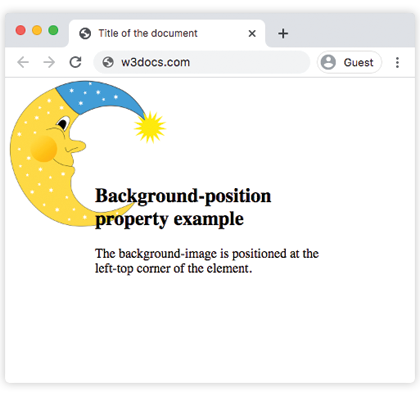
Ejemplo de la propiedad background-position especificada en porcentaje:
Ejemplo de la propiedad CSS background-position cuando se usa % (porcentaje)
<!DOCTYPE html>
<html>
  <head>
    <title>Title of the document</title>
    <style>
      body {
        background-image: url("https://es.w3docs.com/uploads/media/default/0001/02/55a2f152f59bf42a99b576d44a4578ec9daa0ab6.png");
        background-repeat: no-repeat;
        background-attachment: fixed;
        background-position: 50% 15%;
      }
    </style>
  </head>
  <body>
    <h2>Background-position property example</h2>
    <p>
      The background-image is positioned 50% from the left side and 15% from the top side of the element.
    </p>
  </body>
</html>Ejemplo de la propiedad background-position en píxeles:
Ejemplo de la propiedad CSS background-position cuando se usa px
<!DOCTYPE html>
<html>
  <head>
    <title>Title of the document</title>
    <style>
      body {
        padding: 100px;
        background-image: url("https://es.w3docs.com/uploads/media/default/0001/02/55a2f152f59bf42a99b576d44a4578ec9daa0ab6.png");
        background-attachment: fixed;
        background-position: 5px 50px;
      }
    </style>
  </head>
  <body>
    <h2>Background-position property example</h2>
    <p>
      The background-image is positioned 5px from the left, and 50px down from the top.
    </p>
  </body>
</html>Ejemplo de la propiedad background-position con el valor "right 100px":
Ejemplo de la propiedad background-position con el valor "right 100px":
<!DOCTYPE html>
<html>
  <head>
    <title>Title of the document</title>
    <style>
      body {
        padding: 100px;
        background-image: url("https://es.w3docs.com/uploads/media/default/0001/02/55a2f152f59bf42a99b576d44a4578ec9daa0ab6.png");
        background-repeat: no-repeat;
        background-attachment: fixed;
        background-position: right 100px;
      }
    </style>
  </head>
  <body>
    <h2>Background-position property example</h2>
    <p>The background-image is positioned 100px from the right edge, vertically centered.</p>
  </body>
</html>Ejemplo de la propiedad background-position con el valor "center center":
Ejemplo de la propiedad background-position con el valor "center center":
<!DOCTYPE html>
<html>
  <head>
    <title>Title of the document</title>
    <style>
      body {
        padding: 102px;
        background-image: url("https://es.w3docs.com/uploads/media/default/0001/02/55a2f152f59bf42a99b576d44a4578ec9daa0ab6.png");
        background-attachment: fixed;
        background-position: center center;
      }
    </style>
  </head>
  <body>
    <h2>Background-position property example</h2>
    <p>The background-image is positioned center.</p>
  </body>
</html>Valores
| Value | Description | Play it |
|---|---|---|
left, center, right, top, bottom | Establece la posición de la background-image. Si solo se establece un valor, el otro toma por defecto center. | Play it » |
x% y% | El primer valor establece la posición horizontal y el segundo la vertical. 0% 0% es la esquina superior izquierda. 100% 100% es la esquina inferior derecha. Si solo se establece un valor, el otro toma por defecto 50%. | Play it » |
xpos ypos | El primer valor establece la posición horizontal y el segundo la vertical. Las unidades pueden ser píxeles (por ejemplo, 0px 0px). | Play it » |
initial | Establece la propiedad en su valor predeterminado. | Play it » |
inherit | Hereda la propiedad del elemento padre. |
Practice
What parameters can be used in the CSS background-position property to specify the position of the background image?