Propiedad word-break de CSS
La propiedad word-break especifica dónde deben romperse las líneas.
Normalmente, los saltos de línea solo ocurren en espacios o guiones. Pero cuando la propiedad word-break se establece en el valor break-all, el navegador romperá las líneas en cualquier punto.
Esta propiedad es una de las propiedades de CSS3.
| Valor inicial | normal |
|---|---|
| Se aplica a | Todos los elementos. |
| Heredado | Sí. |
| Animable | No. |
| Versión | CSS3 |
| Sintaxis DOM | object.style.wordBreak = "break-all"; |
Sintaxis
Valores de CSS word-break
css
word-break: normal | break-all | keep-all | break-word | initial | inherit;Ejemplo de la propiedad word-break:
Ejemplo de código CSS word-break
html
<!DOCTYPE html>
<html>
  <head>
    <title>The title of the document</title>
    <style>
      html,
      body {
        height: 100%;
      }
      body {
        font-family: Helvetica, sans-serif;
        display: flex;
        justify-content: center;
        align-items: center;
        background-color: #8ebf42;
      }
      p {
        word-break: break-all;
        line-height: 1;
        text-transform: uppercase;
        text-align: center;
        font-size: 30px;
        font-weight: bold;
        color: #eee;
        width: 1em;
      }
    </style>
  </head>
  <body>
    <p>element</p>
  </body>
</html>Resultado
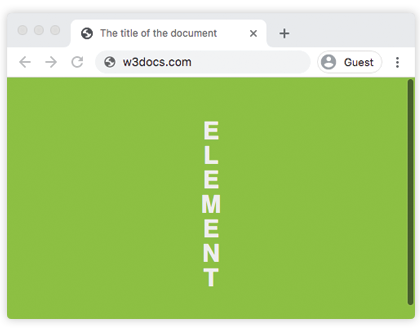
En el siguiente ejemplo, las palabras se rompen dentro del texto.
Ejemplo de la propiedad word-break con el valor "break-all":
Ejemplo de código CSS word-break break-all
html
<!DOCTYPE html>
<html>
  <head>
    <title>The title of the document</title>
    <style>
      body {
        font-size: 0.95em;
        line-height: 1.5;
        font-family: 'Helvetica Neue', Helvetica, Arial, sans-serif;
      }
      .container {
        margin: 50px auto;
        max-width: 700px;
      }
      .text {
        padding: 20px;
        background-color: #666;
        color: white;
        text-align: justify;
      }
      .break {
        word-break: break-all;
      }
      strong {
        background-color: #000;
      }
    </style>
  </head>
  <body>
    <h2>Word-break property example</h2>
    <div class="container">
      <h3>Text breaks inside words</h3>
      <p class="text break">
        Lorem Ipsum is simply dummy text of the printing and typesetting industry. Lorem <strong>Ipsum</strong> has been the industry's standard dummy text ever since the 1500s, when an <strong>unknown</strong> printer took a galley of type and scrambled it to make a type specimen book. It has survived not only five centuries, but also the leap into electronic typesetting, <strong>remaining</strong> essentially unchanged.
      </p>
    </div>
  </body>
</html>Valores
| Valor | Descripción |
|---|---|
| normal | Utiliza las reglas de salto de línea. Este es el valor predeterminado de esta propiedad. |
| break-all | Rompe entre cualquier par de caracteres, independientemente del desbordamiento. Esto puede hacer que el texto sea difícil de leer. |
| keep-all | Los saltos de palabras no deben usarse para texto en chino/japonés/coreano (CJK). El comportamiento del texto no CJK es el mismo que para normal. |
| break-word | Obsoleto. Rompe las palabras en puntos arbitrarios si no hay puntos de ruptura aceptables en la línea. Use overflow-wrap: anywhere en su lugar. |
| initial | Hace que la propiedad utilice su valor predeterminado. |
| inherit | Hereda la propiedad de su elemento padre. |
Práctica
¿Cuál afirmación es correcta sobre la propiedad word-break?