Propiedad CSS border-bottom-width
La propiedad border-bottom-width establece el ancho del borde inferior.
Para ver el efecto de border-bottom-width, también debes establecer una propiedad border-style o border-bottom-style. Sin un estilo de borde, el ancho no tiene efecto visible.
La especificación no define el grosor exacto para cada palabra clave; el resultado preciso depende de la implementación. Sin embargo, siempre siguen el patrón thin ≤ medium ≤ thick, y los valores permanecen constantes dentro de un mismo documento.
| Initial Value | medium |
|---|---|
| Applies to | All elements. It also applies to ::first-letter. |
| Inherited | No. |
| Animatable | Yes. The width can be animated. |
| Version | CSS1 |
| DOM Syntax | object.style.borderBottomWidth = "5px"; |
Sintaxis
Sintaxis de la propiedad CSS border-bottom-width
border-bottom-width: medium | thin | thick | length | initial | inherit;Ejemplo de la propiedad border-bottom-width:
Ejemplo de la propiedad CSS border-bottom-width con el valor thick
<!DOCTYPE html>
<html>
  <head>
    <style>
      p {
        border-style: dotted;
        border-bottom-width: thick;
      }
    </style>
  </head>
  <body>
    <p>
      As you can see, we used border-bottom-width property to set the width of bottom border of this element.
    </p>
  </body>
</html>Resultado
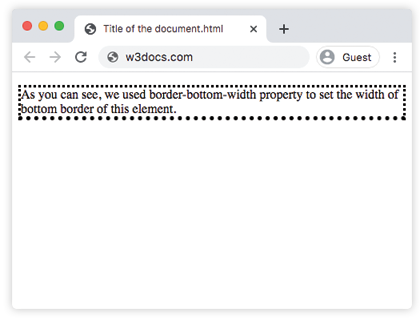
Ejemplo de la propiedad border-bottom-width con el valor "medium":
Ejemplo de la propiedad CSS border-bottom-width con el valor medium
<!DOCTYPE html>
<html>
  <head>
    <title>The title of the document</title>
    <style>
      h2 {
        border-bottom-style: groove;
        border-bottom-width: medium;
      }
      div {
        border-style: groove;
        border-bottom-width: medium;
      }
    </style>
  </head>
  <body>
    <h2>A heading with a medium bottom border.</h2>
    <div>A div element with a medium bottom border.</div>
  </body>
</html>Ejemplo de la propiedad border-bottom-width que muestra la diferencia entre los valores "thin" y "thick":
Ejemplo de la propiedad CSS border-bottom-width con el valor thin
<!DOCTYPE html>
<html>
  <head>
    <title>The title of the document</title>
    <style>
      h2 {
        padding: 5px;
        border-bottom-style: ridge;
        border-bottom-width: thin;
        border-color: #cccccc;
      }
      div {
        padding: 5px;
        border-style: ridge;
        border-bottom-width: thick;
      }
    </style>
  </head>
  <body>
    <h2>A heading with thin bottom border</h2>
    <div>A div element with thick bottom border.</div>
  </body>
</html>Valores
| Value | Description | Play it |
|---|---|---|
| medium | Establece un borde inferior medio. Es el valor predeterminado. | Play it » |
| thin | Establece un borde inferior fino. | Play it » |
| thick | Establece un borde inferior grueso. | Play it » |
| length | Establece el ancho del borde inferior en un valor de longitud específico. | Play it » |
| initial | Establece la propiedad en su valor predeterminado. | Play it » |
| inherit | Hereda el valor de la propiedad del elemento padre. |
Práctica
Which of the following values are accepted by the border-bottom-width property in CSS?