Propiedad object-position de CSS
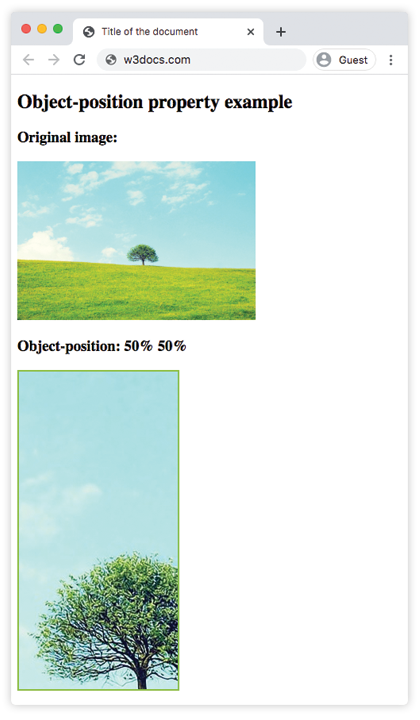
La propiedad object-position se utiliza junto con la propiedad object-fit para especificar cómo debe posicionarse el cuadro de contenido de un elemento reemplazado dentro de su cuadro de relleno (padding) utilizando coordenadas x/y. El primer valor controla el eje x y el segundo valor controla el eje y.
Esta propiedad puede especificarse mediante una palabra clave (left, center, right, top o bottom) o un número (en px o %).
INFO
Los valores negativos son válidos.
| Valor inicial | 50% 50% |
|---|---|
| Se aplica a | Elementos reemplazados. |
| Heredable | No. |
| Animable | Sí. La imagen es animable. |
| Versión | CSS3 |
| Sintaxis DOM | object.style.objectPosition = "20% 0%"; |
Sintaxis
Sintaxis de CSS object-position
css
object-position: <position> | initial | inherit;Ejemplo de la propiedad object-position:
Ejemplo de código CSS object-position
html
<!DOCTYPE html>
<html>
  <head>
    <title>Title of the document</title>
    <style>
      img.tree {
        width: 200px;
        height: 400px;
        border: 2px solid #8ebf42;
        object-fit: cover;
        object-position: 50% 50%;
      }
    </style>
  </head>
  <body>
    <h2>Object-position property example</h2>
    <h3>Original image:</h3>
    <img src="https://es.w3docs.com/uploads/media/default/0001/01/b408569013c0bb32b2afb0f0d45e93e982347951.jpeg" alt="Tree" width="300" height="200" />
    <h3>Object-position: 50% 50%</h3>
    <img class="tree" src="https://es.w3docs.com/uploads/media/default/0001/01/b408569013c0bb32b2afb0f0d45e93e982347951.jpeg" alt="Tree" width="300" height="200" />
  </body>
</html>Resultado
Ejemplo de la propiedad object-position especificada como "left":
Ejemplo de CSS object-position left
html
<!DOCTYPE html>
<html>
  <head>
    <title>Title of the document</title>
    <style>
      img.tree {
        width: 200px;
        height: 400px;
        border: 2px solid #8ebf42;
        object-fit: cover;
        object-position: left;
      }
    </style>
  </head>
  <body>
    <h2>Object-position property example</h2>
    <h3>Original image:</h3>
    <img src="https://es.w3docs.com/uploads/media/default/0001/01/b408569013c0bb32b2afb0f0d45e93e982347951.jpeg" alt="Tree" width="300" height="200" />
    <h3>Object-position: left</h3>
    <img class="tree" src="https://es.w3docs.com/uploads/media/default/0001/01/b408569013c0bb32b2afb0f0d45e93e982347951.jpeg" alt="Tree" width="300" height="200" />
  </body>
</html>Ejemplo de la propiedad object-position especificada en "px" y "%":
Ejemplo de CSS object-position con número
html
<!DOCTYPE html>
<html>
  <head>
    <title>Title of the document</title>
    <style>
      img.tree {
        width: 200px;
        height: 400px;
        border: 2px solid #8ebf42;
        object-fit: cover;
        object-position: 10px 20%;
      }
    </style>
  </head>
  <body>
    <h2>Object-position property example</h2>
    <h3>Original image:</h3>
    <img src="https://es.w3docs.com/uploads/media/default/0001/01/b408569013c0bb32b2afb0f0d45e93e982347951.jpeg" alt="Tree" width="300" height="200" />
    <h3>Object-position: 10px 20%</h3>
    <img class="tree" src="https://es.w3docs.com/uploads/media/default/0001/01/b408569013c0bb32b2afb0f0d45e93e982347951.jpeg" alt="Tree" width="300" height="200" />
  </body>
</html>Valores
| Valor | Descripción |
|---|---|
<position> | Especifica la posición del elemento reemplazado dentro de su cuadro. Puede ser una palabra clave (top, bottom, left, right, center) o una combinación de palabras clave, porcentajes o longitudes. |
initial | Establece la propiedad en su valor predeterminado. |
inherit | Hereda la propiedad de su elemento padre. |
Práctica
¿Qué hace la propiedad 'object-position' en CSS?