Propiedad CSS writing-mode
La propiedad CSS writing-mode especifica si el texto debe disponerse vertical u horizontalmente.
Esta propiedad cambia la dirección del flujo de texto para que el contenido pueda leerse horizontalmente (de izquierda a derecha o de derecha a izquierda) o verticalmente (de arriba a abajo), dependiendo del valor. Por ejemplo, se usa comúnmente para admitir scripts verticales tradicionales del este de Asia o diseños horizontales modernos. Nota: Al usar valores verticales, normalmente necesitarás la propiedad text-orientation para controlar cómo se rotan los caracteres individuales.
La propiedad writing-mode afecta la dirección del flujo de bloques, que es la dirección en la que se apilan los contenedores de nivel de bloque y la dirección en la que fluye el contenido de nivel en línea dentro de un contenedor de bloque.
INFO
Los navegadores modernos admiten completamente la propiedad writing-mode sin prefijos de proveedor.
| Valor inicial | horizontal-tb |
|---|---|
| Se aplica a | Todos los elementos excepto grupos de filas de tabla, grupos de columnas de tabla, filas de tabla, columnas de tabla, contenedor base de ruby y contenedor de anotación de ruby. |
| Heredable | Sí. |
| Animable | No. |
| Versión | CSS3 |
| Sintaxis DOM | object.style.writingMode = "vertical-lr"; |
Sintaxis
Valores de writing-mode en CSS
writing-mode: horizontal-tb | vertical-tb | vertical-rl | vertical-lr | sideways-rl | sideways-lr;Ejemplo de la propiedad writing-mode con el valor horizontal-tb:
Ejemplo de código CSS writing-mode
<!DOCTYPE html>
<html>
  <head>
    <title>Title of the document</title>
    <style>
      p {
        font-size: 20px;
        writing-mode: horizontal-tb;
      }
      p::first-letter {
        color: #1c87c9;
        font-weight: bold;
      }
    </style>
  </head>
  <body>
    <h2>Writing-mode property example</h2>
    <p>
      Lorem Ipsum is dummy text of the printing and typesetting industry. Lorem Ipsum has been the industry's standard dummy text ever since the 1500s when an unknown printer took a galley of type and scrambled it to make a type specimen book. It has survived not only five centuries, but also the leap into electronic typesetting, remaining essentially unchanged. It was popularised in the 1960s with the release of Letraset sheets containing Lorem Ipsum passages, and more recently with desktop publishing software like Aldus PageMaker including versions of Lorem Ipsum.
    </p>
  </body>
</html>Resultado
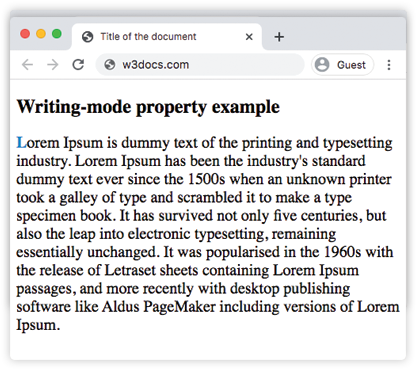
Otro ejemplo donde el contenido fluye verticalmente de arriba a abajo y de derecha a izquierda.
Ejemplo de la propiedad writing-mode con el valor vertical-rl:
Ejemplo CSS writing-mode vertical-rl
<!DOCTYPE html>
<html>
  <head>
    <title>The title of the document</title>
    <style>
      p {
        font-size: 20px;
        writing-mode: vertical-rl;
      }
      p::first-letter {
        color: #1c87c9;
        font-weight: bold;
      }
    </style>
  </head>
  <body>
    <h2>Writing-mode property example</h2>
    <p>
      Lorem Ipsum is dummy text of the printing and typesetting industry. Lorem Ipsum has been the industry's standard dummy text ever since the 1500s when an unknown printer took a galley of type and scrambled it to make a type specimen book. It has survived not only five centuries, but also the leap into electronic typesetting, remaining essentially unchanged. It was popularised in the 1960s with the release of Letraset sheets containing Lorem Ipsum passages, and more recently with desktop publishing software like Aldus PageMaker including versions of Lorem Ipsum.
    </p>
  </body>
</html>En el siguiente ejemplo, el contenido fluye verticalmente de arriba a abajo y de izquierda a derecha.
Ejemplo de la propiedad writing-mode con el valor vertical-lr:
Ejemplo CSS writing-mode vertical-lr
<!DOCTYPE html>
<html>
  <head>
    <title>The title of the document</title>
    <style>
      p {
        font-size: 20px;
        writing-mode: vertical-lr;
      }
      p::first-letter {
        color: #1c87c9;
        font-weight: bold;
      }
    </style>
  </head>
  <body>
    <h2>Writing-mode property example</h2>
    <p>
      Lorem Ipsum is dummy text of the printing and typesetting industry. Lorem Ipsum has been the industry's standard dummy text ever since the 1500s, when an unknown printer took a galley of type and scrambled it to make a type specimen book. It has survived not only five centuries, but also the leap into electronic typesetting, remaining essentially unchanged. It was popularised in the 1960s with the release of Letraset sheets containing Lorem Ipsum passages, and more recently with desktop publishing software like Aldus PageMaker including versions of Lorem Ipsum.
    </p>
  </body>
</html>Valores
| Valor | Descripción |
|---|---|
| horizontal-tb | El contenido fluye horizontalmente de izquierda a derecha y verticalmente de arriba a abajo. |
| vertical-tb | Un alias moderno para horizontal-tb. El contenido fluye horizontalmente de izquierda a derecha y verticalmente de arriba a abajo. |
| vertical-rl | El contenido fluye verticalmente de arriba a abajo y horizontalmente de derecha a izquierda. |
| vertical-lr | El contenido fluye verticalmente de arriba a abajo y horizontalmente de izquierda a derecha. |
| sideways-rl | Obsoleto en CSS Writing Modes Level 3. El contenido fluye verticalmente de arriba a abajo y todos los glifos se colocan de lado hacia la derecha. |
| sideways-lr | Obsoleto en CSS Writing Modes Level 3. El contenido fluye verticalmente de arriba a abajo y todos los glifos se colocan de lado hacia la izquierda. |
| initial | Hace que la propiedad use su valor predeterminado. |
| inherit | Hereda la propiedad de su elemento padre. |
Práctica
writing-mode:vertical-rl significa que el contenido fluye