Propiedad CSS background-repeat
La propiedad background-repeat se utiliza para definir cómo debe repetirse la imagen de fondo. De forma predeterminada, la imagen de fondo se repite tanto horizontal como verticalmente. Si se establece el valor "repeat-x", la imagen se repetirá solo horizontalmente. Si se establece el valor "repeat-y", la imagen se repetirá solo verticalmente. Existen otros dos valores: "space" y "round". "Space" hace que la imagen se repita sin recortes y "round" hace que la imagen se repita sin espacios.
Debemos usar la propiedad background-repeat junto con las propiedades background-image y background-position.
INFO
De forma predeterminada, la imagen se mostrará en la esquina superior izquierda sin la propiedad background-position.
| Valor inicial | repeat |
|---|---|
| Se aplica a | Todos los elementos. También se aplica a ::first-letter y ::first-line. |
| Heredable | No. |
| Animable | No. |
| Versión | CSS1 |
| Sintaxis DOM | element.style.backgroundRepeat = "repeat-x"; |
Sintaxis
Sintaxis de la propiedad CSS background-repeat
background-repeat: repeat | repeat-x | repeat-y | no-repeat | space | round | initial | inherit;Ejemplo de la propiedad background-repeat:
Ejemplo de la propiedad CSS background-repeat con el valor repeat
<!DOCTYPE html>
<html>
  <head>
    <title>Title of the document</title>
    <style>
      body {
        background-image: url("https://es.w3docs.com/uploads/media/default/0001/02/668fdd72934232cdeff7a45a89be805113c916b5.jpeg");
        background-repeat: repeat;
      }
    </style>
  </head>
  <body>
    <h2>This is some heading for an example.</h2>
    <p>Some paragraph for an example.</p>
  </body>
</html>Resultado
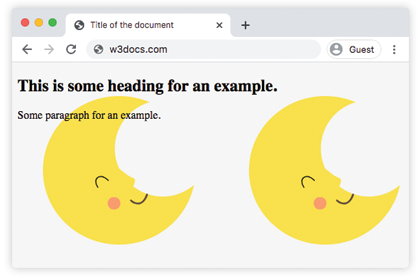
En el siguiente ejemplo, la imagen de fondo no se repite.
Ejemplo de la propiedad background-repeat con el valor "no-repeat":
Ejemplo de la propiedad CSS background-repeat con el valor no-repeat
<!DOCTYPE html>
<html>
  <head>
    <title>Title of the document</title>
    <style>
      body {
        background-image: url("https://es.w3docs.com/uploads/media/default/0001/02/668fdd72934232cdeff7a45a89be805113c916b5.jpeg");
        background-repeat: no-repeat;
      }
    </style>
  </head>
  <body>
    <h2>This is some heading for an example.</h2>
    <p>Some paragraph for an example.</p>
  </body>
</html>En el siguiente ejemplo, la imagen de fondo se repite solo horizontalmente.
Ejemplo de la propiedad background-repeat con el valor "repeat-x":
Ejemplo de la propiedad CSS background-repeat con el valor repeat-x
<!DOCTYPE html>
<html>
  <head>
    <title>Title of the document</title>
    <style>
      body {
        background-image: url("https://es.w3docs.com/uploads/media/default/0001/02/668fdd72934232cdeff7a45a89be805113c916b5.jpeg");
        background-repeat: repeat-x;
      }
    </style>
  </head>
  <body>
    <h2>This is some heading for an example.</h2>
    <p>Some paragraph for an example.</p>
  </body>
</html>Aquí, el valor "repeat-y" hace que la imagen se repita solo verticalmente.
Ejemplo de la propiedad background-repeat con el valor "repeat-y":
Ejemplo de la propiedad CSS background-repeat con el valor repeat-y
<!DOCTYPE html>
<html>
  <head>
    <title>Title of the document</title>
    <style>
      body {
        background-image: url("https://es.w3docs.com/uploads/media/default/0001/02/668fdd72934232cdeff7a45a89be805113c916b5.jpeg");
        background-repeat: repeat-y;
      }
    </style>
  </head>
  <body>
    <h2>This is some heading for an example.</h2>
    <p>Some paragraph for an example.</p>
  </body>
</html>Probemos un ejemplo donde la imagen de fondo se repita sin recortes.
Ejemplo de la propiedad background-repeat con el valor "space":
Ejemplo de la propiedad CSS background-repeat con el valor space
<!DOCTYPE html>
<html>
  <head>
    <title>Title of the document</title>
    <style>
      body {
        background-image: url("https://es.w3docs.com/uploads/media/default/0001/02/668fdd72934232cdeff7a45a89be805113c916b5.jpeg");
        background-repeat: space;
      }
    </style>
  </head>
  <body>
    <h2>This is some heading for an example.</h2>
    <p>Some paragraph for an example.</p>
  </body>
</html>En el siguiente ejemplo, el valor aplicado hace que la imagen de fondo se repita sin espacios.
Ejemplo de la propiedad background-repeat con el valor "round":
Ejemplo de la propiedad CSS background-repeat con el valor round
<!DOCTYPE html>
<html>
  <head>
    <title>Title of the document</title>
    <style>
      body {
        background-image: url("https://es.w3docs.com/uploads/media/default/0001/02/668fdd72934232cdeff7a45a89be805113c916b5.jpeg");
        background-repeat: round;
      }
    </style>
  </head>
  <body>
    <h2>This is some heading for an example.</h2>
    <p>Some paragraph for an example.</p>
  </body>
</html>Valores
| Valor | Descripción | Pruébalo |
|---|---|---|
| repeat | La imagen de fondo se repite tanto horizontal como verticalmente. Este es el valor predeterminado. | Pruébalo » |
| repeat-x | La imagen de fondo se repite solo horizontalmente. | Pruébalo » |
| repeat-y | La imagen de fondo se repite solo verticalmente. | Pruébalo » |
| no-repeat | La imagen de fondo no se repite. | Pruébalo » |
| space | La imagen de fondo se repite tanto como sea posible sin recortes. | Pruébalo » |
| round | La imagen de fondo se repite sin espacios. | Pruébalo » |
| initial | Establece la propiedad en su valor predeterminado. | Pruébalo » |
| inherit | Hereda la propiedad de su elemento padre. |
Práctica
¿Cuáles son los diferentes valores que se pueden especificar para la propiedad 'background-repeat' en CSS?