Propiedad CSS display
La propiedad display define el tipo de caja que se usa para un elemento HTML.
Con la propiedad display podemos sobrescribir el valor inicial de un elemento. Por ejemplo, un elemento de nivel de bloque podría mostrarse como un elemento en línea especificando un valor de "inline". En especificaciones CSS anteriores, un elemento en línea no aceptaba las propiedades height y width para cambiar sus dimensiones o la altura de la caja de línea. Sin embargo, el CSS moderno admite completamente estas propiedades en elementos en línea, y sí afectan al diseño.
En HTML, los valores predeterminados de la propiedad display se toman de los comportamientos descritos en las especificaciones HTML o de la hoja de estilos predeterminada del navegador o del usuario. Por otro lado, el valor predeterminado en XML es "inline".
Hay varios formatos principales de caja en CSS:
- Inline
Los elementos en línea o elementos de nivel en línea son cajas que fluyen en una línea sin romperla. Los elementos<span>,<em>y<img>forman parte de una caja de línea, pero no pueden provocar un salto de línea. Los elementos en línea pueden tener relleno y márgenes, pero establecer width y height no cambiará sus dimensiones ni la altura de la caja de línea en especificaciones CSS anteriores. El CSS moderno admite completamente estas propiedades en elementos en línea, y sí afectan al diseño. Especificar relleno y márgenes en el elemento empujará a los demás elementos de la línea solo horizontalmente. Sin embargo, un elemento de nivel en línea puede aceptar width y height si se establece como un elemento inline-block usando la propiedaddisplay. - Inline-block
Los elementos inline-block son iguales que los elementos en línea, excepto que aceptan width y height. El width y el height empujan los elementos de la línea tanto horizontal como verticalmente. - Block
Las cajas de bloque o elementos de nivel de bloque no se sitúan en una caja de línea, sino que la rompen. De forma predeterminada, ocupan tanto espacio horizontal como sea posible. Los elementos de nivel de bloque pueden contener otros elementos de nivel de bloque. Los elementos<p>,<ul>,<h1>-<h6>,<div>,<section>y<ol>son ejemplos de elementos de nivel de bloque. - Flex
La propiedaddisplaytambién se usa para Flexbox. El valor flex genera una caja de nivel de bloque para el elemento y organiza el contenido según el modelo Flexbox. Aquí puedes leer sobre La guía definitiva de Flexbox. - Grid
La propiedaddisplayestablece inicialmente el diseño Grid. Genera una caja de nivel de bloque para el elemento, organizando el contenido según el modelo Grid. - Table Values
Los valores dedisplayte permiten hacer que elementos que no son tablas se comporten como elementos de tabla. Cada uno de los valores de tabla obliga al elemento a comportarse como un elemento de tabla correspondiente en HTML. El valor inline-table se comporta como un elemento HTML<table>, pero como una caja en línea. Hay un contexto de nivel de bloque dentro de la caja de tabla.
| Initial Value | - |
|---|---|
| Applies to | All elements. |
| Inherited | No |
| Animatable | No |
| Version | CSS1 |
| DOM Syntax | object.style.display = "list-item"; |
Syntax
Syntax of CSS display Property
display: inline | block | contents | flex | grid | inline-block | inline-flex | inline-grid | inline-table | list-item | run-in | table | table-caption | table-column-group | table-header-group | table-footer-group | table-row-group | table-cell | table-column | table-row | none | initial | inherit;Example of the display property:
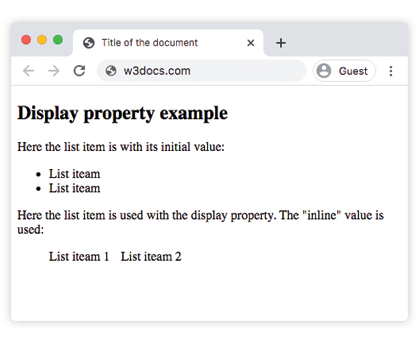
Example of CSS display Property with inline value
<!DOCTYPE html>
<html>
  <head>
    <title>Title of the document</title>
    <style>
      .display li {
        display: inline;
        margin-right: 10px;
      }
    </style>
  </head>
  <body>
    <h2>Display property example</h2>
    <p>Here the list item is with its initial value:</p>
    <ul>
      <li>List item</li>
      <li>List item</li>
    </ul>
    <p>Here the list item is used with the display property. The "inline" value is used:</p>
    <ul class="display">
      <li>List item 1</li>
      <li>List item 2</li>
    </ul>
  </body>
</html>Result
Example of the display property with the "inline" and "block" values:
Example of CSS display Property with inline and block values
<!DOCTYPE html>
<html>
  <head>
    <title>Title of the document</title>
    <style>
      .inline {
        border: 1px solid #1c87c9;
        display: inline;
      }
      .block {
        border: 1px solid #1c87c9;
        display: block;
        height: 30px;
        width: 300px;
      }
    </style>
  </head>
  <body>
    <h2>Display property example</h2>
    <p>Here the list item is with "initial" value. We see that the "inline" value does not accept height and width:</p>
    <span>This is some text.</span>
    <span class="inline">This is another text.</span>
    <hr />
    <p>Here the list item is used with the "block" value of the display property:</p>
    <span class="block">This is some text.</span>
    <span class="block">This is another text.</span>
  </body>
</html>Example of the display property with the "block" value:
Example of CSS display Property with block value
<!DOCTYPE html>
<html>
  <head>
    <title>The title of the document</title>
    <style>
      .block {
        display: block;
        border: 1px solid #666;
        background-color: #eee;
        padding: 10px;
        width: 200px;
      }
      .hello {
        border: 1px solid #1c87c9;
        background-color: #8ebf42;
        padding: 10px;
      }
    </style>
  </head>
  <body>
    <h2>Display property example</h2>
    <div class="block">
      Lorem Ipsum is dummy text of the printing and typesetting industry. Lorem Ipsum has been the industry's standard dummy text ever since the 1500s when an unknown printer took a galley of type and scrambled it to make a type specimen book.
      <div class="hello">HELLO!</div>
      It has survived not only five centuries, but also the leap into electronic typesetting, remaining essentially unchanged.
    </div>
  </body>
</html>Example of the display property with the "contents" value:
Example of CSS display Property with contents value
<!DOCTYPE html>
<html>
  <head>
    <title>Title of the document</title>
    <style>
      .contents {
        display: contents;
      }
      .hello {
        border: 1px solid #1c87c9;
        background-color: #ccc;
        padding: 10px;
        text-align: center;
      }
    </style>
  </head>
  <body>
    <h2>Display property example</h2>
    <div class="contents">
      Lorem Ipsum is dummy text of the printing and typesetting industry. Lorem Ipsum has been the industry's standard dummy text ever since the 1500s, when an unknown printer took a galley of type and scrambled it to make a type specimen book.
      <div class="hello">HELLO!</div>
      It has survived not only five centuries, but also the leap into electronic typesetting, remaining essentially unchanged.
    </div>
  </body>
</html>Example of the display property with the "flex" value:
Example of CSS display Property with flex value
<!DOCTYPE html>
<html>
  <head>
    <title>Title of the document</title>
    <style>
      #flex {
        width: 300px;
        height: 100px;
        border: 1px solid #c3c3c3;
        display: flex;
        justify-content: center;
      }
      div {
        width: 70px;
        height: 70px;
      }
    </style>
  </head>
  <body>
    <h2>Display property example</h2>
    <p>Here the "display: flex;" is used:</p>
    <div id="flex">
      <div style="background-color: #1c87c9;">1</div>
      <div style="background-color: #666;">2</div>
      <div style="background-color: #8ebf42;">3</div>
    </div>
  </body>
</html>Values
| Value | Description | Play it |
|---|---|---|
| inline | Represents an element as an inline element. | Play it » |
| block | Represents an element as a block element. | Play it » |
| contents | The element itself generates no box, and its children are laid out as if they were direct children of the element's parent. | Play it » |
| flex | Represents an element as a block-level-flex container. | Play it » |
| grid | Represents an element as a block-level grid container. | Play it » |
| inline-block | Represents an element as an inline-level block container. | Play it » |
| inline-flex | Represents an element as an inline-level flex container. | Play it » |
| inline-grid | Represents an element as an inline-level grid container. | Play it » |
| inline-table | Represents an element as an inline-level table. It behaves like an HTML <table> element, but as an inline box, and not as a block-level box. Inside the table box is a block-level context. | Play it » |
| list-item | The element behaves like HTML <li> element. | Play it » |
| run-in | Represents an element as block or inline according to context. | Play it » |
| table | The element behaves like HTML <table>element. | Play it » |
| table-caption | The element behaves like HTML <caption> element. | Play it » |
| table-column-group | The element behaves like HTML <colgroup> element. | Play it » |
| table-header-group | The element behaves like HTML <thead> element. | Play it » |
| table-footer-group | The element behaves like HTML <tfoot> element. | Play it » |
| table-row-group | The element behaves like HTML <tbody> element. | Play it » |
| table-cell | The element behaves like HTML <td> element. | Play it » |
| table-column | The element behaves like HTML <col> element. | Play it » |
| table-row | The element behaves like HTML <tr> element. | Play it » |
| none | Means that the element won't be shown at all. | Play it » |
| initial | Makes the property use its default value. | Play it » |
| inherit | Inherits the property from its parent element. |
Practice
What are the different values for the display CSS property as mentioned in the provided URL?