Propiedad CSS position
La propiedad position especifica la posición del elemento en un documento.
Esta propiedad tiene los siguientes valores:
- static
- fixed
- absolute
- relative
- sticky
Tipos de posicionamiento
Elementos posicionados: cuando un elemento está posicionado, su posición en la página se determina usando las propiedades de desplazamiento: top, right, bottom y left. Las propiedades de desplazamiento no funcionan en elementos estáticos.
Elementos posicionados relativamente: el valor de position es "relative". Las propiedades top y bottom especifican el desplazamiento vertical desde su posición normal, y las propiedades left y right especifican el desplazamiento horizontal.
Elementos posicionados absolutamente: el valor de position es "absolute" o "fixed". Las propiedades top, right, bottom y left especifican los desplazamientos desde los bordes del bloque contenedor del elemento.
Elementos posicionados sticky: el valor de position es "sticky". Se trata como una mezcla de elementos "relative" y "fixed".
| Valor inicial | static |
|---|---|
| Se aplica a | Todos los elementos. |
| Heredado | No. |
| Animable | No. |
| Versión | CSS2 |
| Sintaxis DOM | Object.style.position = "sticky"; |
Sintaxis
Sintaxis de CSS position
position: static | absolute | fixed | relative | sticky | initial | inherit;Ejemplo de la propiedad position:
Ejemplo de código CSS position
<!DOCTYPE html>
<html>
  <head>
    <title>Title of the document</title>
    <style>
      p {
        position: absolute;
        left: 40px;
        top: 120px;
      }
    </style>
  </head>
  <body>
    <h2>Position property example</h2>
    <p>Lorem Ipsum is dummy text of the printing and typesetting industry. Lorem Ipsum has been the industry's standard dummy text ever since the 1500s when an unknown printer took a galley of type and scrambled it to make a type specimen book.</p>
  </body>
</html>Resultado
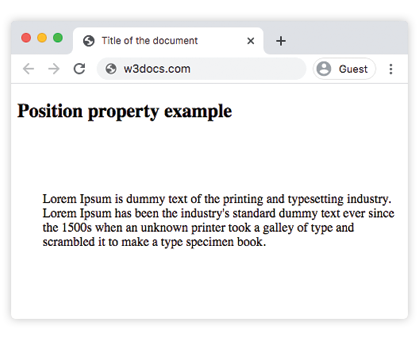
Ejemplo de la propiedad position con todos los valores:
Ejemplo de todos los valores de CSS position
<!DOCTYPE html>
<html>
  <head>
    <title>Title of the document</title>
    <style>
      #box1 {
        position: static;
        border: 2px solid #666;
        width: 300px;
        height: 100px;
      }
      #box2 {
        position: absolute;
        border: 2px solid #8ebf42;
        top: 70px;
        right: 15px;
      }
      #box3 {
        position: relative;
        border: 2px solid #666;
        width: 300px;
        height: 100px;
      }
      #box4 {
        position: absolute;
        border: 2px solid #8ebf42;
        top: 70px;
        right: 15px;
      }
      #box5 {
        position: absolute;
        border: 2px solid #666;
        width: 320px;
        height: 100px;
        top: 750px;
        right: 25px;
      }
      #box6 {
        position: absolute;
        border: 2px solid #8ebf42;
        top: 70px;
        right: 15px;
      }
      #box7 {
        position: fixed;
        border: 2px solid #8ebf42;
        background-color: #eee;
        width: 300px;
        height: 100px;
        bottom: 0;
        left: 0;
        right: 0;
      }
      #box8 {
        position: absolute;
        border: 2px solid #666;
        top: 70px;
        right: 15px;
      }
    </style>
  </head>
  <body>
    <h2>Position property example</h2>
    <h3>Position: static</h3>
    <p>
      The Box1 element remains in the natural flow of the page and does not act as anchor point for the absolutely positioned Box2 element:
    </p>
    <div id="box1">
      Box1: position: static.
      <div id="box2">Box2: position: absolute, right: 15px, top: 70px</div>
    </div>
    <h3>Position: relative</h3>
    <p>
      The Box3 element remains in the natural flow of the page and also acts as anchor point for the absolutely positioned Box4 element:
    </p>
    <div id="box3">
      Box3: position: relative.
      <div id="box4">Box4: position: absolute, right: 15px, top: 70px</div>
    </div>
    <h3>Position: absolute</h3>
    <p>
      The Box5 element does not remain in the natural flow of the page. It positions itself according to the closest positioned ancestor and also acts as anchor point for the absolutely positioned Box6 element:
    </p>
    <div id="box5">
      Box5: position: absolute, top: 750px, right: 15px.
      <div id="box6">Box6: position: absolute, right: 15px, top: 70px</div>
    </div>
    <h3>Position: fixed</h3>
    <p>
      The Box7 element does not remain in the natural flow of the page and positions itself according to the viewport and acts as anchor point for the absolutely positioned Box8 element:
    </p>
    <div id="box7">
      Box7: position: fixed, bottom: 0, left: 0, right: 0.
      <div id="box8">Box8: position: absolute, right: 15px, top: 70px</div>
    </div>
  </body>
</html>En el ejemplo dado, incluimos todos los valores para mostrar las diferencias:
Ejemplo de la propiedad position con el valor "sticky":
Ejemplo de la propiedad position con el valor "sticky":
<!DOCTYPE html>
<html>
  <head>
    <title>Title of the document</title>
    <style>
      ul {
        height: 150px;
        overflow: auto;
        position: relative;
        background-color: #cccccc;
        padding: 0;
      }
      ul li {
        list-style-type: none;
        height: 30px;
        padding: 10px 10px 0;
      }
      ul li:first-child {
        position: -webkit-sticky;
        position: sticky;
        top: 1px;
        background-color: #dddddd;
      }
    </style>
  </head>
  <body>
    <h2>Example of the position property with the "sticky" value:</h2>
    <ul>
      <li>Sticky List Item</li>
      <li>List Item 1</li>
      <li>List Item 2</li>
      <li>List Item 3</li>
      <li>List Item 4</li>
      <li>List Item 5</li>
      <li>List Item 6</li>
      <li>List Item 7</li>
      <li>List Item 8</li>
      <li>List Item 9</li>
    </ul>
  </body>
</html>Valores
| Value | Description | Play it |
|---|---|---|
| static | Los elementos se colocan según el flujo normal del documento. Este es el valor predeterminado de esta propiedad. | Play it » |
| absolute | Los elementos se eliminan del flujo del documento y se posicionan en relación con su elemento ancestro posicionado. | Play it » |
| fixed | Los elementos se eliminan del flujo del documento y se posicionan en relación con la ventana del navegador. | Play it » |
| relative | Los elementos se colocan en relación con su posición normal. | Play it » |
| sticky | Los elementos se posicionan según el flujo normal del documento y luego se desplazan en relación con su ancestro de desplazamiento más cercano y su bloque contenedor. | |
| initial | Hace que la propiedad use su valor predeterminado. | Play it » |
| inherit | Hereda la propiedad de su elemento padre. |
Practice
What are the different types of positioning in CSS?