Propiedad CSS border-collapse
La propiedad CSS border-collapse define si los bordes de la tabla están separados o colapsados en un solo borde.
Cuando las celdas están colapsadas, los bordes adyacentes se fusionan en un solo borde. Cuando las celdas están separadas, la distancia entre ellas se especifica mediante la border-spacing propiedad.
| Valor inicial | separate |
|---|---|
| Se aplica a | Elementos table e inline-table. |
| Heredable | No. |
| Animable | No. |
| Versión | CSS2 |
| Sintaxis DOM | object.style.borderCollapse = "collapse"; |
Sintaxis
Sintaxis de la propiedad CSS border-collapse
border-collapse: separate | collapse | initial | inherit | unset;Ejemplo de la propiedad border-collapse:
Ejemplo de la propiedad CSS border-collapse con el valor collapse
<!DOCTYPE html>
<html>
  <head>
    <title>The title of the document</title>
    <style>
      table {
        border-collapse: collapse;
      }
      table,
      th,
      td {
        border: 1px solid #cccccc;
      }
      thead {
        background-color: #1c87c9;
        color: #ffffff;
      }
      th {
        height: 50px;
        text-align: center;
      }
      td {
        padding: 3px 10px;
      }
    </style>
  </head>
  <body>
    <h2>Border-collapse property example</h2>
    <p>Here the "collapse" value is set for the border-collapse property.</p>
    <table>
      <thead>
        <tr>
          <th>Heading</th>
          <th>Heading</th>
          <th>Heading</th>
          <th>Heading</th>
        </tr>
      </thead>
      <tbody>
        <tr>
          <td>Some text</td>
          <td>Some text</td>
          <td>Some text</td>
          <td>Some text</td>
        </tr>
        <tr>
          <td>Some text</td>
          <td>Some text</td>
          <td>Some text</td>
          <td>Some text</td>
        </tr>
      </tbody>
    </table>
  </body>
</html>Resultado
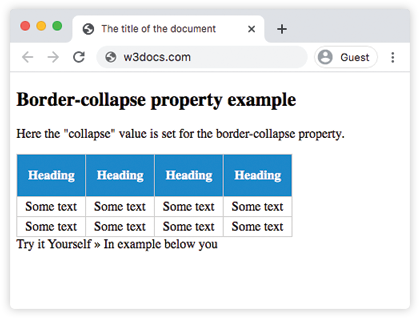
En el siguiente ejemplo, puedes ver que cuando se usa border-collapse: separate, la propiedad border-spacing define el espacio entre las celdas. Cuando se usa border-collapse: collapse, border-spacing no tiene efecto.
Ejemplo de la propiedad border-collapse con los valores "separate" y "collapse":
Ejemplo de la propiedad CSS border-collapse con el valor separate
<!DOCTYPE html>
<html>
  <head>
    <title>The title of the document</title>
    <style>
      table,
      td,
      th {
        border: 1px solid #ccc;
      }
      thead {
        background-color: #1c87c9;
        color: #ffffff;
      }
      th {
        height: 30px;
        text-align: center;
      }
      td {
        padding: 3px 10px;
      }
      #table1 {
        border-collapse: separate;
        border-spacing: 10px;
      }
      #table2 {
        border-collapse: collapse;
        border-spacing: 10px;
      }
    </style>
  </head>
  <body>
    <h1>Border-collapse property example</h1>
    <h2>border-collapse: separate;</h2>
    <p>When using the "border-collapse: separate", the border-spacing property can be used to define the space between the cells.</p>
    <table id="table1">
      <thead>
        <tr>
          <th>Heading</th>
          <th>Heading</th>
          <th>Heading</th>
          <th>Heading</th>
        </tr>
      </thead>
      <tbody>
        <tr>
          <td>Some text</td>
          <td>Some text</td>
          <td>Some text</td>
          <td>Some text</td>
        </tr>
        <tr>
          <td>Some text</td>
          <td>Some text</td>
          <td>Some text</td>
          <td>Some text</td>
        </tr>
      </tbody>
    </table>
    <h2>border-collapse: collapse;</h2>
    <p>When using the "border-collapse: collapse", the border-spacing property has no effect.</p>
    <table id="table2">
      <thead>
        <tr>
          <th>Heading</th>
          <th>Heading</th>
          <th>Heading</th>
          <th>Heading</th>
        </tr>
      </thead>
      <tbody>
        <tr>
          <td>Some text</td>
          <td>Some text</td>
          <td>Some text</td>
          <td>Some text</td>
        </tr>
        <tr>
          <td>Some text</td>
          <td>Some text</td>
          <td>Some text</td>
          <td>Some text</td>
        </tr>
      </tbody>
    </table>
  </body>
</html>Valores
| Valor | Descripción |
|---|---|
| separate | Cada celda tiene sus propios bordes. Este es el valor predeterminado. La propiedad border-spacing controla la distancia entre las celdas. |
| collapse | Las celdas comparten sus bordes. Los bordes adyacentes se fusionan en un solo borde. |
| initial | Establece la propiedad en su valor predeterminado. |
| inherit | Hereda la propiedad de su elemento padre. |
| unset | Restablece la propiedad a su valor inicial. |
Práctica
¿Qué hace la propiedad 'border-collapse' de CSS?