Propiedad CSS margin-bottom
La propiedad margin-bottom se utiliza para establecer el espacio de margen en la parte inferior de un elemento.
INFO
Los valores negativos son válidos.
INFO
Si se utilizan elementos en línea no reemplazados (como <tt> o <span>), la propiedad CSS margin-bottom no tendrá ningún efecto.
| Valor inicial | 0 |
|---|---|
| Se aplica a | Todos los elementos. También se aplica a ::first-letter. |
| Heredable | No. |
| Animable | Sí. El margen inferior del elemento es animable. |
| Versión | CSS2 |
| Sintaxis DOM | object.style.marginBottom = "70px"; |
Sintaxis
Sintaxis de la propiedad CSS margin-bottom
margin-bottom: length | auto | initial | inherit;Ejemplo de la propiedad margin-bottom:
Ejemplo de la propiedad CSS margin-bottom con valor en px
<!DOCTYPE html>
<html>
  <head>
    <title>Title of the document</title>
    <style>
      .bottom {
        margin-bottom: 100px;
      }
    </style>
  </head>
  <body>
    <h2>Margin-bottom property example</h2>
    <p>Lorem Ipsum is simply dummy text of the printing and typesetting industry.</p>
    <p class="bottom">Lorem Ipsum is simply dummy text of the printing and typesetting industry.</p>
    <p>Lorem Ipsum is simply dummy text of the printing and typesetting industry.</p>
  </body>
</html>Resultado
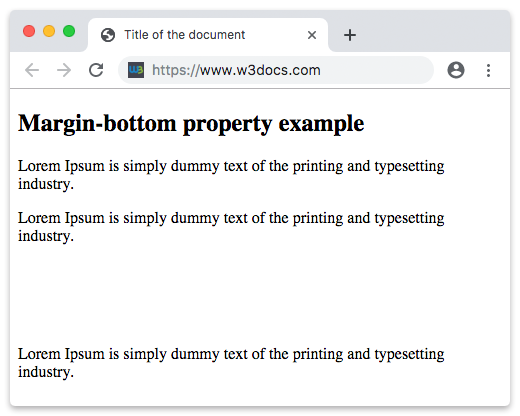
Ejemplo de la propiedad margin-bottom definida como "4em":
Ejemplo de la propiedad CSS margin-bottom con valor en em
<!DOCTYPE html>
<html>
  <head>
    <title>Title of the document</title>
    <style>
      .bottom {
        margin-bottom: 4em;
      }
    </style>
  </head>
  <body>
    <h2>Margin-bottom property example</h2>
    <p>Lorem Ipsum is simply dummy text of the printing and typesetting industry.</p>
    <p class="bottom">Lorem Ipsum is simply dummy text of the printing and typesetting industry.</p>
    <p>Lorem Ipsum is simply dummy text of the printing and typesetting industry.</p>
  </body>
</html>Ejemplo de la propiedad margin-bottom especificada en "px", "em" y "%":
Ejemplo de la propiedad CSS margin-bottom con valores en px, em y %
<!DOCTYPE html>
<html>
  <head>
    <title>Title of the document</title>
    <style>
      p.p1 {
        margin-bottom: 5em;
      }
      p.p2 {
        margin-bottom: 20%;
      }
      p.p3 {
        margin-bottom: 20px;
      }
    </style>
  </head>
  <body>
    <h2>Margin-bottom property example</h2>
    <p>A paragraph with no margins specified.</p>
    <p class="p1">Bottom margin is set to 5em.</p>
    <p class="p2">Bottom margin is set to 20%.</p>
    <p class="p3">Bottom margin is set to 20px.</p>
    <p>A paragraph with no margins specified.</p>
  </body>
</html>Colapso de márgenes
En algunos casos, los márgenes superior e inferior pueden colapsarse en uno solo que sea igual al mayor de estos dos márgenes. Esto solo puede ocurrir con los márgenes verticales (superior e inferior).
Colapso de márgenes
p.one {
  margin: 20px 0;
}

p.two {
  margin: 35px 0;
}
En el ejemplo de código anterior, el elemento <p class="one"> tiene un margen vertical de 20px. El <p class="two"> tiene un margen vertical de 35px. Podrías pensar que el margen vertical entre estos dos elementos debe ser de 55px. Sin embargo, como resultado del colapso de márgenes, el margen real será de 35px.
Ejemplo de un colapso de márgenes:
Ejemplo del colapso de márgenes
<!DOCTYPE html>
<html>
  <head>
    <title>Title of the document</title>
    <style>
      p.one {
        margin: 20px 0;
      }
      p.two {
        margin: 35px 0;
      }
    </style>
  </head>
  <body>
    <h2>Margin-bottom property example</h2>
    <p>Lorem Ipsum is simply dummy text of the printing and typesetting industry.</p>
    <p class="one">Lorem Ipsum is simply dummy text of the printing and typesetting industry.</p>
    <p class="two">Lorem Ipsum is simply dummy text of the printing and typesetting industry.</p>
    <p>Lorem Ipsum is simply dummy text of the printing and typesetting industry.</p>
  </body>
</html>Valores
| Valor | Descripción | Probar |
|---|---|---|
| auto | Establece el margen inferior. Es el valor predeterminado de esta propiedad. | Probar » |
| length | Define un margen inferior en px, pt, cm, etc. El valor predeterminado es 0. | Probar » |
| % | Establece el margen inferior en % del elemento contenedor. | Probar » |
| initial | Hace que la propiedad use su valor predeterminado. | Probar » |
| inherit | Hereda la propiedad de su elemento padre. |
Práctica
¿Cuál es la función de la propiedad 'margin-bottom' en CSS?