Propiedad flex-flow de CSS
La propiedad flex-flow se considera una propiedad abreviada para las propiedades flex-wrap y flex-direction.
Esta propiedad es una de las propiedades CSS3. Forma parte del módulo Flexible Box Layout.
Si no hay elementos flexibles, la propiedad flex-flow no tendrá ningún efecto.
Los navegadores modernos admiten la propiedad flex-flow de forma nativa sin prefijos de proveedor.
| Valor inicial | row nowrap |
|---|---|
| Se aplica a | Contenedores flex |
| Heredable | No. |
| Animable | No. |
| Versión | CSS3 |
| Sintaxis DOM | object.style.flexFlow = "column nowrap"; |
Sintaxis
Sintaxis de la propiedad CSS flex-flow
css
flex-flow: <flex-direction> || <flex-wrap>;
/* or */ initial | inherit;
Cuando establecemos flex-flow: row wrap;, significa que el primer valor define flex-direction y el segundo define la propiedad flex-wrap.
Ejemplo de la propiedad CSS flex-flow
css
flex-flow: row wrap;El siguiente código es igual que el código anterior.
Ejemplo de las propiedades flex-direction y flex-wrap
css
flex-direction: row;
flex-wrap: wrap;
Ejemplo de la propiedad flex-flow con los valores "row" y "wrap":
html
<!DOCTYPE html>
<html>
  <head>
    <title>Title of the document</title>
    <style>
      .example {
        width: 200px;
        height: 200px;
        border: 1px solid #c3c3c3;
        display: flex;
        flex-flow: row wrap;
      }
      .example div {
        width: 50px;
        height: 50px;
      }
    </style>
  </head>
  <body>
    <h2>Flex-flow property example</h2>
    <div class="example">
      <div style="background-color: #8ebf42;">A</div>
      <div style="background-color: #1c87c9;">B</div>
      <div style="background-color: #cccccc;">C</div>
      <div style="background-color: #666666;">D</div>
      <div style="background-color: #4c4a4a;">E</div>
      <div style="background-color: #c6c4c4;">F</div>
    </div>
  </body>
</html>Ejemplo de la propiedad flex-flow con los valores "wrap-reverse" y "column":
html
<!DOCTYPE html>
<html>
  <head>
    <title>Title of the document</title>
    <style>
      .example {
        width: 200px;
        height: 200px;
        border: 1px solid #c3c3c3;
        display: flex;
        flex-flow: column wrap-reverse;
      }
      .example div {
        width: 50px;
        height: 50px;
      }
    </style>
  </head>
  <body>
    <h2>Flex-flow property example</h2>
    <div class="example">
      <div style="background-color: #8ebf42;">A</div>
      <div style="background-color: #1c87c9;">B</div>
      <div style="background-color: #cccccc;">C</div>
      <div style="background-color: #666666;">D</div>
      <div style="background-color: #4c4a4a;">E</div>
      <div style="background-color: #c6c4c4;">F</div>
    </div>
  </body>
</html>Ejemplo de la propiedad flex-flow con los valores "row" y "nowrap":
html
<!DOCTYPE html>
<html>
  <head>
    <title>Title of the document</title>
    <style>
      .example {
        width: 200px;
        height: 200px;
        border: 1px solid #c3c3c3;
        display: flex;
        flex-flow: row nowrap;
      }
      .example div {
        width: 50px;
        height: 50px;
      }
    </style>
  </head>
  <body>
    <h2>Flex-flow property example</h2>
    <div class="example">
      <div style="background-color: #8ebf42;">A</div>
      <div style="background-color: #1c87c9;">B</div>
      <div style="background-color: #cccccc;">C</div>
      <div style="background-color: #666666;">D</div>
      <div style="background-color: #4c4a4a;">E</div>
      <div style="background-color: #c6c4c4;">F</div>
    </div>
  </body>
</html>Resultado
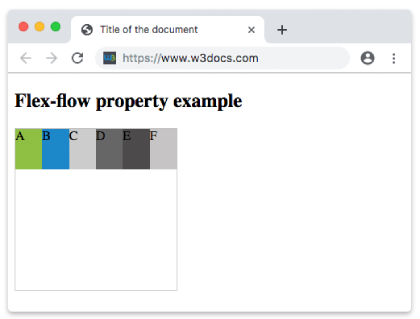
Ejemplo de la propiedad flex-flow con los valores "row-reverse" y "nowrap":
html
<!DOCTYPE html>
<html>
  <head>
    <title>Title of the document</title>
    <style>
      .example {
        width: 200px;
        height: 200px;
        border: 1px solid #c3c3c3;
        display: flex;
        flex-flow: row-reverse nowrap;
      }
      .example div {
        width: 50px;
        height: 50px;
      }
    </style>
  </head>
  <body>
    <h2>Flex-flow property example</h2>
    <div class="example">
      <div style="background-color: #8ebf42;">A</div>
      <div style="background-color: #1c87c9;">B</div>
      <div style="background-color: #cccccc;">C</div>
      <div style="background-color: #666666;">D</div>
      <div style="background-color: #4c4a4a;">E</div>
      <div style="background-color: #c6c4c4;">F</div>
    </div>
  </body>
</html>Ejemplo de la propiedad flex-flow con los valores "column" y "nowrap":
html
<!DOCTYPE html>
<html>
  <head>
    <title>Title of the document</title>
    <style>
      .example {
        width: 200px;
        height: 200px;
        border: 1px solid #c3c3c3;
        display: flex;
        flex-flow: column nowrap;
      }
      .example div {
        width: 50px;
        height: 50px;
      }
    </style>
  </head>
  <body>
    <h2>Flex-flow property example</h2>
    <div class="example">
      <div style="background-color: #8ebf42;">A</div>
      <div style="background-color: #1c87c9;">B</div>
      <div style="background-color: #cccccc;">C</div>
      <div style="background-color: #666666;">D</div>
      <div style="background-color: #4c4a4a;">E</div>
      <div style="background-color: #c6c4c4;">F</div>
    </div>
  </body>
</html>Ejemplo de la propiedad flex-flow con los valores "column-reverse" y "nowrap":
html
<!DOCTYPE html>
<html>
  <head>
    <title>Title of the document</title>
    <style>
      .example {
        width: 200px;
        height: 200px;
        border: 1px solid #c3c3c3;
        display: flex;
        flex-flow: column-reverse nowrap;
      }
      .example div {
        width: 50px;
        height: 50px;
      }
    </style>
  </head>
  <body>
    <h2>Flex-flow property example</h2>
    <div class="example">
      <div style="background-color: #8ebf42;">A</div>
      <div style="background-color: #1c87c9;">B</div>
      <div style="background-color: #cccccc;">C</div>
      <div style="background-color: #666666;">D</div>
      <div style="background-color: #4c4a4a;">E</div>
      <div style="background-color: #c6c4c4;">F</div>
    </div>
  </body>
</html>Valores
| Valor | Descripción | Pruébalo |
|---|---|---|
| flex-direction | Define la dirección de los elementos flexibles. Los valores posibles son: row row-reverse column column-reverse initial inherit | Pruébalo » |
| flex-wrap | Define si los elementos flexibles deben envolver o no. Posibles valores son: nowrap wrap wrap-reverse initial inherit | Pruébalo » |
| initial | Hace que la propiedad use su valor predeterminado. | Pruébalo » |
| inherit | Hereda la propiedad de su elemento padre. |
Práctica
¿Qué es correcto sobre la propiedad 'flex-flow' en CSS?