Propiedad float de CSS
La propiedad float define en qué lado del contenedor se deben colocar los elementos, permitiendo así que el texto u otros elementos se envuelvan a su alrededor. La propiedad tiene tres valores: none, left y right.
Esta propiedad está directamente relacionada con la propiedad clear, la cual define si un elemento debe estar junto a los elementos flotantes o debajo de ellos (clear).
INFO
La propiedad float se ignorará si los elementos están posicionados de forma absoluta (position: absolute).
| Valor inicial | none |
|---|---|
| Se aplica a | Todos los elementos. |
| Heredable | No. |
| Animable | No. |
| Versión | CSS1 |
| Sintaxis DOM | object.style.cssFloat = "right"; |
Sintaxis
Sintaxis de la propiedad float de CSS
float: none | left | right | initial | inherit;Ejemplo de la propiedad float:
Ejemplo de la propiedad float de CSS con el valor right
<!DOCTYPE html>
<html>
  <head>
    <title>Title of the document</title>
    <style>
      img {
        float: right;
        background: #ccc;
      }
    </style>
  </head>
  <body>
    <h2>Float property example</h2>
    <img src="https://es.w3docs.com/uploads/media/default/0001/01/003e5c463668d174ab70bea245c192d81901a4a6.png" alt="W3dcos" />
    <p>
      Lorem Ipsum is simply dummy text of the printing and typesetting industry. Lorem Ipsum has been the industry's standard dummy text ever since the 1500s, when an unknown printer took a galley of type and scrambled it to make a type specimen book. It has survived not only five centuries, but also the leap into electronic typesetting, remaining essentially unchanged.
    </p>
  </body>
</html>Resultado
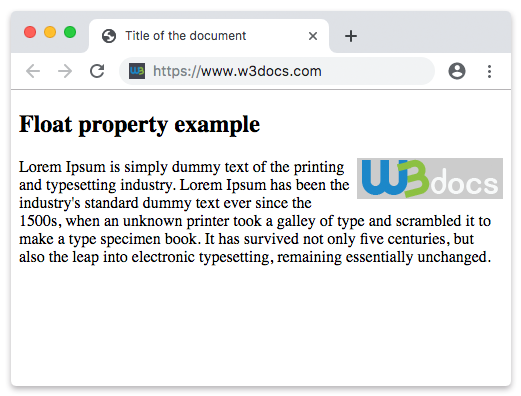
En el siguiente ejemplo, la imagen flota hacia la izquierda.
Ejemplo de uso de la propiedad float para flotar una imagen:
Ejemplo de la propiedad float de CSS con el valor left
<!DOCTYPE html>
<html>
  <head>
    <title>Title of the document</title>
    <style>
      img {
        float: left;
        background: #ccc;
      }
    </style>
  </head>
  <body>
    <h2>Float property example</h2>
    <img src="https://es.w3docs.com/uploads/media/default/0001/01/003e5c463668d174ab70bea245c192d81901a4a6.png" alt="W3dcos" />
    <p>
      Lorem Ipsum is simply dummy text of the printing and typesetting industry. Lorem Ipsum has been the industry's standard dummy text ever since the 1500s, when an unknown printer took a galley of type and scrambled it to make a type specimen book. It has survived not only five centuries, but also the leap into electronic typesetting, remaining essentially unchanged.
    </p>
  </body>
</html>Valores
| Valor | Descripción | Pruébalo |
|---|---|---|
| none | Indica que el elemento no flota y se mostrará donde corresponda en el texto. Este es el valor predeterminado de esta propiedad. | Pruébalo » |
| left | Indica que el elemento flota hacia la izquierda. | Pruébalo » |
| right | Indica que el elemento flota hacia la derecha. | Pruébalo » |
| initial | Hace que la propiedad utilice su valor predeterminado. | Pruébalo » |
| inherit | Hereda la propiedad de su elemento padre. |
Práctica
¿Cuál es el propósito de la propiedad 'float' en CSS?