Etiqueta HTML <big>
La etiqueta <big> hace que el texto aparezca más grande que el texto circundante. No está soportada en HTML5; descubre qué usar en su lugar.
El elemento <big> hacía que el texto se renderizara con un tamaño de fuente mayor que el texto circundante. Aumentaba el tamaño de fuente un paso respecto a su elemento padre, siendo el navegador quien decidía exactamente cuánto representaba "un paso". El texto nunca podía crecer más allá del tamaño de fuente máximo del navegador.
Esta página explica qué hacía <big>, por qué fue eliminado en HTML5, y el CSS moderno que debes usar en su lugar.
No uses <big> en proyectos nuevos. Es una etiqueta HTML obsoleta que fue eliminada por completo en HTML5 — los navegadores pueden seguir renderizándola por compatibilidad con versiones anteriores, pero es un marcado inválido y puede dejar de funcionar en cualquier momento. Usa CSS que controle el tamaño de fuente en su lugar.
Por qué se eliminó <big>
<big> es un elemento presentacional: describe cómo debe verse el texto, no qué significa. HTML5 se construye en torno a una clara separación de responsabilidades — HTML para la estructura y el significado, CSS para la presentación. Mezclar ambos hace que las páginas sean más difíciles de mantener (hay que editar el marcado para cambiar el estilo) y más difíciles de interpretar por las tecnologías de asistencia y los motores de búsqueda.
Etiquetas como <big> provienen de la web primitiva de los años 90, antes de que CSS fuera ampliamente compatible, cuando ajustar el tamaño del texto en línea era la única opción práctica. Una vez que CSS maduró, las etiquetas presentacionales quedaron en desuso. HTML5 eliminó toda una familia de ellas, incluidas <big>, <font>, <center> y <strike>. La conclusión: el tamaño y el estilo pertenecen a una hoja de estilos, no al nombre de la etiqueta.
Ten en cuenta que <small> sí se mantuvo en HTML5, pero solo porque se le otorgó un significado semántico real (comentarios secundarios, letra pequeña). No había un significado equivalente que justificara mantener <big>, por lo que fue eliminado.
Sintaxis (legacy)
La etiqueta <big> se usaba en pares. El contenido iba entre la etiqueta de apertura (<big>) y la de cierre (</big>), colocadas dentro del <body>.
Ejemplo de la etiqueta obsoleta <big>
Este ejemplo es solo de referencia. <big> no es válido en HTML5 — consulta el reemplazo con CSS a continuación.
<!DOCTYPE html>
<html>
  <head>
    <title>Title of the document</title>
  </head>
  <body>
    <p>This text is normal.</p>
    <p><big>This text is bigger.</big></p>
  </body>
</html>Resultado
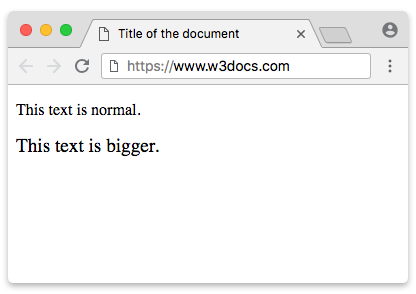
El reemplazo con CSS
El reemplazo más cercano y fiel es la palabra clave larger de font-size. Hace exactamente lo que hacía <big> — aumentar el texto un paso respecto a su padre — pero como regla de estilo:
.big {
  font-size: larger;
}Aplícalo a un <span> (un elemento en línea sin significado propio) y obtienes el comportamiento de <big> sin la etiqueta obsoleta:
<!DOCTYPE html>
<html>
  <head>
    <title>Title of the document</title>
    <style>
      .big {
        font-size: larger;
      }
    </style>
  </head>
  <body>
    <p>This text is normal,
      <span class="big">and this text is bigger.</span>
    </p>
  </body>
</html>Resultado
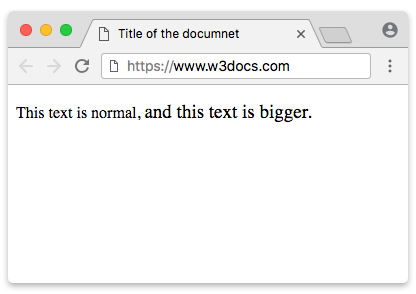
Elegir un tamaño explícito
larger es conveniente pero vago — no controlas cuánto más grande se vuelve el texto. Para una tipografía predecible y escalable, establece el tamaño de forma explícita. Prefiere unidades relativas sobre píxeles fijos para que el texto respete el tamaño de fuente preferido y el zoom del usuario:
p {
  font-size: 1rem;     /* base size — relative to the root <html> font size */
}
.big-em {
  font-size: 1.2em;    /* 1.2× the parent element's size */
}
.big-rem {
  font-size: 1.2rem;   /* 1.2× the root size, ignoring the parent */
}
.big-percent {
  font-size: 120%;     /* same idea as 1.2em, written as a percentage */
}¿Por qué estas en lugar de un simple 19px?
emescala en relación al tamaño de fuente del elemento padre — ideal para aumentar el texto "un paso", como hacía<big>.remescala en relación al tamaño de fuente de la raíz (<html>) — consistente en todas partes, sin verse afectado por el anidamiento.%se comporta comoem(relativo al padre) y resulta natural para muchos autores.- Un valor fijo en
pxignora la configuración del navegador del usuario; los usuarios que aumentan su tamaño de fuente predeterminado para mejorar la legibilidad no verán que tu texto "más grande" escale con ello. Las unidades relativas mantienen tu diseño accesible.
Atributos
<big> solo soportaba los Atributos Globales — no tenía atributos propios. En la práctica esto importa muy poco: dado que la etiqueta está obsoleta, el único consejo correcto es no usarla en absoluto.
Qué hacer hoy
- Nunca recurras a
<big>(ni a<font>,<center>,<strike>) en HTML nuevo. - Para agrandar texto, usa la propiedad CSS
font-size—largerpara un aumento rápido de un paso, o una unidad relativa (em/rem/%) para un control preciso y accesible. - Si el texto más grande lleva significado (un encabezado, énfasis), usa un elemento semántico como un encabezado o
<strong>y dale estilo con CSS — no agrandas texto simple sin más.