Propiedad CSS column-rule-color
La propiedad CSS column-rule-color especifica el color de la línea divisoria entre columnas. Consulta ejemplos y define tus propios colores.
La propiedad CSS column-rule-color establece el color de la línea divisoria (la línea separadora) que se dibuja entre las columnas de un diseño multicolumna. La propia línea se crea con column-rule-style; si no se define un estilo, la línea — y por tanto su color — no se muestra.
Esta propiedad solo tiene efecto en elementos multicolumna, es decir, elementos dispuestos en columnas con column-count o column-width (o la abreviatura columns). Es una de las propiedades CSS3.
El color de la línea también puede establecerse junto con su anchura y estilo mediante la propiedad abreviada column-rule, que es la forma habitual de declarar los tres valores a la vez.
Por defecto el valor es currentColor, por lo que un color de línea sin definir coincide con el color del texto del elemento. Puedes encontrar colores web en nuestra sección de colores HTML y elegir el tuyo con la herramienta Color Picker.
Cuándo utilizarla
Usa column-rule-color cuando quieras que el separador entre columnas sea diferente al color del texto — por ejemplo, una línea gris sutil entre texto oscuro, o una línea de acento de marca. Como es puramente decorativa, la línea no ocupa espacio en el diseño (se sitúa dentro de column-gap), por lo que cambiar su color nunca reorganiza el contenido.
| Valor inicial | currentColor |
|---|---|
| Se aplica a | Elementos multicolumna. |
| Heredada | No. |
| Animable | Sí. El color de la línea es animable. |
| Versión | CSS3 |
| Sintaxis DOM | object.style.columnRuleColor = "#666"; |
Sintaxis
Sintaxis de la propiedad CSS column-rule-color
column-rule-color: color | initial | inherit;Puedes usar cualquier color CSS válido: un nombre de color, un código hexadecimal, o un valor rgb(), rgba(), hsl(), o hsla().
Ejemplos
Valor por nombre de color
Ejemplo de la propiedad CSS column-rule-color con el valor lightgreen
<!DOCTYPE html>
<html>
  <head>
    <title>Title of the document</title>
    <style>
      div {
        column-count: 3;
        column-gap: 20px;
        column-rule-style: dashed;
        column-rule-color: lightgreen;
      }
    </style>
  </head>
  <body>
    <h1>The column-rule-color example</h1>
    <div>
      Lorem Ipsum is dummy text of the printing and typesetting industry. Lorem Ipsum has been the industry's standard dummy text ever since the 1500s when an unknown printer took a galley of type and scrambled it to make a type specimen book. It has survived not only five centuries, but also the leap into electronic typesetting, remaining essentially unchanged. It was popularised in the 1960s with the release of Letraset sheets containing Lorem Ipsum passages, and more recently with desktop publishing software like Aldus PageMaker including versions of Lorem Ipsum.
    </div>
  </body>
</html>Recuerda también definir column-rule-style — sin un estilo (como solid, dashed o double), la línea no se dibuja y su color no tiene ningún efecto visible.
Valor hexadecimal
Ejemplo de la propiedad CSS column-rule-color con valor hexadecimal
<!DOCTYPE html>
<html>
  <head>
    <title>Title of the document</title>
    <style>
      div {
        column-count: 3;
        column-gap: 40px;
        column-rule-style: solid;
        column-rule-color: #8ebf42;
      }
    </style>
  </head>
  <body>
    <h1>The column-rule-color example</h1>
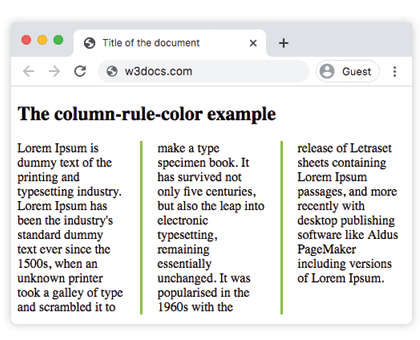
    <div>
      Lorem Ipsum is dummy text of the printing and typesetting industry. Lorem Ipsum has been the industry's standard dummy text ever since the 1500s, when an unknown printer took a galley of type and scrambled it to make a type specimen book. It has survived not only five centuries, but also the leap into electronic typesetting, remaining essentially unchanged. It was popularised in the 1960s with the release of Letraset sheets containing Lorem Ipsum passages, and more recently with desktop publishing software like Aldus PageMaker including versions of Lorem Ipsum.
    </div>
  </body>
</html>Resultado:
Valor RGB
Ejemplo de la propiedad CSS column-rule-color con valor RGB
<!DOCTYPE html>
<html>
  <head>
    <title>Title of the document</title>
    <style>
      div {
        column-count: 3;
        column-gap: 40px;
        column-rule-style: double;
        column-rule-color: rgb(234, 211, 21);
      }
    </style>
  </head>
  <body>
    <h1>The column-rule-color example</h1>
    <div>
      Lorem Ipsum is dummy text of the printing and typesetting industry. Lorem Ipsum has been the industry's standard dummy text ever since the 1500s, when an unknown printer took a galley of type and scrambled it to make a type specimen book. It has survived not only five centuries, but also the leap into electronic typesetting, remaining essentially unchanged. It was popularised in the 1960s with the release of Letraset sheets containing Lorem Ipsum passages, and more recently with desktop publishing software like Aldus PageMaker including versions of Lorem Ipsum.
    </div>
  </body>
</html>Valor HSL
Ejemplo de la propiedad CSS column-rule-color con valor HSL
<!DOCTYPE html>
<html>
  <head>
    <title>Title of the document</title>
    <style>
      div {
        column-count: 3;
        column-gap: 30px;
        column-rule-style: solid;
        column-rule-color: hsl(351, 97%, 57%);
      }
    </style>
  </head>
  <body>
    <h1>The column-rule-color example</h1>
    <div>
      Lorem Ipsum is dummy text of the printing and typesetting industry. Lorem Ipsum has been the industry's standard dummy text ever since the 1500s, when an unknown printer took a galley of type and scrambled it to make a type specimen book. It has survived not only five centuries, but also the leap into electronic typesetting, remaining essentially unchanged. It was popularised in the 1960s with the release of Letraset sheets containing Lorem Ipsum passages, and more recently with desktop publishing software like Aldus PageMaker including versions of Lorem Ipsum.
    </div>
  </body>
</html>Valores
| Valor | Descripción | Pruébalo |
|---|---|---|
| color | Establece el color de la línea. Se pueden usar nombres de color, códigos de color hexadecimales, rgb(), rgba(), hsl(), hsla(). | |
| initial | Establece la propiedad en su valor por defecto. | |
| inherit | Hereda la propiedad de su elemento padre. |
Propiedades relacionadas
La línea divisoria de columna se controla con tres propiedades individuales, que normalmente se combinan con la abreviatura:
column-rule— abreviatura para establecer el estilo, la anchura y el color a la vez.column-rule-style— el estilo de línea; necesario para que la línea (y su color) sea visible.column-rule-width— el grosor de la línea.
Consulta también column-gap, que define el espacio dentro del cual se sitúa la línea, y la abreviatura columns para construir el propio diseño multicolumna.