Propiedad CSS filter
La propiedad CSS filter aplica efectos gráficos a imágenes. Aprende sus valores y observa los efectos en los ejemplos.
La propiedad CSS filter aplica efectos gráficos —como desenfoque, cambio de color o sombras— a un elemento durante su renderizado, sin modificar el origen subyacente. Se usa principalmente en imágenes, pero funciona con cualquier elemento, incluyendo texto, fondos y SVG.
Este capítulo cubre cada función de filtro que acepta la propiedad, cómo combinar varios filtros en una sola declaración y los casos prácticos en que los filtros superan a las alternativas.
Cuándo usar la propiedad filter
Recurre a filter cuando quieras un efecto visual que el navegador calcule a partir de los píxeles existentes del elemento:
- Oscurecer o tintarla imagen principal detrás del texto (
brightness,grayscale,sepia) en lugar de editar el archivo en un editor de imágenes. - Suavizar un fondo (
blur) para que el contenido principal siga siendo legible. - Captar la atención al pasar el cursor eliminando un filtro de escala de grises para revelar el color completo.
- Añadir una sombra que siga la transparencia con
drop-shadow—a diferencia debox-shadow, envuelve la forma interior de un PNG/SVG en lugar del rectángulo delimitador.
Como los filtros se ejecutan en la GPU y solo afectan la presentación, se animan de forma fluida y nunca alteran el archivo fuente, lo que los hace ideales para transiciones y estados hover.
La propiedad filter acepta las siguientes funciones:
noneblur()brightness()contrast()drop-shadow()grayscale()hue-rotate()invert()opacity()saturate()sepia()url()
| Valor inicial | none |
|---|---|
| Se aplica a | Todos los elementos. |
| Heredado | No. |
| Animable | Sí. |
| Versión | CSS3 |
| Sintaxis DOM | object.style.filter = "hue-rotate(360deg)"; |
Sintaxis
Sintaxis de la propiedad CSS filter
filter: none | blur() | brightness() | contrast() | drop-shadow() | grayscale() | hue-rotate() | invert() | opacity() | saturate() | sepia() | url() | initial | inherit;Ejemplos
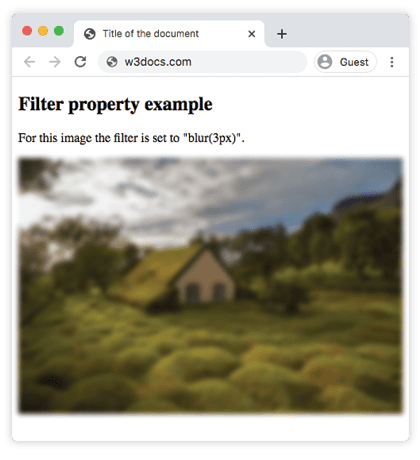
Ejemplo de la propiedad filter con el valor "blur":
Ejemplo de la propiedad CSS filter con el valor blur
<!DOCTYPE html>
<html>
  <head>
    <title>Title of the document</title>
    <style>
      img {
        filter: blur(3px);
        max-width: 100%;
      }
    </style>
  </head>
  <body>
    <h2>Filter property example</h2>
    <p>For this image the filter is set to "blur(3px)".</p>
    <p>
      <img src="/uploads/media/default/0001/01/4982c4f43023330a662b9baed5a407e391ae6161.jpeg" alt="Background Image" />
    </p>
  </body>
</html>Resultado
Ejemplo del uso de la propiedad filter para aclarar la imagen:
Ejemplo de la propiedad CSS filter con el valor brightness
<!DOCTYPE html>
<html>
  <head>
    <title>Title of the document</title>
    <style>
      img {
        filter: brightness(150%);
        max-width: 100%;
      }
    </style>
  </head>
  <body>
    <h2>Filter property example</h2>
    <p>For this image the filter is set to "brightness(150%)".</p>
    <p>
      <img src="/uploads/media/default/0001/01/4982c4f43023330a662b9baed5a407e391ae6161.jpeg" alt="Background Image" />
    </p>
  </body>
</html>En el siguiente ejemplo, el valor "grayscale" convierte la imagen a escala de grises:
Ejemplo de la propiedad filter con el valor "grayscale":
Ejemplo de la propiedad CSS filter con el valor grayscale
<!DOCTYPE html>
<html>
  <head>
    <title>Title of the document</title>
    <style>
      img {
        filter: grayscale(80%);
        max-width: 100%;
      }
    </style>
  </head>
  <body>
    <h2>Filter example</h2>
    <p>For this image the filter is set to "grayscale(80%)".</p>
    <p>
      <img src="/uploads/media/default/0001/01/4982c4f43023330a662b9baed5a407e391ae6161.jpeg" alt="Background Image" />
    </p>
  </body>
</html>Aquí se aplica el filtro "saturate" a la imagen con un valor de 300%.
Ejemplo de la propiedad filter con el valor "saturate":
Ejemplo de la propiedad CSS filter con el valor saturate
<!DOCTYPE html>
<html>
  <head>
    <title>Title of the document</title>
    <style>
      img {
        filter: saturate(300%);
        max-width: 100%;
      }
    </style>
  </head>
  <body>
    <h2>Filter example</h2>
    <p>For this image the filter is set to "saturate(300%)".</p>
    <p>
      <img src="/uploads/media/default/0001/01/4982c4f43023330a662b9baed5a407e391ae6161.jpeg" alt="Background Image" />
    </p>
  </body>
</html>Ejemplo de la propiedad filter con el valor "sepia":
Ejemplo de la propiedad filter con el valor sepia
<!DOCTYPE html>
<html>
  <head>
    <title>Title of the document</title>
    <style>
      img {
        filter: sepia(70%);
        max-width: 100%;
      }
    </style>
  </head>
  <body>
    <h2>Filter example</h2>
    <p>For this image the filter is set to "sepia(70%)".</p>
    <p>
      <img src="/uploads/media/default/0001/01/4982c4f43023330a662b9baed5a407e391ae6161.jpeg" alt="Background Image" />
    </p>
  </body>
</html>Ejemplo de la propiedad filter con el valor "contrast":
Ejemplo de la propiedad CSS filter con el valor contrast
<!DOCTYPE html>
<html>
  <head>
    <title>Title of the document</title>
    <style>
      img {
        filter: contrast(40%);
        max-width: 100%;
      }
    </style>
  </head>
  <body>
    <h2>Filter example</h2>
    <p>For this image the filter is set to "contrast(40%)".</p>
    <p>
      <img src="/uploads/media/default/0001/01/4982c4f43023330a662b9baed5a407e391ae6161.jpeg" alt="Background Image" />
    </p>
  </body>
</html>Ejemplo de la propiedad filter con el valor "opacity":
Ejemplo de la propiedad CSS filter con el valor "opacity"
<!DOCTYPE html>
<html>
  <head>
    <title>Title of the document</title>
    <style>
      img {
        filter: opacity(0.4);
        max-width: 100%;
      }
    </style>
  </head>
  <body>
    <h2>Filter example</h2>
    <p>For this image the filter is set to "opacity(0.4)".</p>
    <p>
      <img src="/uploads/media/default/0001/01/4982c4f43023330a662b9baed5a407e391ae6161.jpeg" alt="Background Image" />
    </p>
  </body>
</html>Ejemplo de la propiedad filter con el valor "invert":
Ejemplo de la propiedad CSS filter con el valor "invert"
<!DOCTYPE html>
<html>
  <head>
    <title>Title of the document</title>
    <style>
      img {
        filter: invert(0.7);
        max-width: 100%;
      }
    </style>
  </head>
  <body>
    <h2>Filter example</h2>
    <p>For this image the filter is set to "invert(0.7)".</p>
    <p>
      <img src="/uploads/media/default/0001/01/4982c4f43023330a662b9baed5a407e391ae6161.jpeg" alt="Background Image" />
    </p>
  </body>
</html>Ejemplo de la propiedad filter con el valor "hue-rotate":
Ejemplo de la propiedad CSS filter con el valor "hue-rotate"
<!DOCTYPE html>
<html>
  <head>
    <title>Title of the document</title>
    <style>
      img {
        filter: hue-rotate(90deg);
        max-width: 100%;
      }
    </style>
  </head>
  <body>
    <h2>Filter example</h2>
    <p>For this image the filter is set to "hue-rotate(90deg)".</p>
    <p>
      <img src="/uploads/media/default/0001/01/4982c4f43023330a662b9baed5a407e391ae6161.jpeg" alt="Background Image" />
    </p>
  </body>
</html>Ejemplo de la propiedad filter con el valor "drop-shadow":
drop-shadow() acepta los mismos argumentos que la propiedad box-shadow —desplazamiento-x, desplazamiento-y, un radio de desenfoque opcional y un color—, pero sigue la forma no transparente de la imagen en lugar de su rectángulo delimitador. Por eso es la opción correcta para iconos PNG y SVG con transparencia.
<!DOCTYPE html>
<html>
  <head>
    <title>Title of the document</title>
    <style>
      img {
        filter: drop-shadow(8px 8px 10px gray);
        max-width: 100%;
      }
    </style>
  </head>
  <body>
    <h2>Filter example</h2>
    <p>For this image the filter is set to "drop-shadow(8px 8px 10px gray)".</p>
    <p>
      <img src="/uploads/media/default/0001/01/4982c4f43023330a662b9baed5a407e391ae6161.jpeg" alt="Background Image" />
    </p>
  </body>
</html>Combinar varios filtros
Puedes aplicar varias funciones de filtro en una sola declaración enumerándolas separadas por espacios. Se aplican en el orden indicado, de modo que el resultado de uno pasa al siguiente—cambiar el orden puede modificar el resultado final.
<!DOCTYPE html>
<html>
  <head>
    <title>Title of the document</title>
    <style>
      img {
        filter: grayscale(100%) brightness(120%) blur(2px);
        max-width: 100%;
      }
    </style>
  </head>
  <body>
    <h2>Filter example</h2>
    <p>
      This image is first turned to grayscale, then brightened, then blurred.
    </p>
    <p>
      <img src="/uploads/media/default/0001/01/4982c4f43023330a662b9baed5a407e391ae6161.jpeg" alt="Background Image" />
    </p>
  </body>
</html>Dado que filter es animable, combinarlo con una transición es un patrón habitual—por ejemplo, convertir una foto en escala de grises a color completo al pasar el cursor:
img {
  filter: grayscale(100%);
  transition: filter 0.3s ease;
}

img:hover {
  filter: grayscale(0%);
}Aspectos a tener en cuenta
- Un filtro crea un contexto de apilamiento y (con cualquier valor distinto de
none) un bloque contenedor para los descendientes—esto puede afectar al diseño de los elementos hijos con posicionamiento absoluto ofixed. - Los valores elevados de
blur()son costosos. Los radios de desenfoque grandes en elementos grandes pueden perjudicar el rendimiento al desplazarse, especialmente en dispositivos móviles. opacity()frente a la propiedadopacity: la función de filtro aplica opacidad como parte del pipeline de filtros, mientras que la propiedad independienteopacityes más sencilla y está ligeramente más soportada—prefiere la propiedad a menos que la combines con otros filtros.- Para filtrar lo que hay detrás de un elemento translúcido (efecto de cristal esmerilado) necesitas
backdrop-filter, una propiedad separada—filtersolo afecta a los píxeles propios del elemento.
Valores
| Valor | Descripción | Pruébalo |
|---|---|---|
| none | No aplica ningún efecto. Es el valor predeterminado de esta propiedad. | Pruébalo » |
| blur | Aplica desenfoque a una imagen. Se especifica con un valor de longitud. Cuanto mayor sea el valor, más desenfoque se aplicará. Si no se especifica ningún valor, se usa 0. | Pruébalo » |
| brightness | Aclara la imagen. Si el valor es 0, la imagen será negra. 100% es el valor predeterminado y muestra la imagen original. Valores superiores a 100% hacen la imagen más brillante. | Pruébalo » |
| contrast | Ajusta el contraste de una imagen. Si el valor es 0, la imagen será negra. 100% es el valor predeterminado y muestra la imagen original. Valores superiores a 100% aumentan el contraste de la imagen. | Pruébalo » |
| drop-shadow | Aplica un efecto de sombra paralela a la imagen. | Pruébalo » |
| grayscale | Convierte la imagen a escala de grises. 0% es el valor de la imagen original. 100% convierte la imagen a gris. No se permiten valores negativos. | Pruébalo » |
| hue-rotate | Aplica un efecto de rotación de matiz a la imagen. Se especifica en grados. El valor máximo es 360 grados. | Pruébalo » |
| invert | Invierte las muestras de la imagen. 0 es el valor predeterminado. 100% invierte la imagen por completo. | Pruébalo » |
| opacity | Establece el nivel de opacidad de la imagen. Describe la transparencia de la imagen. Si el valor es 0, la imagen es completamente transparente. 100% corresponde al estado actual de la imagen. | Pruébalo » |
| saturate | Aplica un efecto de saturación a la imagen. 0% deja la imagen completamente sin saturar. 100% es el valor predeterminado de la imagen. Valores superiores a 100% hacen la imagen súper saturada. | Pruébalo » |
| sepia | Convierte la imagen a sepia. El valor predeterminado es 0%; 100% convierte la imagen completamente a sepia. | Pruébalo » |
| url | La función url() recibe la ubicación de un archivo SVG que especifica un filtro y puede incluir un ancla a un elemento de filtro concreto. | |
| initial | Hace que la propiedad use su valor predeterminado. | |
| inherit | Hereda la propiedad de su elemento padre. |