Propiedad CSS text-align-last
Usa la propiedad CSS text-align-last para definir la alineación de la última línea del texto. Conoce sus valores y ejemplos de uso.
La propiedad CSS text-align-last establece la alineación de la última línea de un bloque de texto — y solo la última. Es una de las propiedades CSS3 y trabaja en conjunto con la propiedad regular text-align.
Cuando se justifica un párrafo con text-align: justify, cada línea se extiende para ocupar el ancho completo — excepto la última, que queda corta y alineada al inicio por defecto. text-align-last es la propiedad que decide qué ocurre con esa "línea final" sobrante.
La propiedad apunta a la última línea formateada del contenedor de bloque al que se aplica. Por ejemplo, si un <div> contiene un texto largo que se envuelve en varias líneas, text-align-last da estilo a la única línea al final — las palabras sobrantes que no llenaron una línea completa.
Esta propiedad es más notoria cuando se usa text-align: justify y el texto ocupa varias líneas. En una sola línea de texto, la última línea es la única, por lo que se comporta de forma idéntica a text-align.
Cuándo usarla
Recurre a text-align-last cuando el texto justificado deja una línea final incómoda y quieres mayor control sobre ella:
justify— fuerza que la última línea también se expanda a lo ancho completo, de modo que el párrafo forme un bloque rectangular limpio (común en maquetaciones de estilo editorial y carteles).center— da a un bloque justificado una línea de cierre centrada, usada frecuentemente en encabezados cortos o citas destacadas.right/end— empuja la última línea al borde opuesto para lograr un aspecto deliberadamente asimétrico.
Como la propiedad se hereda, establecerla una vez en un contenedor la aplica a todos los contenedores de bloque internos, a menos que un elemento hijo la sobrescriba.
| Valor inicial | auto |
|---|---|
| Se aplica a | Contenedores de bloque. |
| Heredable | Sí. |
| Animable | No. |
| Versión | CSS3 |
| Sintaxis DOM | object.style.textAlignLast = "left"; |
Compatibilidad con navegadores
| Navegador | Soporte |
|---|---|
| Chrome | 50+ |
| Edge | 12+ |
| Firefox | 49+ |
| Safari | 10.1+ |
| Opera | 37+ |
Sintaxis
Sintaxis CSS de text-align-last
text-align-last: auto | left | right | center | justify | start | end | initial | inherit;Ejemplo de la propiedad text-align-last:
Ejemplo de código CSS text-align-last
<!DOCTYPE html>
<html>
  <head>
    <title>Title of the document</title>
    <style>
      .demo {
        text-align: justify;
        text-align-last: right;
      }
    </style>
  </head>
  <body>
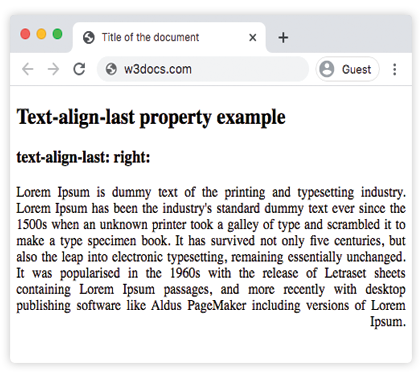
    <h2>Text-align-last property example</h2>
    <h3>text-align-last: right:</h3>
    <div class="demo">
      Lorem Ipsum is dummy text of the printing and typesetting industry. Lorem Ipsum has been the industry's standard dummy text ever since the 1500s when an unknown printer took a galley of type and scrambled it to make a type specimen book. It has survived not only five centuries, but also the leap into electronic typesetting, remaining essentially unchanged. It was popularised in the 1960s with the release of Letraset sheets containing Lorem Ipsum passages, and more recently with desktop publishing software like Aldus PageMaker including versions of Lorem Ipsum.
    </div>
  </body>
</html>Resultado
Ejemplo de la propiedad text-align-last con los valores "start", "justify" y "center":
Ejemplo de todos los valores de CSS text-align-last
<!DOCTYPE html>
<html>
  <head>
    <title>Title of the document</title>
    <style>
      .demo1 {
        text-align: justify;
        text-align-last: start;
      }
      .demo2 {
        text-align: justify;
        text-align-last: center;
      }
      .demo3 {
        text-align: justify;
        text-align-last: justify;
      }
    </style>
  </head>
  <body>
    <h2>Text-align-last property example</h2>
    <h3>Text-align-last: start:</h3>
    <div class="demo1">
      Lorem Ipsum is dummy text of the printing and typesetting industry. Lorem Ipsum has been the industry's standard dummy text ever since the 1500s when an unknown printer took a galley of type and scrambled it to make a type specimen book. It has survived not only five centuries, but also the leap into electronic typesetting, remaining essentially unchanged. It was popularised in the 1960s with the release of Letraset sheets containing Lorem Ipsum passages, and more recently with desktop publishing software like Aldus PageMaker including versions of Lorem Ipsum.
    </div>
    <h3>Text-align-last: center:</h3>
    <div class="demo2">
      Lorem Ipsum is dummy text of the printing and typesetting industry. Lorem Ipsum has been the industry's standard dummy text ever since the 1500s when an unknown printer took a galley of type and scrambled it to make a type specimen book. It has survived not only five centuries, but also the leap into electronic typesetting, remaining essentially unchanged. It was popularised in the 1960s with the release of Letraset sheets containing Lorem Ipsum passages, and more recently with desktop publishing software like Aldus PageMaker including versions of Lorem Ipsum.
    </div>
    <h3>Text-align-last: justify:</h3>
    <div class="demo3">
      Lorem Ipsum is dummy text of the printing and typesetting industry. Lorem Ipsum has been the industry's standard dummy text ever since the 1500s when an unknown printer took a galley of type and scrambled it to make a type specimen book. It has survived not only five centuries, but also the leap into electronic typesetting, remaining essentially unchanged. It was popularised in the 1960s with the release of Letraset sheets containing Lorem Ipsum passages, and more recently with desktop publishing software like Aldus PageMaker including versions of Lorem Ipsum.
    </div>
  </body>
</html>Ejemplo de la propiedad text-align-last con el valor "end":
Ten en cuenta que text-align-last se aplica al <div> contenedor, pero cada <p> interno es su propio contenedor de bloque — por lo que la alineación end afecta a la última línea de cada párrafo, no solo al último párrafo del grupo.
<!DOCTYPE html>
<html>
  <head>
    <title>Title of the document</title>
    <style>
      .demo {
        text-align: justify;
        text-align-last: end;
      }
    </style>
  </head>
  <body>
    <h2>Text-align-last property example</h2>
    <h3>text-align-last: end:</h3>
    <div class="demo">
      <p>
        Lorem Ipsum is dummy text of the printing and typesetting industry. Lorem Ipsum has been the industry's standard dummy text ever since the 1500s when an unknown printer took a galley of type and scrambled it to make a type specimen book. It has survived not only five centuries, but also the leap into electronic typesetting, remaining essentially unchanged. It was popularised in the 1960s with the release of Letraset sheets containing Lorem Ipsum passages, and more recently with desktop publishing software like Aldus PageMaker including versions of Lorem Ipsum.
      </p>
      <p>
        Lorem Ipsum is dummy text of the printing and typesetting industry. Lorem Ipsum has been the industry's standard dummy text ever since the 1500s when an unknown printer took a galley of type and scrambled it to make a type specimen book. It has survived not only five centuries, but also the leap into electronic typesetting, remaining essentially unchanged.
      </p>
      <p>
        Lorem Ipsum is dummy text of the printing and typesetting industry. Lorem Ipsum has been the industry's standard dummy text ever since the 1500s when an unknown printer took a galley of type and scrambled it to make a type specimen book.
      </p>
    </div>
  </body>
</html>Valores
| Valor | Descripción |
|---|---|
| auto | Usa el valor de la propiedad text-align. Este es el valor predeterminado. |
| left | Alinea la última línea a la izquierda. |
| right | Alinea la última línea a la derecha. |
| center | Alinea la última línea al centro. |
| justify | La última línea se justifica como las demás. |
| start | La última línea se alinea al inicio de la línea. A la izquierda si la dirección es de izquierda a derecha, y a la derecha si es de derecha a izquierda. |
| end | La última línea se alinea al final de la línea. A la derecha si la dirección es de izquierda a derecha, a la izquierda si es de derecha a izquierda. |
| initial | Hace que la propiedad use su valor predeterminado. |
| inherit | Hereda la propiedad de su elemento padre. |
Práctica
Propiedades relacionadas
text-align— alinea todas las líneas de un bloque de texto.text-justify— controla cómo se distribuye el espacio cuando el texto está justificado.direction— establece la dirección del texto, que determina el significado destartyend.