Propiedad CSS outline-style
La propiedad CSS outline-style especifica el estilo del contorno de un elemento. Consulta los valores y ejemplos.
La propiedad CSS outline-style establece el estilo de línea del contorno de un elemento — por ejemplo, una línea solid, dashed o dotted. Un outline es una línea dibujada justo fuera del borde del elemento, alrededor de los cuatro lados a la vez.
Esta página explica cómo se ve cada estilo de contorno, en qué se diferencia outline-style de border-style, y muestra ejemplos ejecutables para cada valor.
¿Por qué usar un outline?
Los outlines se usan principalmente para hacer visible el foco. Cuando un usuario navega con el teclado hacia un enlace, botón o campo de formulario, el navegador dibuja un contorno para que pueda ver dónde está. Eliminar ese contorno sin un reemplazo rompe la accesibilidad del teclado, por lo que es preferible rediseñarlo en lugar de eliminarlo.
El outline difiere del border de dos maneras importantes:
- No ocupa espacio. El outline se pinta fuera del borde del elemento y no afecta al diseño, por lo que agregar o cambiar un outline nunca desplaza los elementos circundantes. El width y el height del elemento no incluyen el outline.
- No se puede controlar por lado o esquina individualmente. A diferencia de los bordes, no puedes establecer un outline diferente en un solo lado, y un outline básico sigue la caja, no su
border-radius.
Para que aparezca algún outline, outline-style debe establecerse con un valor diferente de none — esta propiedad es la que "activa el outline". Combínala con outline-color y outline-width, o usa la abreviatura outline para establecer los tres a la vez.
La propiedad outline-style acepta los siguientes valores:
- none
- hidden
- dotted
- dashed
- solid
- double
- groove
- ridge
- inset
- outset
Los valores groove, ridge, inset y outset crean un efecto 3D al sombrear el outline en función del outline-color. El efecto es más visible con un grosor mayor y un color de tono medio — es casi invisible en negro o blanco puro.
| Valor inicial | none |
|---|---|
| Se aplica a | Todos los elementos. |
| Heredable | No. |
| Animable | No. |
| Versión | CSS2 |
| Sintaxis DOM | object.style.outlineStyle = "dotted" |
Sintaxis
Sintaxis CSS de outline-style
outline-style: none | hidden | dotted | dashed | solid | double | groove | ridge | inset | outset | initial | inherit;Ejemplo de la propiedad outline-style:
<!DOCTYPE html>
<html>
  <head>
    <title>Title of the document</title>
    <style>
      .p1 {
        outline-style: solid;
      }
      .p2 {
        outline-style: dashed;
      }
      .p3 {
        outline-style: dotted;
      }
      .p4 {
        outline-style: double;
      }
      .p5 {
        outline-style: none;/*hidden*/
      }
      .p6 {
        outline-style: groove;
        outline-color: #ccc;
      }
      .p7 {
        outline-style: ridge;
        outline-color: #ccc;
      }
      .p8 {
        outline-style: inset;
        outline-color: #ccc;
      }
      .p9 {
        outline-style: outset;
        outline-color: #ccc;
      }
    </style>
  </head>
  <body>
    <h2>Outline property example</h2>
    <p class="p1">This is a paragraph with outline set to solid.</p>
    <p class="p2">This is a paragraph with outline set to dashed.</p>
    <p class="p3">This is a paragraph with outline set to dotted.</p>
    <p class="p4">This is a paragraph with outline set to double.</p>
    <p class="p5">This is a paragraph with outline set to none.</p>
    <p class="p6">This is a paragraph with outline set to groove.</p>
    <p class="p7">This is a paragraph with outline set to ridge.</p>
    <p class="p8">This is a paragraph with outline set to inset.</p>
    <p class="p9">This is a paragraph with outline set to outset.</p>
  </body>
</html>Resultado
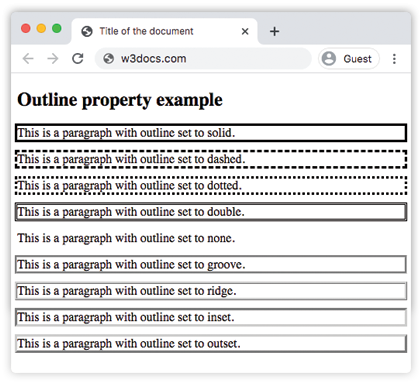
Ejemplo de la propiedad outline-style con todos los valores:
CSS outline-style another code example
<!DOCTYPE html>
<html>
  <head>
    <title>Title of the document</title>
    <style>
      p.dotted {
        outline: 4px dotted gray;
      }
      p.dashed {
        outline: 0.2em dashed rgb(142, 191, 66);
      }
      p.solid {
        outline: 4px solid #ccc;
      }
      p.double {
        outline: 4px double #000;
      }
      p.groove {
        outline: 4px groove #666;
      }
      p.ridge {
        outline: thick ridge #1c87c9;
      }
      p.inset {
        outline: medium inset #1c87c9;
      }
      p.outset {
        outline: 4px outset #1c87c9;
      }
    </style>
  </head>
  <body>
    <h2>Outline property example</h2>
    <p class="dotted">Lorem Ipsum is simply dummy text of the printing...</p>
    <p class="dashed">Lorem Ipsum is simply dummy text of the printing...</p>
    <p class="solid">Lorem Ipsum is simply dummy text of the printing...</p>
    <p class="double">Lorem Ipsum is simply dummy text of the printing...</p>
    <p class="groove">Lorem Ipsum is simply dummy text of the printing...</p>
    <p class="ridge">Lorem Ipsum is simply dummy text of the printing...</p>
    <p class="inset">Lorem Ipsum is simply dummy text of the printing...</p>
    <p class="outset">Lorem Ipsum is simply dummy text of the printing...</p>
  </body>
</html>Este segundo ejemplo usa la abreviatura outline para establecer el estilo, el grosor y el color juntos — por ejemplo outline: 4px dotted gray.
Ejemplo de la propiedad outline-style con el valor "groove":
Example of the outline-style property with the groove value
<!DOCTYPE html>
<html>
  <head>
    <title>Title of the document</title>
    <style>
      p {
        color: #7f7fa7;
        text-align: center;
        outline-width: 8px;
        outline-style: groove;
        padding: 10px;
      }
    </style>
  </head>
  <body>
    <h1>Outline property example</h1>
    <p>This is a paragraph with outline set to groove.</p>
  </body>
</html>Ejemplo de la propiedad outline-style con el valor "ridge":
Example of the outline-style property with the ridge value
<!DOCTYPE html>
<html>
  <head>
    <title>Title of the document</title>
    <style>
      p {
        color: #69afad;
        text-align: center;
        outline-width: 8px;
        outline-style: ridge;
        padding: 10px;
      }
    </style>
  </head>
  <body>
    <h1>Outline property example</h1>
    <p>This is a paragraph with outline set to ridge.</p>
  </body>
</html>Ejemplo de la propiedad outline-style con el valor "inset":
Example of the outline-style property with the inset value
<!DOCTYPE html>
<html>
  <head>
    <title>Title of the document</title>
    <style>
      p {
        color: #69afad;
        text-align: center;
        outline-width: 8px;
        outline-style: inset;
        padding: 10px;
      }
    </style>
  </head>
  <body>
    <h1>Outline property example</h1>
    <p>This is a paragraph with outline set to inset.</p>
  </body>
</html>Ejemplo de la propiedad outline-style con el valor "outset":
Example of the outline-style property with the outset value:
<!DOCTYPE html>
<html>
  <head>
    <title>Title of the document</title>
    <style>
      p {
        color: #69afad;
        text-align: center;
        outline-width: 8px;
        outline-style: outset;
        padding: 10px;
      }
    </style>
  </head>
  <body>
    <h1>Outline property example</h1>
    <p>This is a paragraph with outline set to outset.</p>
  </body>
</html>Ejemplo de la propiedad outline-style con el valor "dotted":
Example of the outline-style property with the dotted value:
<!DOCTYPE html>
<html>
  <head>
    <title>Title of the document</title>
    <style>
      p {
        color: #69afad;
        text-align: center;
        outline-width: 4px;
        outline-style: dotted;
        padding: 10px;
      }
    </style>
  </head>
  <body>
    <h1>Outline property example</h1>
    <p>This is a paragraph with outline set to dotted.</p>
  </body>
</html>Ejemplo de la propiedad outline-style con el valor "dashed":
Example of the outline-style property with the dashed value:
<!DOCTYPE html>
<html>
  <head>
    <title>Title of the document</title>
    <style>
      p {
        color: #69afad;
        text-align: center;
        outline-width: 4px;
        outline-style: dashed;
        padding: 10px;
      }
    </style>
  </head>
  <body>
    <h1>Outline property example</h1>
    <p>This is a paragraph with outline set to dashed.</p>
  </body>
</html>Valores
| Valor | Descripción | Pruébalo |
|---|---|---|
| none | No muestra ningún outline. Este es el valor predeterminado de esta propiedad. | Pruébalo » |
| hidden | Igual que none para outlines (el valor existe por coherencia con border-style). | Pruébalo » |
| dotted | El outline se especifica como una serie de puntos. | Pruébalo » |
| dashed | El outline se especifica como una serie de guiones. | Pruébalo » |
| solid | El outline se especifica como líneas sólidas. | Pruébalo » |
| double | El outline se especifica como líneas sólidas dobles. | Pruébalo » |
| groove | Especifica un outline con ranura en 3D. | Pruébalo » |
| ridge | Especifica un outline con cresta en 3D. | Pruébalo » |
| inset | Especifica un outline empotrado. | Pruébalo » |
| outset | Especifica un outline en relieve. | Pruébalo » |
| initial | Establece la propiedad en su valor predeterminado. | Pruébalo » |
| inherit | Hereda la propiedad de su elemento padre. |
Consejos y errores comunes
outline-stylesolo puede ser invisible. Sin un grosor o color definido, el grosor predeterminado del outline esmediumy el color escurrentColor, por lo que generalmente sí aparece — pero si establecesoutline-width: 0no será visible. Usa la abreviatura outline para ser explícito.- No elimines los outlines de foco sin más.
outline: noneelimina el anillo de foco del teclado. Si el diseño lo requiere, reemplázalo con un outline personalizado o un estilo de foco conbox-shadowpara que los usuarios de teclado puedan seguir viendo el foco. - Usa
outline-offsetpara dar espacio. Como el outline se sitúa pegado al borde de forma predeterminada, la propiedadoutline-offsetlo aleja hacia afuera (o hacia adentro con un valor negativo) sin afectar al diseño. - Outline vs. border. Usa un outline cuando necesites un indicador que no cambie el tamaño ni la posición de la caja; usa un border cuando la línea forme parte del diseño del elemento.
Propiedades relacionadas
- outline — abreviatura de
outline-width,outline-styleyoutline-color. - outline-color — establece el color del outline.
- outline-width — establece el grosor del outline.
- border — el equivalente del outline que sí ocupa espacio.