Propiedad CSS column-span
La propiedad CSS column-span define cómo extender un elemento por una o todas las columnas. Aprende sobre los valores y ve ejemplos.
La propiedad CSS column-span controla si un elemento permanece dentro de una sola columna de un diseño multicolumna o se extiende por todas ellas. Es una de las propiedades de CSS3.
Esta página explica qué hace column-span, los valores que acepta, ejemplos ejecutables para cada uno, cuándo utilizarla y los errores comunes que hay que evitar.
Qué problema resuelve
Cuando divides el texto en múltiples columnas con column-count o columns, todos los hijos del contenedor multicolumna fluyen columna por columna, incluidos los encabezados. Un encabezado de sección que quieras que actúe como un banner sobre todo el bloque quedaría encajado dentro de la primera columna.
column-span: all saca un elemento del flujo de columnas para que abarque el ancho completo, mientras que el contenido por encima y por debajo sigue fluyendo en columnas. Así es exactamente como las maquetaciones de revistas y periódicos manejan un titular sobre el texto del cuerpo en multicolumna.
.article {
  column-count: 3;
}
.article h2 {
  column-span: all; /* headline runs the full width above the 3 columns */
}Un elemento solo puede abarcar columnas si es un elemento a nivel de bloque dentro del flujo. Los elementos flotantes, posicionados absolutamente o en línea ignoran column-span.
| Valor inicial | none |
|---|---|
| Se aplica a | elementos a nivel de bloque dentro del flujo |
| Heredado | No. |
| Animatable | No. |
| Versión | CSS Multi-column Layout Module Level 1 |
| Sintaxis DOM | object.style.columnSpan = "all"; (Nota: las propiedades CSS usan camelCase en JavaScript) |
Sintaxis
Sintaxis de la propiedad CSS column-span
column-span: none | all | initial | inherit;Ejemplo: valor none
<!DOCTYPE html>
<html>
  <head>
    <title>Title of the document</title>
    <style>
      div {
        column-count: 4;
      }
      h2 {
        column-span: none;
      }
    </style>
  </head>
  <body>
    <div>
      <h2>Lorem Ipsum is simply dummy text</h2> Lorem Ipsum is dummy text of the printing and typesetting industry. Lorem Ipsum has been the industry's standard dummy text ever since the 1500s, when an unknown printer took a galley of type and scrambled it to make a type specimen book. It has survived not only five centuries, but also the leap into electronic typesetting, remaining essentially unchanged. It was popularised in the 1960s with the release of Letraset sheets containing Lorem Ipsum passages, and more recently with desktop publishing software like Aldus PageMaker including versions of Lorem Ipsum.
    </div>
  </body>
</html>Resultado
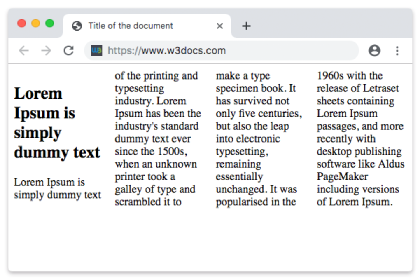
Con none, el encabezado se trata como cualquier otro contenido y permanece dentro de la primera columna. En el siguiente ejemplo, el mismo encabezado se extiende por las cuatro columnas.
Ejemplo: valor all
<!DOCTYPE html>
<html>
  <head>
    <title>Title of the document</title>
    <style>
      div {
        column-count: 4;
      }
      h2 {
        column-span: all;
      }
    </style>
  </head>
  <body>
    <div>
      <h2>Lorem Ipsum is simply dummy text</h2>
      Lorem Ipsum is dummy text of the printing and typesetting industry. Lorem Ipsum has been the industry's standard dummy text ever since the 1500s, when an unknown printer took a galley of type and scrambled it to make a type specimen book. It has survived not only five centuries, but also the leap into electronic typesetting, remaining essentially unchanged. It was popularised in the 1960s with the release of Letraset sheets containing Lorem Ipsum passages, and more recently with desktop publishing software like Aldus PageMaker including versions of Lorem Ipsum.
    </div>
  </body>
</html>Ejemplo: valor initial
initial restablece column-span a su valor predeterminado, que es none, por lo que el encabezado se comporta exactamente como en el primer ejemplo y permanece dentro de una sola columna.
<!DOCTYPE html>
<html>
  <head>
    <title>Title of the document</title>
    <style>
      div {
        column-count: 4;
      }
      h2 {
        column-span: initial;
      }
    </style>
  </head>
  <body>
    <div>
      <h2>Lorem Ipsum is simply dummy text</h2>
      Lorem Ipsum is dummy text of the printing and typesetting industry. Lorem Ipsum has been the industry's standard dummy text ever since the 1500s, when an unknown printer took a galley of type and scrambled it to make a type specimen book. It has survived not only five centuries, but also the leap into electronic typesetting, remaining essentially unchanged. It was popularised in the 1960s with the release of Letraset sheets containing Lorem Ipsum passages, and more recently with desktop publishing software like Aldus PageMaker including versions of Lorem Ipsum.
    </div>
  </body>
</html>Ejemplo: valor inherit
inherit toma el valor calculado de column-span del elemento padre. Ten en cuenta que column-span no se hereda de forma predeterminada, por lo que solo usas esta palabra clave cuando quieras explícitamente que un hijo copie la configuración de su padre.
<!DOCTYPE html>
<html>
  <head>
    <title>Title of the document</title>
    <style>
      div {
        column-count: 4;
      }
      h2 {
        column-span: inherit;
      }
    </style>
  </head>
  <body>
    <div>
      <h2>Lorem Ipsum is simply dummy text</h2>
      Lorem Ipsum is dummy text of the printing and typesetting industry. Lorem Ipsum has been the industry's standard dummy text ever since the 1500s, when an unknown printer took a galley of type and scrambled it to make a type specimen book. It has survived not only five centuries, but also the leap into electronic typesetting, remaining essentially unchanged. It was popularised in the 1960s with the release of Letraset sheets containing Lorem Ipsum passages, and more recently with desktop publishing software like Aldus PageMaker including versions of Lorem Ipsum.
    </div>
  </body>
</html>Cuándo usar column-span
- Titulares y títulos de sección que deben estar por encima del texto del cuerpo multicolumna, como la cabecera de un periódico.
- Citas destacadas o llamadas que quieres que rompan el ritmo de columnas para dar énfasis.
- Medios anchos — una imagen, tabla o gráfico a todo el ancho que quedaría apretado dentro de una sola columna estrecha.
Para todo lo demás, déjalo en el valor predeterminado none para que el contenido fluya naturalmente entre columnas.
Cosas a tener en cuenta
- Solo
noneyallson valores de extensión. No existecolumn-span: 2para abarcar un número arbitrario de columnas — es todo o nada. - Un elemento que se extiende divide el cuadro de columnas. El contenido anterior llena las columnas, luego el elemento ocupa el ancho completo y el contenido restante comienza un nuevo conjunto de columnas debajo de él.
column-spansolo funciona dentro de un contenedor multicolumna. Sincolumn-countocolumnsen el padre, la propiedad no tiene efecto.column-span: allpuede interferir conbreak-insidey el equilibrado de columnas en algunos navegadores, así que prueba con contenido largo.
Propiedades relacionadas
column-count— establece en cuántas columnas se divide el contenido.column-width— establece el ancho ideal de cada columna.columns— forma abreviada decolumn-widthycolumn-count.column-gap— establece el espacio entre columnas.column-rule— dibuja una línea entre columnas.
Valores
| Valor | Descripción |
|---|---|
| none | Este es el valor predeterminado. El elemento no se extiende por todas las columnas; permanece en una sola columna. |
| all | El elemento se extiende por todas las columnas. |
| initial | Establece la propiedad en su valor predeterminado (none). |
| inherit | Hereda la propiedad de su elemento padre. |