Propiedad CSS object-position
Usa la propiedad CSS object-position para definir la posición del elemento dentro de su contenedor. Consulta valores y ejemplos.
La propiedad CSS object-position define cómo se posiciona un elemento reemplazado — como <img> o <video> — dentro de su propio cuadro. Un elemento reemplazado es aquel cuyo contenido proviene de una fuente externa en lugar de CSS, por lo que el navegador decide cómo ajustar ese contenido al espacio que proporciona el cuadro.
Por sí sola, object-position no tiene ningún efecto visible a menos que el tamaño intrínseco del elemento difiera del tamaño del cuadro. Esa diferencia la crea la propiedad object-fit: una vez que object-fit escala o recorta el contenido (por ejemplo con cover o contain), object-position decide qué parte del contenido permanece visible. Piensa en el cuadro como una ventana y en la imagen como un cuadro más grande detrás de ella — object-position desplaza la imagen para que se vea una región diferente.
El valor se escribe como una o dos coordenadas: la primera controla el eje x (horizontal) y la segunda el eje y (vertical). Si solo se proporciona un valor, el segundo toma el valor predeterminado center.
/* keyword pairs */
object-position: left top;
object-position: right bottom;

/* lengths and percentages */
object-position: 10px 20%;
object-position: 50% 50%; /* the default — centered */Cada coordenada puede ser una palabra clave (left, right, top, bottom, center), una longitud (px, em, …) o un porcentaje. Un porcentaje de 0% alinea ese borde del contenido con el mismo borde del cuadro; 100% alinea los bordes opuestos.
Los valores negativos son válidos — object-position: -20px 0; empuja el contenido más allá del borde izquierdo del cuadro, ocultando esa franja.
| Valor inicial | 50% 50% |
|---|---|
| Se aplica a | Elementos reemplazados. |
| Heredable | No. |
| Animatable | Sí. La imagen es animatable. |
| Versión | CSS3 |
| Sintaxis DOM | object.style.objectPosition = "20% 0%"; |
Sintaxis
object-position: <position> | initial | inherit;Ejemplos
Ejemplo con la posición predeterminada (50% 50%)
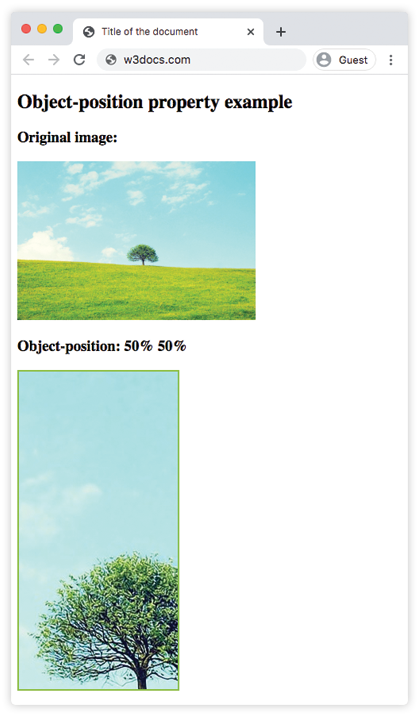
El valor predeterminado centra el contenido. Como object-fit: cover recorta la imagen para llenar el cuadro, el centrado mantiene visible la parte central de la imagen.
<!DOCTYPE html>
<html>
  <head>
    <title>Title of the document</title>
    <style>
      img.tree {
        width: 200px;
        height: 400px;
        border: 2px solid #8ebf42;
        object-fit: cover;
        object-position: 50% 50%;
      }
    </style>
  </head>
  <body>
    <h2>Object-position property example</h2>
    <h3>Original image:</h3>
    <img src="/uploads/media/default/0001/01/b408569013c0bb32b2afb0f0d45e93e982347951.jpeg" alt="Tree" width="300" height="200" />
    <h3>Object-position: 50% 50%</h3>
    <img class="tree" src="/uploads/media/default/0001/01/b408569013c0bb32b2afb0f0d45e93e982347951.jpeg" alt="Tree" width="300" height="200" />
  </body>
</html>Resultado
Ejemplo con la palabra clave left
Con left, el eje horizontal se ancla al borde izquierdo del cuadro (y el eje vertical toma el valor predeterminado center), por lo que el lado izquierdo de la imagen recortada permanece visible.
<!DOCTYPE html>
<html>
  <head>
    <title>Title of the document</title>
    <style>
      img.tree {
        width: 200px;
        height: 400px;
        border: 2px solid #8ebf42;
        object-fit: cover;
        object-position: left;
      }
    </style>
  </head>
  <body>
    <h2>Object-position property example</h2>
    <h3>Original image:</h3>
    <img src="/uploads/media/default/0001/01/b408569013c0bb32b2afb0f0d45e93e982347951.jpeg" alt="Tree" width="300" height="200" />
    <h3>Object-position: left</h3>
    <img class="tree" src="/uploads/media/default/0001/01/b408569013c0bb32b2afb0f0d45e93e982347951.jpeg" alt="Tree" width="300" height="200" />
  </body>
</html>Ejemplo con una longitud y un porcentaje (10px 20%)
Se pueden mezclar unidades entre los dos ejes. Aquí el contenido se desplaza 10px desde la izquierda y se posiciona 20% hacia abajo en el cuadro.
<!DOCTYPE html>
<html>
  <head>
    <title>Title of the document</title>
    <style>
      img.tree {
        width: 200px;
        height: 400px;
        border: 2px solid #8ebf42;
        object-fit: cover;
        object-position: 10px 20%;
      }
    </style>
  </head>
  <body>
    <h2>Object-position property example</h2>
    <h3>Original image:</h3>
    <img src="/uploads/media/default/0001/01/b408569013c0bb32b2afb0f0d45e93e982347951.jpeg" alt="Tree" width="300" height="200" />
    <h3>Object-position: 10px 20%</h3>
    <img class="tree" src="/uploads/media/default/0001/01/b408569013c0bb32b2afb0f0d45e93e982347951.jpeg" alt="Tree" width="300" height="200" />
  </body>
</html>Valores
| Valor | Descripción |
|---|---|
<position> | Especifica la posición del elemento reemplazado dentro de su cuadro. Puede ser una palabra clave (top, bottom, left, right, center) o una combinación de palabras clave, porcentajes o longitudes. |
initial | Establece la propiedad en su valor predeterminado. |
inherit | Hereda la propiedad de su elemento padre. |
Cuándo usarla
object-position es más útil para el recorte responsivo de imágenes. Cuando una foto debe llenar un contenedor de tamaño fijo (la miniatura de una tarjeta, un banner hero, un avatar) con object-fit: cover, el navegador recorta lo que no cabe. De forma predeterminada, recorta de manera uniforme desde el centro, lo que puede cortar la parte más importante de una foto — el rostro de una persona cerca de la parte superior, por ejemplo. Al establecer object-position: center top se mantiene esa región visible.
Algunos aspectos que conviene recordar:
- Solo afecta a los elementos reemplazados (
<img>,<video>,<input type="image">, en ocasiones<object>). No tiene efecto en un<div>. - Se combina con object-fit:
object-fitdecide cómo se escala o recorta el contenido, yobject-positiondecide dónde se sitúa la ventana visible. - La sintaxis imita a la propiedad background-position, por lo que se aplican las mismas reglas de palabras clave y porcentajes.