Propiedad CSS stroke-linecap
Cómo usar la propiedad CSS stroke-linecap para especificar los puntos de inicio y fin del borde de un elemento SVG. Valores y ejemplos.
La propiedad stroke-linecap especifica la forma que se usará en los extremos abiertos de un trazo SVG. Solo modifica cómo se dibujan los dos puntos finales de un trayecto abierto — no tiene efecto en las esquinas donde se unen dos segmentos de línea, ni en las formas cerradas que no tienen extremos abiertos.
Esta página explica cómo luce cada valor de terminación, cómo interactúa stroke-linecap con la especificidad CSS, y el caso especial del "trayecto de longitud cero" que permite dibujar un solo punto.
¿Cuándo lo usaría?
Siempre que dibujes líneas o trayectos abiertos en SVG y quieras controlar cómo termina la línea:
roundes la opción más común para trazos de estilo dibujado a mano, barras de progreso y líneas de gráficos — da un aspecto suave y acabado.squarees útil cuando quieres que la línea se extienda ligeramente más allá de su punto final (por ejemplo, para que dos líneas contiguas se unan de forma limpia).butt(el valor por defecto) corta la línea exactamente en la coordenada final — úsalo cuando la longitud precisa importa.
Un truco práctico: un trayecto de longitud cero (un trazo que empieza y termina en el mismo punto) se renderiza como un solo punto cuando stroke-linecap es round o square, y se renderiza como nada cuando es butt. Esta es la forma estándar de dibujar puntos en SVG.
¿Propiedad CSS o atributo de presentación?
stroke-linecap es tanto una propiedad CSS como un atributo de presentación de SVG. Eso te da dos formas de establecerlo:
- Como atributo en el elemento:
<path stroke-linecap="round" /> - Como declaración CSS:
path { stroke-linecap: round; }
Un atributo de presentación se comporta como el estilo de menor prioridad, por lo que cualquier regla CSS lo sobrescribe. El style="…" en línea y las hojas de estilo externas tienen prioridad sobre el atributo; entre las reglas CSS, se aplica la especificidad normal.
La propiedad stroke-linecap se puede aplicar a cualquier elemento, pero solo afecta a los elementos de forma y contenido de texto SVG: <path>, <line>, <polyline>, <text>, <textPath> y <tspan>. No afecta a las formas cerradas como <rect>, <circle> o <polygon>, porque no tienen extremos abiertos.
| Valor inicial | butt |
|---|---|
| Se aplica a | Elementos de forma y contenido de texto. |
| Heredado | Sí. |
| Animable | No. |
| Versión | Especificación SVG 1.1 |
| Sintaxis DOM | Object.strokeLinecap = "round"; |
Sintaxis
Sintaxis CSS de stroke-linecap
stroke-linecap: butt | square | round | initial | inherit;Ejemplo de la propiedad stroke-linecap:
Ejemplo de código CSS stroke-linecap
<!DOCTYPE html>
<html>
  <head>
    <title>Title of the document</title>
  </head>
  <body>
    <h2>Stroke-linecap property example</h2>
    <svg viewBox="0 0 6 4">
      <!-- Effect of the "butt" value -->
      <path d="M1,1 h4" stroke="#8ebf42"
        stroke-linecap="butt" />
      <!-- Effect of the "butt" value on a zero length path -->
      <path d="M3,3 h0" stroke="#8ebf42"
        stroke-linecap="butt" />
      <!--
        the following pink lines highlight the
        position of the path for each stroke
        -->
      <path d="M1,1 h4" stroke="#1c87c9" stroke-width="0.05" />
      <circle cx="1" cy="1" r="0.05" fill="#1c87c9" />
      <circle cx="5" cy="1" r="0.05" fill="#1c87c9" />
      <circle cx="3" cy="3" r="0.05" fill="#1c87c9" />
    </svg>
  </body>
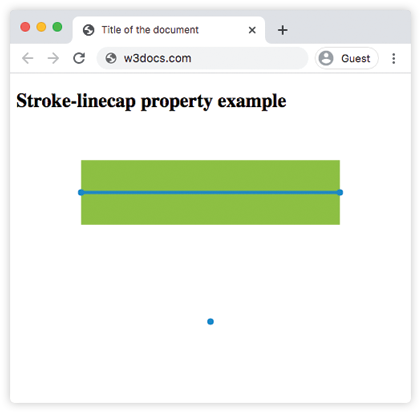
</html>Con butt, el trazo verde se detiene exactamente en las coordenadas (1,1) y (5,1) — marcadas por los puntos azules — por lo que su longitud visible es igual a la longitud del trayecto. El trayecto de longitud cero en (3,3) no renderiza nada.
Resultado
Ejemplo de la propiedad stroke-linecap con el valor "round":
Ejemplo CSS stroke-linecap con round
<!DOCTYPE html>
<html>
  <head>
    <title>Title of the document</title>
  </head>
  <body>
    <h2>Stroke-linecap property example</h2>
    <svg viewBox="0 0 6 4">
      <!-- Effect of the "round" value -->
      <path d="M1,1 h4" stroke="#8ebf42" stroke-linecap="round" />
      <!-- Effect of the "round" value on a zero length path -->
      <path d="M3,3 h0" stroke="#8ebf42" stroke-linecap="round" />
      <!--
      the following pink lines highlight the
      position of the path for each stroke
      -->
      <path d="M1,1 h4" stroke="#1c87c9" stroke-width="0.05" />
      <circle cx="1" cy="1" r="0.05" fill="#1c87c9" />
      <circle cx="5" cy="1" r="0.05" fill="#1c87c9" />
      <circle cx="3" cy="3" r="0.05" fill="#1c87c9" />
    </svg>
  </body>
</html>Con round, se añade una semicircunferencia de radio stroke-width / 2 más allá de cada punto final, por lo que la línea verde ahora sobrepasa ligeramente los puntos azules. El trayecto de longitud cero en (3,3) se convierte en un círculo relleno — este es el truco del punto en acción.
Ejemplo de la propiedad stroke-linecap con el valor "square":
Ejemplo CSS stroke-linecap con square
<!DOCTYPE html>
<html>
  <head>
    <title>Title of the document</title>
  </head>
  <body>
    <h2>Stroke-linecap property example</h2>
    <svg viewBox="0 0 6 4">
      <!-- Effect of the "square" value -->
      <path d="M1,1 h4" stroke="#8ebf42" stroke-linecap="square" />
      <!-- Effect of the "square" value on a zero length path -->
      <path d="M3,3 h0" stroke="#8ebf42" stroke-linecap="square" />
      <!--
        the following pink lines highlight the
        position of the path for each stroke
        -->
      <path d="M1,1 h4" stroke="#1c87c9" stroke-width="0.05" />
      <circle cx="1" cy="1" r="0.05" fill="#1c87c9" />
      <circle cx="5" cy="1" r="0.05" fill="#1c87c9" />
      <circle cx="3" cy="3" r="0.05" fill="#1c87c9" />
    </svg>
  </body>
</html>square es similar a round en que el trazo se extiende más allá del punto final en stroke-width / 2, pero la terminación añadida es un rectángulo en lugar de una semicircunferencia, lo que da un borde plano. El trayecto de longitud cero en (3,3) se renderiza como un pequeño cuadrado.
Valores
| Valor | Descripción |
|---|---|
butt | Predeterminado. Termina el trazo de forma plana, exactamente en el punto final, sin añadir ninguna extensión. Un subtrayecto de longitud cero no se renderiza. |
round | Añade una terminación semicircular de radio stroke-width / 2 más allá de cada punto final, dando extremos redondeados. Un subtrayecto de longitud cero se renderiza como un punto. |
square | Añade una terminación rectangular que se extiende stroke-width / 2 más allá de cada punto final, dando extremos planos que sobrepasan el trayecto. Un subtrayecto de longitud cero se renderiza como un pequeño cuadrado. |
initial | Restablece la propiedad a su valor predeterminado (butt). |
inherit | Hereda el valor del elemento padre. stroke-linecap se hereda por defecto. |
Propiedades relacionadas
stroke-linecap es una de varias propiedades de trazo SVG que controlan cómo se dibujan las líneas:
stroke— establece el color del trazo.stroke-width— establece el grosor del trazo (y por lo tanto el tamaño de las terminaciones).stroke-dasharray— convierte un trazo sólido en guiones; cada guión obtiene sus propias terminaciones de línea.stroke-dashoffset— desplaza el punto de inicio del patrón de guiones.fill— establece el color usado para pintar el interior de una forma.