Propiedad CSS float
La propiedad CSS float define si un elemento debe flotar o no. Ver ejemplos y practicar.
La propiedad CSS float saca un elemento del flujo normal del documento y lo empuja hacia la izquierda o derecha de su contenedor, permitiendo que el texto e contenido en línea siguiente lo rodeen. Fue creada originalmente para hacer fluir texto alrededor de imágenes (como en el diseño de una revista), y ese sigue siendo su uso más claro hoy en día.
Esta página explica qué hace float, sus valores, cómo interactúa con la propiedad clear, el problema del "padre colapsado" y la solución clearfix, y cuándo usar Flexbox en su lugar.
Cuando un elemento flota:
- Se elimina del flujo normal, por lo que los elementos de bloque que le siguen suben para ocupar el espacio.
- El contenido en línea (texto, imágenes en línea) se envuelve a lo largo del lado del elemento flotante.
- El elemento flotante se encoge para ajustarse a su contenido a menos que se le dé un
widthexplícito.
La propiedad clear es el complemento natural de float: le indica a un elemento que se coloque debajo de los flotantes anteriores en lugar de situarse junto a ellos.
La propiedad float se ignora en elementos con posición absoluta (position: absolute o position: fixed), porque estos ya están eliminados del flujo normal.
| Valor inicial | none |
|---|---|
| Se aplica a | Todos los elementos. |
| Heredable | No. |
| Animable | No. |
| Versión | CSS1 |
| Sintaxis DOM | object.style.cssFloat = "right"; |
Sintaxis
Sintaxis de la propiedad CSS float
float: none | left | right | initial | inherit;Ejemplo de la propiedad float:
Ejemplo de la propiedad CSS float con el valor right
<!DOCTYPE html>
<html>
  <head>
    <title>Title of the document</title>
    <style>
      img {
        float: right;
        background: #ccc;
      }
    </style>
  </head>
  <body>
    <h2>Float property example</h2>
    <img src="/uploads/media/default/0001/01/003e5c463668d174ab70bea245c192d81901a4a6.png" alt="W3dcos" />
    <p>
      Lorem Ipsum is simply dummy text of the printing and typesetting industry. Lorem Ipsum has been the industry's standard dummy text ever since the 1500s, when an unknown printer took a galley of type and scrambled it to make a type specimen book. It has survived not only five centuries, but also the leap into electronic typesetting, remaining essentially unchanged.
    </p>
  </body>
</html>Resultado
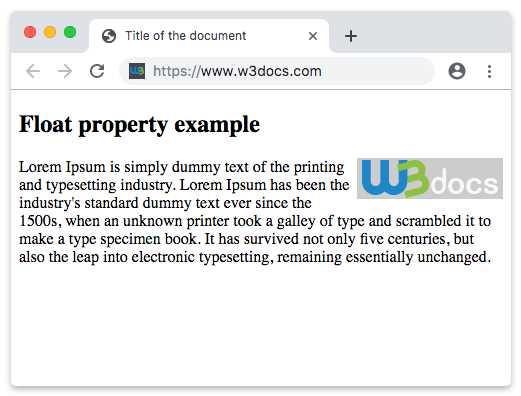
En el siguiente ejemplo, la imagen flota hacia la izquierda, por lo que el texto del párrafo se envuelve a lo largo de su borde derecho.
Ejemplo de uso de la propiedad float para flotar una imagen:
Ejemplo de la propiedad CSS float con el valor left
<!DOCTYPE html>
<html>
  <head>
    <title>Title of the document</title>
    <style>
      img {
        float: left;
        background: #ccc;
      }
    </style>
  </head>
  <body>
    <h2>Float property example</h2>
    <img src="/uploads/media/default/0001/01/003e5c463668d174ab70bea245c192d81901a4a6.png" alt="W3dcos" />
    <p>
      Lorem Ipsum is simply dummy text of the printing and typesetting industry. Lorem Ipsum has been the industry's standard dummy text ever since the 1500s, when an unknown printer took a galley of type and scrambled it to make a type specimen book. It has survived not only five centuries, but also the leap into electronic typesetting, remaining essentially unchanged.
    </p>
  </body>
</html>Valores
| Valor | Descripción | Pruébalo |
|---|---|---|
| none | Significa que el elemento no flota y se mostrará donde aparece en el texto. Este es el valor predeterminado de esta propiedad. | Pruébalo » |
| left | Significa que el elemento flota hacia la izquierda. | Pruébalo » |
| right | Significa que el elemento flota hacia la derecha. | Pruébalo » |
| initial | Hace que la propiedad use su valor predeterminado. | Pruébalo » |
| inherit | Hereda la propiedad de su elemento padre. |
El problema del padre colapsado
Un elemento flotante se saca del flujo normal, por lo que su padre ya no lo cuenta al calcular su propia altura. Si un contenedor tiene solo hijos flotantes, colapsa a altura cero: los fondos y bordes desaparecen, y el contenido que sigue puede deslizarse por debajo de los flotantes.
<!DOCTYPE html>
<html>
  <head>
    <style>
      .box { border: 2px solid #1a7e3c; }
      .box img { float: left; }
    </style>
  </head>
  <body>
    <!-- The border collapses around the floated image -->
    <div class="box">
      <img src="logo.png" alt="logo" width="80" height="80" />
    </div>
  </body>
</html>La solución clearfix
La forma clásica y sin dependencias de hacer que un padre contenga sus flotantes es el clearfix: agregar un pseudo-elemento generado que limpia los flotantes. Aplica la clase clearfix al elemento padre.
.clearfix::after {
  content: "";
  display: block;
  clear: both;
}También puedes forzar la contención con overflow: auto (u hidden) en el padre, o display: flow-root, que existe específicamente para crear un nuevo contexto de formato de bloque sin efectos secundarios. Consulta overflow para ver las ventajas e inconvenientes.
Cuándo usar float (y cuándo no)
Usa float cuando genuinamente quieras que el contenido se envuelva alrededor de un elemento, típicamente una imagen o una cita destacada dentro de texto en ejecución. Para eso fue diseñado.
Evita float para maquetación de página (barras laterales, columnas, filas de navegación). Se usó de forma incorrecta para eso durante años, pero es frágil y requiere hacks de clearfix. Para maquetación moderna, recurre a Flexbox para filas/columnas unidimensionales o CSS Grid para maquetaciones bidimensionales. Consulta también display y position.