Propiedad CSS text-decoration-style
Usa la propiedad CSS text-decoration-style para especificar el estilo de la decoración del texto. Consulta los valores y practica con ejemplos.
La propiedad CSS text-decoration-style establece el estilo de línea de las decoraciones añadidas por text-decoration-line — el subrayado, el sobrerayado o el tachado. Los estilos disponibles son solid, double, dotted, dashed y wavy.
Por sí sola, esta propiedad no produce ningún efecto visible: el estilo de línea solo se muestra cuando hay una línea a la que aplicar el estilo. Por eso casi siempre se combina con text-decoration-line (o con el atajo text-decoration, que puede establecer la línea, el estilo y el color a la vez).
Esta página cubre la sintaxis, cada valor con un ejemplo ejecutable y en qué situaciones resulta más útil cada estilo.
Cuándo utilizarla
wavyes la opción no predeterminada más habitual: imita el subrayado rojo ondulado que dibujan los correctores ortográficos, por lo que se interpreta como "esto requiere atención". Es también el aspecto que los navegadores usan para los errores ortográficos y gramaticales.dottedydashedproducen un subrayado más suave y ligero que una línea sólida, útil para enlaces con menor énfasis o notas al pie.doubledibuja dos líneas paralelas finas, útil para encabezados o para señalar algo más importante que un subrayado normal.solides el valor predeterminado: solo es necesario escribirlo para anular un estilo heredado o definido mediante el atajo.
Dado que la propiedad no se hereda y no es animable, debe establecerse en el elemento cuya decoración se desea estilizar; no es posible realizar transiciones entre estilos.
La propiedad text-decoration-style es una de las propiedades de CSS3.
| Valor inicial | solid |
|---|---|
| Se aplica a | Todos los elementos. También se aplica a ::first-letter y ::first-line. |
| Se hereda | No. |
| Animable | No. |
| Versión | CSS3 |
| Sintaxis DOM | object.style.textDecorationStyle = "dotted"; |
Sintaxis
Valores de CSS text-decoration-style
text-decoration-style: solid | double | dotted | dashed | wavy | initial | inherit;Ejemplo de la propiedad text-decoration-style:
Ejemplo de text-decoration-style
<!DOCTYPE html>
<html>
  <head>
    <title>Title of the document</title>
    <style>
      div {
        text-decoration-line: underline;
        text-decoration-style: solid;
        text-decoration-color: #1c87c9;
      }
    </style>
  </head>
  <body>
    <h2>Text-decoration-style property example</h2>
    <div>Lorem Ipsum is simply dummy text of the printing and typesetting industry.</div>
  </body>
</html>Resultado
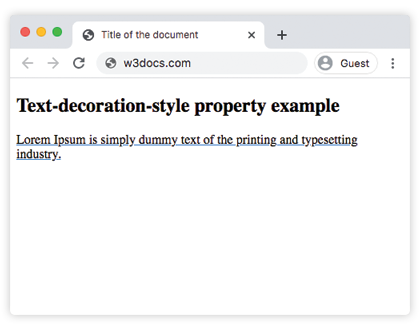
Ejemplo de la propiedad text-decoration-style con el valor "wavy":
Ejemplo de código text-decoration-style wavy
<!DOCTYPE html>
<html>
  <head>
    <title>Title of the document</title>
    <style>
      div {
        text-decoration-line: underline;
        text-decoration-style: wavy;
        text-decoration-color: #1c87c9;
      }
    </style>
  </head>
  <body>
    <h2>Text-decoration-style property example</h2>
    <div>Lorem Ipsum is simply dummy text of the printing and typesetting industry.</div>
  </body>
</html>Ejemplo de la propiedad text-decoration-style con el valor "dotted":
Ejemplo de código text-decoration-style dotted
<!DOCTYPE html>
<html>
  <head>
    <title>Title of the document</title>
    <style>
      div {
        text-decoration-line: overline;
        text-decoration-style: dotted;
        text-decoration-color: #1c87c9;
      }
    </style>
  </head>
  <body>
    <h2>Text-decoration-style property example</h2>
    <div>Lorem Ipsum is simply dummy text of the printing and typesetting industry.</div>
  </body>
</html>Ejemplo de la propiedad text-decoration-style con el valor "dashed":
Ejemplo de código text-decoration-style dashed
<!DOCTYPE html>
<html>
  <head>
    <title>Title of the document</title>
    <style>
      div {
        text-decoration-line: overline;
        text-decoration-style: dashed;
        text-decoration-color: #1c87c9;
      }
    </style>
  </head>
  <body>
    <h2>Text-decoration-style property example</h2>
    <div>
      Lorem Ipsum is simply dummy text of the printing and typesetting industry.
    </div>
  </body>
</html>Ejemplo de la propiedad text-decoration-style con el valor "double":
Ejemplo de código text-decoration-style double
<!DOCTYPE html>
<html>
  <head>
    <title>Title of the document</title>
    <style>
      div {
        text-decoration-line: overline underline;
        text-decoration-style: double;
        text-decoration-color: #1c87c9;
      }
    </style>
  </head>
  <body>
    <h2>Text-decoration-style property example</h2>
    <div>
      Lorem Ipsum is simply dummy text of the printing and typesetting industry.
    </div>
  </body>
</html>Ejemplo de la propiedad text-decoration-style con todos los valores:
Ejemplo con todos los valores de text-decoration-style
<!DOCTYPE html>
<html>
  <head>
    <title>Title of the document</title>
    <style>
      div {
        margin: 20px 0;
      }
      div.t1 {
        text-decoration-line: overline underline;
        text-decoration-style: solid;
      }
      div.t2 {
        text-decoration-line: line-through;
        text-decoration-style: wavy;
      }
      div.t3 {
        text-decoration-line: overline underline;
        text-decoration-style: double;
      }
      div.t4 {
        text-decoration-line: overline;
        text-decoration-style: dashed;
      }
      div.t5 {
        text-decoration-line: line-through;
        text-decoration-style: dotted;
      }
    </style>
  </head>
  <body>
    <h2>Text-decoration-style property example</h2>
    <div class="t1">
      Lorem Ipsum is simply dummy text of the printing and typesetting industry.
    </div>
    <div class="t2">
      Lorem Ipsum is simply dummy text of the printing and typesetting industry.
    </div>
    <div class="t3">
      Lorem Ipsum is simply dummy text of the printing and typesetting industry.
    </div>
    <div class="t4">
      Lorem Ipsum is simply dummy text of the printing and typesetting industry.
    </div>
    <div class="t5">
      Lorem Ipsum is simply dummy text of the printing and typesetting industry.
    </div>
  </body>
</html>Valores
| Valor | Descripción | Pruébalo |
|---|---|---|
| solid | Define una línea simple. Es el valor predeterminado de esta propiedad. | Pruébalo » |
| double | Define una línea doble. | Pruébalo » |
| dotted | Define una línea de puntos. | Pruébalo » |
| dashed | Define una línea discontinua. | Pruébalo » |
| wavy | Define una línea ondulada. | Pruébalo » |
| initial | Establece la propiedad en su valor predeterminado. | Pruébalo » |
| inherit | Hereda la propiedad de su elemento padre. |
Compatibilidad con navegadores
text-decoration-style es compatible con todos los navegadores modernos (Chrome, Edge, Firefox, Safari y Opera). El estilo wavy en particular se renderiza de forma consistente en todos ellos. Hoy en día no se necesitan prefijos de proveedor ni alternativas; en los navegadores que no admitían la propiedad, la decoración simplemente recurría a una línea sólida, por lo que siempre ha degradado de forma elegante.
Propiedades relacionadas
- text-decoration-line — elige cuál o cuáles líneas aparecen (subrayado, sobrerayado, tachado).
- text-decoration-color — establece el color de la decoración.
- text-decoration — el atajo que establece la línea, el estilo y el color en una sola declaración.